
- Your Virtual Office Address Goes Live
- How Mail Is Received, Logged & Secured
- From Mail to Meetings – Booking a Room at Your Business Center
Q: What actually happens inside an Alliance Virtual Offices business center after I sign up for a virtual office?
A: An Alliance Virtual Office is tied to a real, professionally staffed business center where your mail is received and secured, your clients are greeted, and your meetings take place in fully equipped, client-ready rooms, all without a long-term lease.
Your Business Center, Unpacked: From the First Envelope to the Final Handshake
When most people hear “virtual office,” they picture a simple mailing address. Something digital. Something distant. Maybe even something a little alien.
And that’s exactly where hesitation creeps in.
You sign up for a virtual office, start using the address on your website and business filings, and then a quiet question lingers in the background:
What is actually happening at that location every day?
Is anyone really there?
Who’s touching my mail?
What happens if a client shows up expecting a professional office?
If you’re comparing providers, this uncertainty matters. A business address is not just a line on a form. It represents your company to banks, clients, partners, and regulators.
That’s where an Alliance Virtual Offices business center is different.
An Alliance Virtual Offices Virtual Office is not a standalone address or a digital mailbox. It is tied directly to a real, professionally managed business center with onsite staff, secure mail handling, and client-ready meeting rooms.
Mail arrives. People receive it. Guests are greeted. Rooms are prepared. Meetings happen.
In this guide, we’ll walk through exactly what happens inside an Alliance Virtual Offices business center, from the moment your address goes live to the moment your clients shake hands and leave the building.
You’ll see how mail, staff, technology, and meeting space all work together behind the scenes, so you can choose your virtual office with confidence.
Early next step: If you want to follow along with a real location, you can browse virtual office locations near you and see which business centers are available.
What Is an Alliance Virtual Offices Business Center?
Before we get into the day-to-day flow, it’s important to clarify what an Alliance Virtual Offices business center actually is.
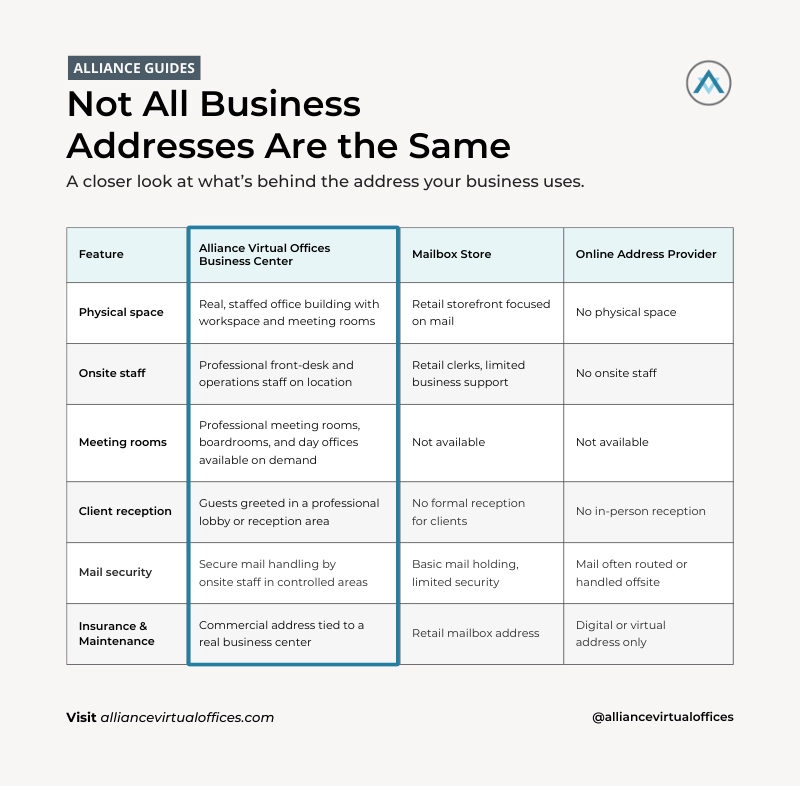
At its core, an Alliance Virtual Offices business center is a physical workplace. It is a commercial office location with a recognized street address, staffed during business hours, designed to support real businesses.
Inside, you’ll typically find:
- A professional lobby or reception area
- Onsite front-desk or community staff
- Secure mail storage areas
- Meeting rooms, conference rooms, and day offices
- In many locations, coworking space and additional workspace options
This is fundamentally different from a mailbox store or a purely online address provider.
A mailbox store is designed to hand you mail. That’s it. A digital address provider may never interact with your mail or your clients at all.
An Alliance Virtual Offices business center is built to support business operations through a global network of more than 1,400 professionally managed center locations, each with onsite staff, mail handling, and access to meeting rooms.
Your virtual office plan is wrapped around this physical location. That means:
- Your professional business address is tied to a real office building
- Mail is received and handled by onsite staff
- You can book meeting rooms at the same location when you need them
- Clients and partners can walk into a real space and be greeted professionally
If you want a deeper foundation on how virtual offices work when tied to real locations, this explainer is a helpful reference:
Step 1: Your Virtual Office Address Goes Live
Once you choose your Alliance Virtual Offices location and complete signup, your virtual office address doesn’t just appear on a screen. It becomes active inside the business center itself.
Behind the scenes, several things happen quickly.
Your business information is added to the center’s internal systems. Staff are notified that your company is now authorized to receive mail at that address. Your business name is associated with a specific mail slot or suite designation.
From day one, there are real people at that address who know your company exists.
This is also where proper verification matters. Alliance Virtual Offices requires documentation because business centers are handling real mail, legal notices, and packages on your behalf. This protects you, the center, and the integrity of the address.
The result is simple but powerful.
Your business address is live.
Mail can be received immediately.
And the front-desk team knows who you are.
If you want to understand how virtual office services are structured around physical workspace, this guide provides additional context:
Step 2: How Mail Is Received, Logged, and Secured
Mail handling is where many virtual office providers fall short. It’s also where Alliance Virtual Offices business centers do the most invisible work.
Here’s what actually happens when mail arrives.
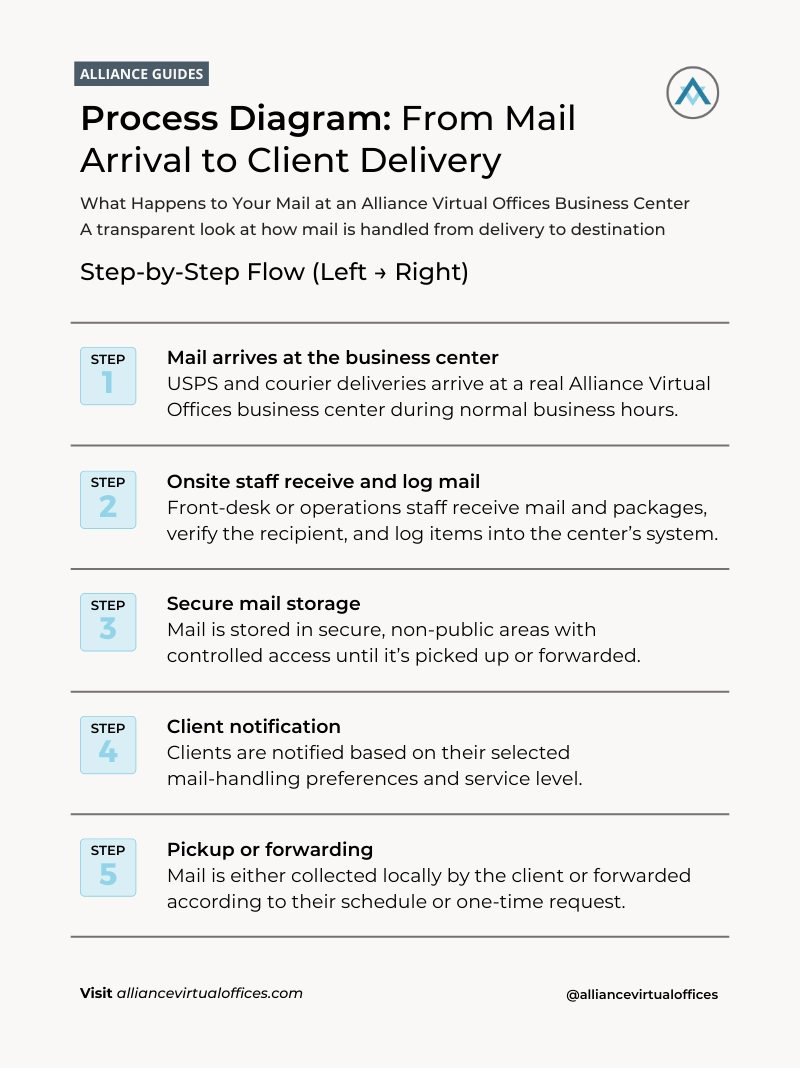
When mail and packages are delivered
USPS, FedEx, UPS, and other couriers deliver mail directly to the business center. Onsite staff receive items during normal delivery hours, just as they would for any traditional office tenant.
Mail is checked against active client listings to confirm it belongs to an authorized business. This step matters. It prevents misdelivery and protects sensitive information.
Secure storage and access
Once received, mail is stored in a secure area that is not accessible to the public. Packages and sensitive documents are handled according to center protocols.
Only authorized individuals can pick up mail, and ID is typically required. If you’ve designated someone else to collect mail on your behalf, that authorization is documented in advance.
Your options as a client
Alliance Virtual Offices mail handling is flexible by design. Depending on your plan and preferences, you can choose:
- Local pickup during business hours
- Scheduled mail forwarding on a daily, weekly, or monthly basis
- One-off forwarding requests for time-sensitive items
- Package notifications and handling within stated size and storage limits
Many clients combine physical mail handling with digital notifications or scanning, which gives them visibility without losing the security of a staffed mailroom.
If you’re weighing alternatives like PO boxes or private mailbox services, this breakdown explains the differences clearly:
A quick real-world example
A small consulting firm receives a certified letter related to a contract dispute. The business center staff log the delivery the same day. The owner is notified, requests overnight forwarding, and receives the document in time to respond.
No missed deadline. No scrambling. No uncertainty about where the mail went.
If mail handling is a deciding factor for you, explore virtual office locations that offer the right pickup and forwarding options for your workflow.
Step 3: From Mail to Meetings: Booking a Room at Your Business Center
For many businesses, the real value of a virtual office business center shows up the moment an in-person meeting is needed.
A client visit.
A team strategy session.
An interview.
A board meeting.
Because your virtual office is tied to a physical business center, you don’t need to scramble for space elsewhere.
How meeting room access works
Virtual office clients can book meeting rooms by the hour or by the day. Some plans include bundled meeting room hours, while others allow pay-as-you-go booking.
You can search available rooms online by location, date, and capacity, or work with a meeting room specialist if you need help coordinating.
Meeting rooms are available not only at your primary business center, but also at other locations in the Alliance Virtual Offices network, depending on availability.
Real Life Application: Alliance Virtual Offices meeting rooms are regularly used for client consultations, interviews, board meetings, and hybrid team sessions by businesses that don’t need full-time office space.
That flexibility is especially useful for hybrid teams and traveling professionals.
If you want a deeper look at how virtual offices and meeting rooms work together, this guide walks through common setups:
Explore meeting rooms near you and see live availability and pricing.
Step 4: What Happens When You and Your Guests Arrive
This is the moment many business owners worry about most. It’s also where an Alliance Virtual Offices business center feels most tangible.
You and your guests arrive at the building.
There is a lobby.
There is a front desk.
There are real people there to help.
The arrival experience
When guests walk in, they are greeted by onsite staff. The front-desk team confirms the meeting details and directs everyone to the reserved room.
If you arrive early, you can typically access the room to set up, test Wi-Fi, and prepare materials. If something isn’t working, help is nearby.
Staff may assist with:
- Wi-Fi access
- Basic tech questions
- Coffee or water service, where available
- Directions or parking guidance for guests
A simple meeting flow
- 15 minutes before start time: you arrive and set up
- Start time: guests are greeted and escorted
- During the meeting: the room is private and uninterrupted
- Afterward: staff reset the space for the next booking
You get the benefits of a staffed office without employing anyone yourself.
This is the part many virtual office skeptics never see. The business center team becomes your on-the-ground support.
Step 5: Inside the Meeting Rooms: Tech, Privacy, and Hospitality
Once the door closes, the room itself needs to do its job.
Alliance Virtual Offices business centers offer a range of meeting spaces depending on location, including:
- Small meeting rooms for two to four people
- Boardrooms for larger groups
- Training rooms
- Day offices for focused work
- Coworking areas for flexible use
What you can typically expect
- Business-grade Wi-Fi
- Screens or monitors in many rooms
- Whiteboards or presentation tools
- Comfortable, professional furnishings
These are client-ready spaces, designed for confidential conversations and serious work.
Supporting hybrid meetings
Many rooms are well-suited for hybrid setups, allowing some participants to join remotely while others attend in person. This supports modern team structures without sacrificing professionalism.
For more on how remote and hybrid teams use these spaces, this article provides real use cases:
Step 6: Beyond the Meeting: Add-On Services and Scaling Up
An Alliance Virtual Offices business center is not a one-off solution. It’s designed to grow with your business.
As your needs evolve, you can add services without changing providers or addresses.
Common ways clients scale
- Adding live receptionist services to handle calls professionally
- Adding a business phone line
- Increasing bundled meeting room hours for recurring team days
- Expanding into additional cities using the same network
This allows you to maintain consistency as you grow, without long-term leases or fragmented vendors.
If you’re thinking about long-term flexibility and value, this overview of virtual office benefits is a helpful reference:
Already using a virtual office? Explore how adding meeting rooms or receptionist support can simplify your next stage of growth.
How to Choose the Right Alliance Virtual Offices Business Center
Not all business centers are identical, and choosing the right one matters.
When comparing locations, consider:
- City and neighborhood credibility for your industry
- Proximity to clients or courts, if relevant
- Meeting room sizes and availability
- Mail handling options and business hours
- Parking, transit access, and building amenities
A simple selection checklist
Must-haves:
- Secure mail handling
- Professional reception
- Suitable meeting room capacity
Nice-to-haves:
- Evening or weekend access
- Onsite parking
- Coworking or day office availability
Strong next step: Browse virtual office locations and filter by the features that matter most to your business.
A Real Business Center, Working for Your Business
When you choose an Alliance Virtual Office, you’re not renting an abstract address.
You’re connecting your business to a real place.
Mail is received by real people.
Clients are greeted by real staff.
Meetings happen in real rooms designed for professional work.
That’s what separates a business center from a mailbox.
If you’re ready to see what that looks like in your city, your next step is simple.
Find your Alliance Virtual Offices business center and set up your Virtual Office today.
Already a client? Book your next meeting room and experience the space behind your address.