
- What Is a Virtual Office With Meeting Room Access?
- Why SMBs Need Both Address & Space in 2025
- Cost Breakdown: Address-Only vs. Bundled Hours
- Picking the Right Plan: 5-Step Checklist
- Pro Tips for Booking & Preparing Meeting Rooms
- Success Metrics & ROI Tracking
Remote and hybrid work are now the norm for small businesses. In fact,
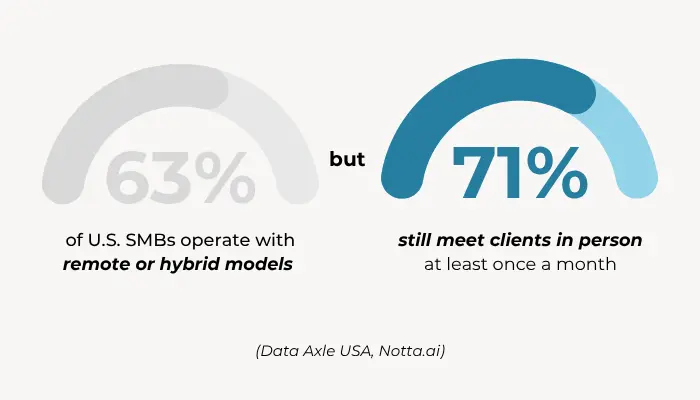
Here’s the bottom line: You may not need a full-time office, but you still need a credible business presence and client-ready space when it counts.
This guide explains how a virtual office with meeting room access helps you project professionalism, stay flexible, and avoid expensive leases. You’ll also learn how to choose the right plan, prepare for important meetings, and track real ROI.
Unlock Our Current Virtual Office Offers
Enter your email below and we’ll send you the latest available promotions and monthly specials for Virtual Offices, Meeting Rooms, and Live Receptionists.
What You Really Get With a Virtual Office + Meeting Room Plan
A virtual office with meeting room access gives small businesses the benefits of a physical office—without the full-time cost.
Core Components of the Virtual Office Solution
A modern virtual office plan typically includes:
- A professional business address in a commercial building
- Mail handling and optional mail forwarding services
- Optional live receptionist or phone answering
- On-demand or credit-based access to conference rooms and private offices
This combination creates a professional image while supporting occasional in-person collaboration or client meetings.
How It Works at Alliance Virtual Offices
At Alliance Virtual Offices, there are two core plan tiers:
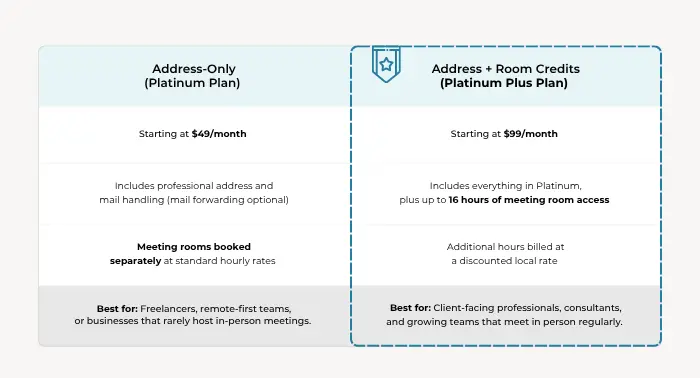
- Platinum Plan: Includes address and mail handling. Meeting rooms are booked a la carte.
- Platinum Plus Plan: Includes the same address benefits plus up to 16 hours of meeting room usage per month, with local hourly rates for additional time.
Learn more: This Virtual Office Plan Is More Than Just a Business Address
Meeting Room Types
Available rooms vary by location, but common options include:
- Day offices (1–3 people): Ideal for solo work, one-to-one meetings or interviews
- Small conference rooms (4–6 people): Great for team check-ins and client pitches
- Boardrooms (10–12 people): Designed for presentations or formal sessions
- Training rooms (15+ people): Equipped for workshops or onboarding sessions
Each room comes furnished and equipped with video-conferencing capabilities, whiteboards, and fast Wi-Fi.
Why Your Business Needs More Than Just a Virtual Address
A virtual address alone solves many administrative challenges—but when you combine it with on-demand meeting space, the business value grows exponentially.
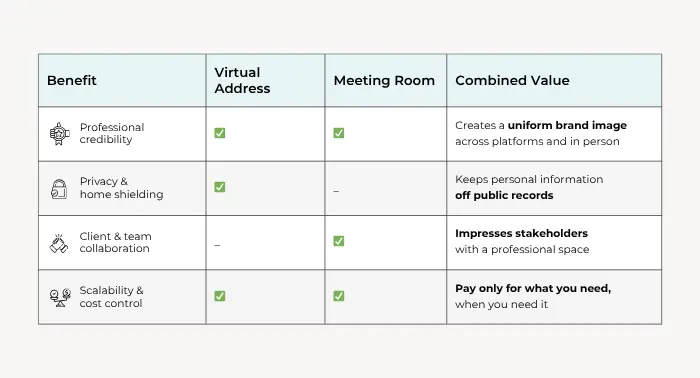
Here’s the takeaway: With one bundled plan, you gain privacy, presence, and flexibility.
Real-World Cost Savings
Leasing a small office in a U.S. metro market often starts at $5,000/month (not including utilities or staff). By comparison, Alliance meeting rooms start at $10/hour.
That means you could host a dozen professional meetings a year for under $500 total—without signing a long-term lease or paying for unused space.
Cost Breakdown: Address-Only vs. Bundled Hours
The right plan depends on how often you need access to space. A virtual business address with conference room space might be preferable to just the address and pay-as-you-go meeting space.
Learn more: Are physical offices or meeting rooms included with my virtual office?
Standalone Room Rentals
- Open to non-Alliance clients
- No bundled savings or address services included
Use case: Out-of-town meetings or one-time needs.
Sample Annual Cost Comparison
| Scenario | Address-Only Plan | Platinum Plus Plan |
| Monthly cost | $49 | $99 |
| Avg. cost per meeting (2 hrs) | $50 | $0 (included) |
| 12 meetings/year | $600 | $1,188 |
| 30 meetings/year | $1,500 | $1,584 |
As your meeting frequency rises, bundled hours deliver more value.
How to Choose the Best Plan for Your Business: A 5-Step Checklist
Choosing a plan is easier when you break it into a few key decisions.
1. Define Meeting Frequency & Headcount
- How often do you meet with clients or team members in person?
- How many people typically attend?
This determines which plan and room size are right for you.
2. Estimate Travel Radius
- How far are your clients or team willing to travel?
- Do you need coverage in more than one city?
Alliance has 4,000+ meeting rooms in 40+ countries, making it easy to scale your location strategy.
3. Audit Tech & Room Requirements
- Do you need video conferencing?
- Whiteboards? Presentation screens?
- Does your meeting format require a private office or a large table?
Match your room features to your working style.
4. Compare Bundled vs. A-La-Carte Costs
- Run the numbers using projected meeting volume
- Consider the added value of on-site support and bundled receptionist services
For many businesses, even 2–3 meetings/month justifies a bundled plan.
5. Read the Fine Print
Before you book:
- Check if unused hours roll over
- Confirm cancellation and rescheduling policies
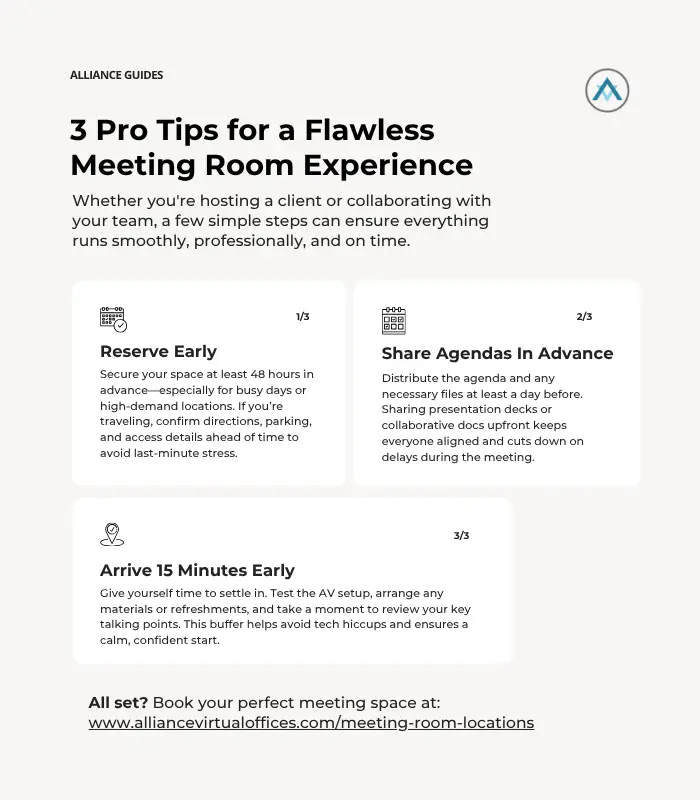
- Look at lead-time requirements (48 hours is common)
Need help deciding? Try this Meeting Room Rental Checklist as a guide.
How to Measure Real ROI From Your Meeting Room Plan
Investing in a virtual office with meeting room access is a smart move—but how do you know it’s working? Tracking a few key metrics can help you evaluate the return on investment, justify ongoing costs, and optimize your plan over time.
Here’s what to keep an eye on:
1. Conversion Rate
This is one of the clearest signs your virtual office meeting room is pulling its weight. Start by tracking how often client meetings—whether they’re sales pitches, onboarding calls, or negotiations—lead to closed deals, signed contracts, or renewals.
In many industries, face-to-face interactions (even hybrid ones) can significantly accelerate trust and decision-making. If you’re seeing better close rates after in-person meetings, that’s a strong signal your virtual office is adding real value.
2. Cost Per Meeting
Think of this as your “efficiency check.” Take the total monthly cost of your virtual office plan—including any added time or fees—and divide it by the number of meetings you’ve hosted.
Then compare that to what you’d pay for a traditional lease, coworking membership, or even on-demand meeting rooms elsewhere. If you’re consistently hosting meetings without overpaying for unused space, that’s money well spent.
Pro tip: If your cost per meeting is dropping over time as you host more meetings, you’re moving in the right direction. Small business meeting room rentals should never be a financial loss.
3. Utilization of Bundled Hours
If you’re on the Platinum Plus plan or another bundle that includes prepaid meeting room hours, be sure you’re actually using them. A good benchmark is aiming to use at least 75% of your included hours each month.
Under-utilization could mean you’re overpaying—or simply not booking proactively. On the flip side, if you’re maxing out your included hours consistently, it may be time to upgrade your plan or explore hourly add-ons.
4. Team Satisfaction
Your meeting room might be technically sound—but is it working for your people? Regularly collect feedback from team members who use the space. Focus on a few key areas:
- Room quality: Are the spaces clean, well-lit, and comfortable?
- Location convenience: Is the venue easy to access for everyone attending?
- Ease of booking: Is it simple to reserve and modify bookings when needed?
- Technology performance: Is the Wi-Fi fast, the AV reliable, and the setup stress-free?
Satisfied teams are more productive—and less likely to waste time troubleshooting a clunky meeting space. Plus, their input can help you fine-tune your workspace strategy moving forward.
Why SMBs Choose Alliance Virtual Offices
Running a small or mid-sized business means wearing a lot of hats—and you need tools that make things easier, not more complicated. That’s exactly why thousands of SMBs trust Alliance Virtual Offices to help them show up professionally and collaborate effectively, without locking themselves into expensive leases or rigid commitments.
Let’s start with availability. Whether you’re based in a major city or expanding into new markets, Alliance gives you access to over 4,000 meeting rooms across the U.S. and internationally. These aren’t just generic office spaces—they’re located in Class A buildings that elevate your brand from the moment a client walks through the door. And the best part? You can browse and book online in just a few clicks. No paperwork. No waiting.
Need flexibility? We’ve built our service with that in mind. You can reserve rooms by the hour, half-day, or full day, depending on what your schedule calls for. There are no long-term contracts to worry about, and pricing is always transparent—with local rate previews so there are no surprises.
Every location is fully equipped with what modern teams expect: fast internet, printers, video-enabled meeting setups, and seamless support for platforms like Zoom, Microsoft Teams, and Webex. There’s even on-site staff during business hours to make sure everything runs smoothly while you focus on your meeting—not the tech setup.
And if you ever hit a snag or need help adjusting your plan? Our support team is available seven days a week to answer questions, assist with bookings, or guide you through upgrades and provide virtual office solutions for SMB.
Bottom line: Alliance makes it easy for SMBs to work smarter, meet professionally, and stay flexible—all without breaking the budget.
Find Your Alliance Meeting Room Today
If your business is remote-first, hybrid, or just getting off the ground, you don’t need a full office lease to look and operate like a professional.
A virtual office with meeting room access gives you the freedom to work from anywhere—while still offering a polished space to meet clients, build trust, and collaborate in person when it matters most.
With Alliance Virtual Offices, it’s simple to get started. Pick your plan. Book your space. Show up like a pro.
Book your first meeting room or contact us to get started.