


Hybrid teams still meet face-to-face—but budgets are tighter than ever. And if you’re a small business owner, EA, or finance manager, knowing whether to rent by the hour or book a full day could mean hundreds of dollars saved (or wasted) every month.
So, what’s the smarter move in 2025?
This guide lays it all out—with real prices, break-even math, and decision-making tips based on how long your meetings run, how often you host, and what amenities you need.
We’ll also show you how to easily compare hourly vs. daily meeting room rental options using Alliance Virtual Offices’ transparent booking tools.
Jump to Section:
Unlock Our Current Virtual Office Offers
Enter your email below and we’ll send you the latest available promotions and monthly specials for Virtual Offices, Meeting Rooms, and Live Receptionists.
Hourly vs. Daily Rates: What’s the Difference?
Hourly meeting room rental is perfect for short meetings—think interviews, client calls, or project check-ins. You only pay for the time you book, typically in 1-hour or half-day blocks.
Daily meeting room rental, by contrast, gives you access to the room for a full day—usually up to 8 hours. It’s often a better choice for longer sessions like all-hands meetings, training events, or workshops.
Alliance Virtual Offices offers transparent hourly, half-day, and daily rates across 4,000+ meeting rooms worldwide—so you can choose what fits without hidden fees. Browse meeting rooms now.
2025 Benchmark Pricing & Hidden Costs
Let’s take a closer look at meeting room rental cost. Here’s what you can expect when renting a meeting room this year:
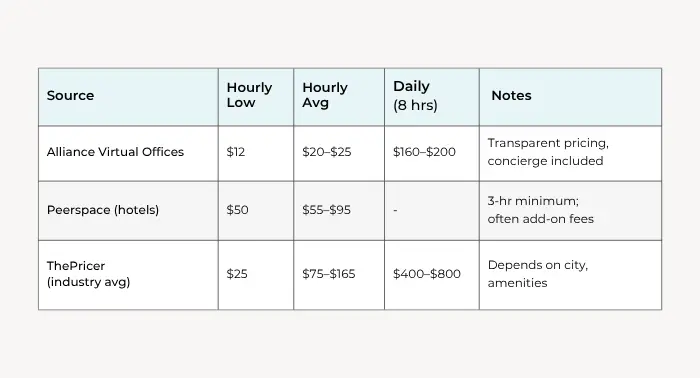
But that’s just the start.
Watch out for hidden meeting costs that can sneak into your final bill:
- AV/tech fees: Projectors, screens, and hybrid meeting equipment often cost extra.
- Service charges: Some venues tack on 10–25% for “coordination.”
- Catering markups: Boxed lunches from preferred vendors may be double what you’d pay directly.
- Cleaning surcharges: A few platforms charge end-of-day cleanup fees.
Alliance Virtual Offices bundles most essentials, so your hourly or daily rate typically includes high-speed Wi-Fi, on-site staff, and video conferencing equipment where available.
Break-Even Calculator: Find Your Sweet Spot
Use this simple formula to decide:
Daily Rate ÷ Hourly Rate = Break-Even Hours
Let’s break it down with real examples:
Example 1: Miami, FL
- Hourly: $22
- Daily: $180
- $180 ÷ $22 = 8.2 hours
So if your meeting runs under 8 hours, hourly rental is cheaper. Over 8? Lock in the conference room daily rate.
Example 2: Chicago, IL (Peerspace Hotel)
- Hourly: $60
- 3-hour minimum: $180
- Daily rate not available
In this case, hourly pricing hits a plateau quickly—and a longer session might require booking two 3-hour blocks, which could exceed $360. A daily rate from Alliance could save you significantly.
Example 3: Training Day in Dallas
- You’re planning a 6-hour onboarding workshop with 8 team members.
- Alliance hourly: $25 × 6 = $150
- Alliance daily: $180
Break-even is close—but if you need setup/teardown time, the daily rate is the safer (and less stressful) bet.
Five Factors That Tilt the Math
Here’s what to consider when choosing hourly vs. daily meeting room rental:
1. Meeting Length Certainty
Know your schedule? Hourly is great. If your agenda tends to run long, pad 30–60 minutes—and weigh whether a day rate offers more value.
2. Setup & Teardown Requirements
Presentations, product demos, and catered events often require time to prep. If setup time adds an hour or more, daily rental becomes a better bet.
3. Attendance Size & Volatility
For solo meetings or small team huddles, hourly is efficient. But if headcount is 10+ and might fluctuate, a flat day rate ensures you’re covered no matter what.
4. Bundled Amenities
Some daily rates include whiteboards, speakerphones, and hybrid AV tech—which could cost extra with an hourly plan. Compare inclusions before booking.
5. Cancellation Policy Flexibility
Hourly bookings often offer more generous cancellation windows (24–48 hours) versus daily blocks. If plans shift frequently, this could save you on penalties.
Money-Saving Tips When Booking Any Meeting Room
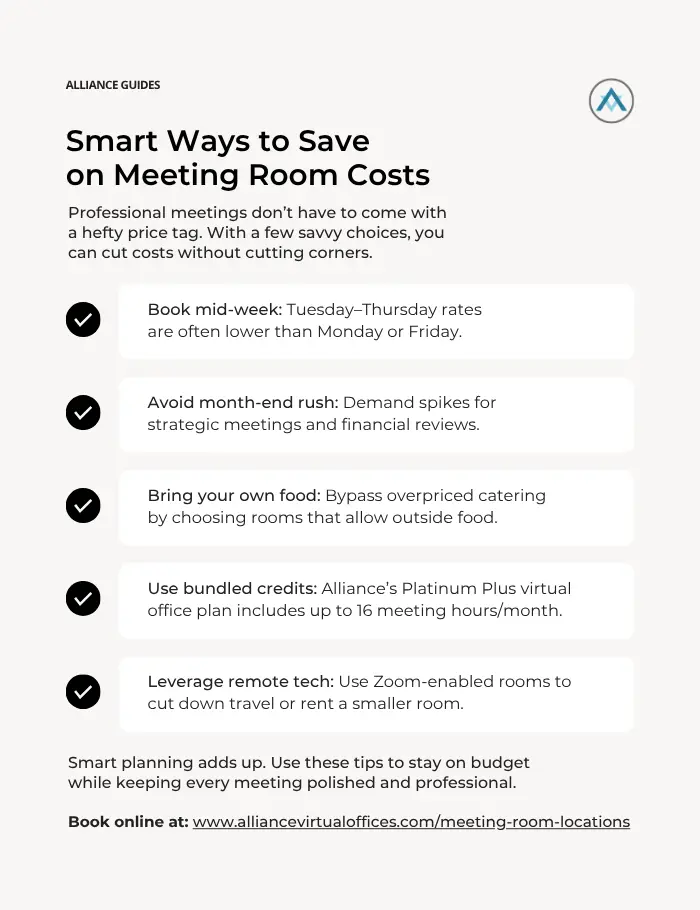
For more prep hacks, check out our meeting room rental checklist.
How to Book With Alliance Virtual Offices
Whether you’re planning a quick client meeting or an all-day strategy session, Alliance Virtual Offices makes it easy to find and book professional meeting space that fits your budget and timeline.
With real-time availability and transparent pricing, you can book a meeting room by the hour or day with confidence—no more wasting time comparing vendors or worrying about surprise fees.
Here’s how the process works:
Step 1 – Search Available Meeting Rooms
Start by visiting Alliance’s Meeting Room Locator. From there, you can:
- Enter your city, ZIP code, or general location
- Filter by room type (e.g., conference room, day office)
- Set your preferred amenities—such as whiteboards, high-speed internet, or video conferencing
- Sort by capacity to match your group size
With over 4,000 spaces worldwide, you’ll find options in major metro areas, suburbs, and even international business hubs—ideal for remote teams or companies with distributed staff.
Step 2 – Select Your Time Block
Once you’ve found the right space, choose how long you want to rent:
- Hourly – Perfect for short meetings, sales calls, or coaching sessions
- Half-Day – Ideal for mid-length agendas or when you need setup/cleanup time (usually 4 hours)
- Full-Day – Best for workshops, offsites, or events that run 6–8 hours
Time slots are clearly displayed, so you can avoid back-and-forth scheduling or conflicts.
💡 Tip: If you’re booking multiple days or recurring meetings, reach out to the Alliance concierge team for custom scheduling support and discounts.
Step 3 – Review Transparent Pricing
Each listing includes a clear breakdown of:
- Hourly, half-day, and full-day rates
- What’s included (e.g., Wi-Fi, receptionist support, tech setup)
- Any add-ons like catering, presentation tools, or additional guest capacity
Unlike many platforms, Alliance includes essential services in your base rate, so you’re not hit with unexpected AV or “coordination” fees during checkout.
Need more context on typical costs? Check out our full guide to meeting room rates to understand pricing by city and room size.
Step 4 – Confirm & Pay Online
Once you’ve made your selection:
- Choose your date and time slot
- Add any notes or preferences (e.g., “Need HDMI connection” or “Arriving early to set up”)
- Complete payment through the secure online portal
You’ll receive an immediate email confirmation with your meeting details—and a dedicated concierge is available via phone or email to help with changes, questions, or special requests.
Need a same-day booking? Alliance often accommodates those too, especially for frequent clients or virtual office members. Simply contact support for rapid assistance.
Bonus: Want More Flexibility?
If you regularly need meeting space—but not every day—consider bundling your usage through a virtual office plan with included meeting hours. Some plans offer 16 hours/month of meeting room access, reducing your per-hour cost substantially.
Need More Details?
For a deeper look at the step-by-step process, including how to secure same-day bookings, see this help article: How can I rent a conference room or an office for a day?
Let’s recap what we’ve learned:
- Hourly rentals are ideal for short, focused sessions (< 4 hours).
- Daily rentals shine when meetings span a full workday—or need extra time for setup, breakdown, or tech checks.
- Break-even point is typically around 8 hours, but bundled amenities and AV needs may tilt the math.
- Alliance Virtual Offices offers transparent rates, 4,000+ global rooms, and 7-day concierge support to simplify your booking process.
Compare meeting room rates by the hour or day and lock in your next workspace now.
Even Easier: Use the Booked App
Want to check availability, compare rates, and reserve meeting rooms in just a few taps? Our new Booked app which launches fall 2025, makes it fast and easy to find and lock in workspace—whether you need it now or next month. It’s built for mobile pros who value flexibility and speed.


