Introduction
In the post-pandemic world, hybrid collaboration has become the norm, not the exception.
But while video conferencing tools have matured, many physical meeting rooms have not kept pace with the demands of distributed teams. As a result, businesses face a serious gap in productivity, engagement, and space efficiency.
AI-powered meeting rooms are closing that gap.
These next-generation collaboration spaces combine real-time video intelligence, automated transcription, predictive scheduling, and voice AI tools to deliver a consistent and equitable meeting experience across in-person and remote attendees.
In fact, AI tracking cameras and real-time transcription are now core features in flagship conference room bundles, according to UC Today.
This guide explores what AI meeting rooms are, the 2025 technologies shaping them, how to implement them strategically, and how Alliance Virtual Offices is helping enterprises roll out smart meeting infrastructure—without a heavy capital investment.
What Are AI-Powered Meeting Rooms?
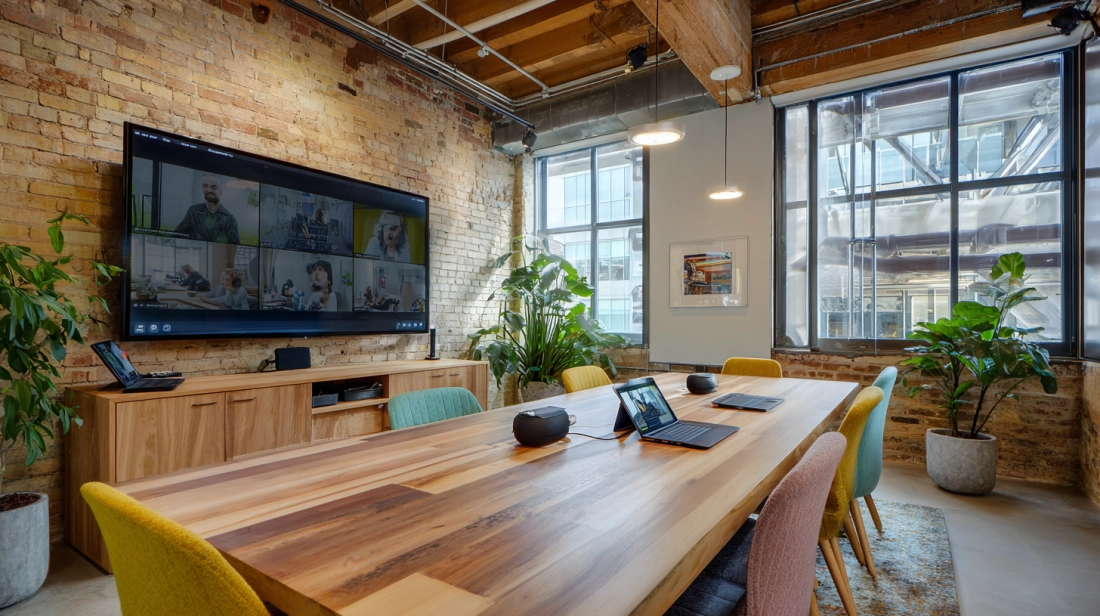
AI-powered meeting rooms integrate intelligent hardware and software to automate and optimize meetings.
They are designed to reduce friction, improve collaboration, and support hybrid work by making physical meeting spaces responsive, adaptive, and data-driven. Here at Alliance, we’re pushing the AI meeting room enterprise with AI-driven collaboration spaces.
Core Components
A standard AI meeting room includes:
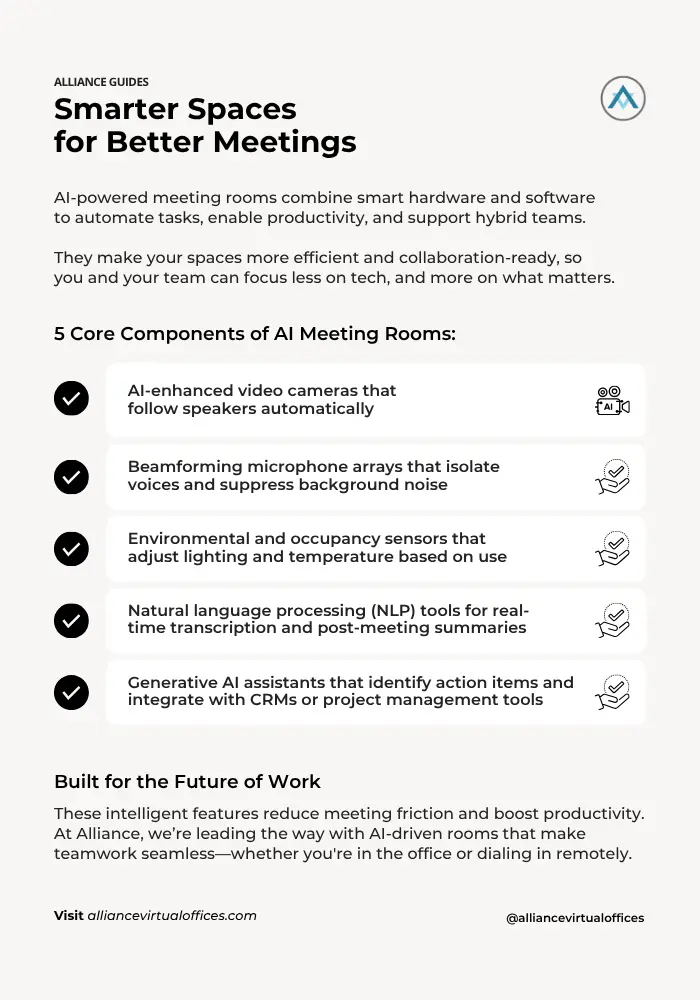
Together, these systems transform the meeting environment from a passive venue into an active participant.
Enterprise Use Cases
AI meeting rooms are now being used in various enterprise scenarios, including:
- Board meetings and investor updates
- Global town halls with multilingual support
- Training sessions with searchable transcripts
- Sales demos with auto-generated follow-up notes
- Client reviews requiring documentation and accountability
These rooms ensure that no matter where employees are located, they receive the same experience and value from meetings.
Alliance Virtual Offices Integration
Alliance Virtual Offices provides professionally managed meeting rooms across major markets. Many locations already feature AI-enabled equipment including:
- AI webcams with auto-framing capabilities
- Directional microphone setups
- Secure, enterprise-grade Wi-Fi and conferencing hardware
- Staff support to assist with setup and tech troubleshooting
This makes it easy for companies to access AI-ready meeting rooms without the cost or complexity of an in-house buildout.
Key AI Technologies Transforming Meeting Rooms in 2025
Smart meeting room technology continues to evolve rapidly. Below are the most influential innovations shaping enterprise meeting rooms in 2025.
Smart Vision Cameras
Advanced computer-vision systems now power dynamic PTZ (pan-tilt-zoom) cameras. These tools:
- Automatically frame the speaker
- Switch angles when a new person begins speaking
- Recognize gestures such as hand raises
- Maintain optimal framing regardless of room size
These features provide remote participants with a more immersive experience and reduce the perception gap between remote and in-room attendees.
Adaptive Audio Technology
According to Audio Video Group, high-end beamforming microphones are now capable of:
- Distinguishing voices in real-time
- Eliminating ambient noise from keyboards, HVAC systems, and outdoor distractions
- Ensuring voice clarity even in large or open spaces
- Supporting simultaneous speakers without conflict
This ensures that everyone is heard clearly, regardless of their position or volume.
NLP and Generative AI Assistants
NLP and large language models (LLMs) like GPT-4 are now embedded in meeting platforms, offering:
- Real-time multi-language transcription
- Intelligent summarization with follow-up task lists
- Sentiment analysis for engagement scoring
- Automatic integration with productivity apps like Notion, Trello, and Salesforce
These tools reduce post-meeting admin work and help ensure decisions are documented accurately. Many businesses are now partnering with a ChatGPT development company to create customized AI meeting assistants tailored to their workflows, further enhancing efficiency and collaboration.
Augmented Reality and Spatial Collaboration
While still emerging, AR and spatial computing tools are beginning to enter enterprise settings. Early adopters are using:
- Mixed-reality whiteboards for brainstorming
- 3D model collaboration tools
- Virtual room replication for remote facility walkthroughs
These applications are expected to become more mainstream over the next 24–36 months, particularly in design and engineering fields.
Predictive Scheduling and Resource Optimization
AI also plays a role in how meeting rooms are booked and maintained. New systems can:
- Predict the best meeting times based on past behavior
- Suggest ideal room configurations
- Automatically release unused rooms to improve availability
- Adjust environmental settings for comfort and energy efficiency
When combined with occupancy sensors, these tools enable facility managers to optimize space usage and reduce operational costs.
Benefits for Enterprise Collaboration and Hybrid Work
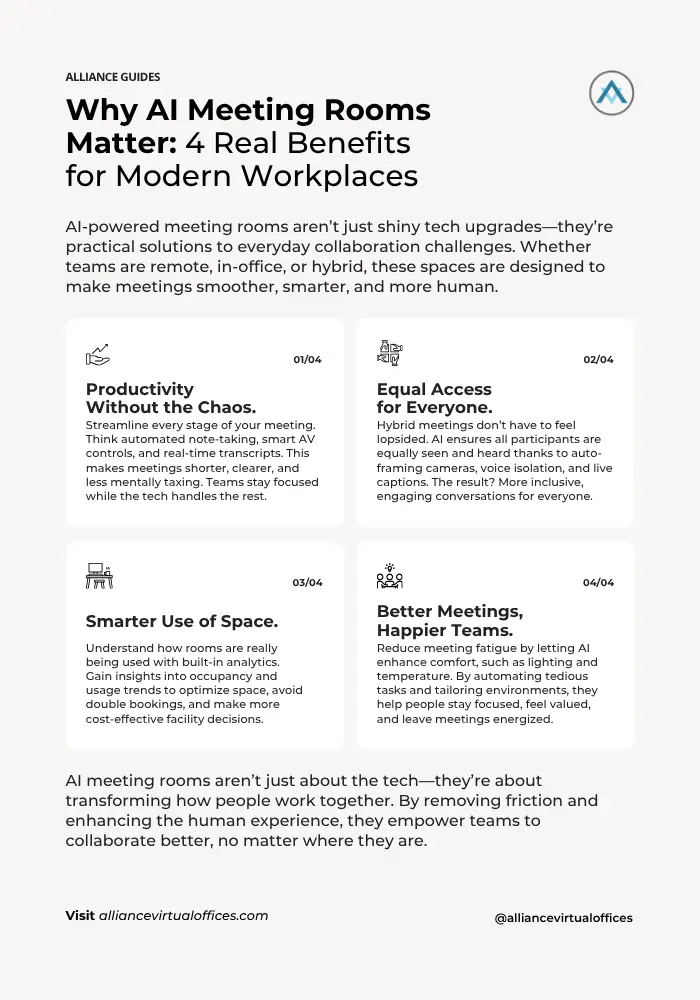
Here’s how they deliver on that promise:
1. Improved Productivity and Focus
Meetings equipped with AI tools tend to run shorter, have clearer outcomes, and require less follow-up work.
We’ve all been there: a 45-minute meeting that could’ve been a 10-minute email, followed by a round of “Who was supposed to follow up on that?”
AI changes the game. With tools like automated note-taking, real-time transcription, and meeting summaries, there’s less need to jot things down or circle back for clarity. Everyone walks away with a record of what was said—and what needs to happen next.
Distraction-reduction tech keeps attendees focused, while smart automation handles the nitty-gritty. Need to turn on the projector? Launch software? Dim the lights? AI handles all of it quietly in the background, letting hosts and participants focus on the conversation instead of the controls.
The result? Shorter meetings. Clearer outcomes. Less mental clutter.
2. Enhanced Hybrid Inclusivity
Let’s talk about hybrid meetings—because if you’re still relying on a webcam pointed at the far end of a long table, remote participants are missing out.
AI meeting rooms are built for this challenge. Smart camera framing ensures that everyone in the room is visible, not just whoever happens to be sitting near the mic. Voice enhancement tools make sure remote team members can hear (and be heard) clearly, even in acoustically tricky environments.
Real-time captioning and transcription bring another layer of accessibility, making sure no one misses a beat. And with automated AV corrections, you can kiss those awkward “You’re frozen” or “There’s an echo” moments goodbye.
When you level the playing field like this, remote employees stop feeling like second-class citizens—and that’s a big deal for morale, participation, and retention.
3. Space and Resource Optimization
Here’s something many companies struggle with: unused or underused meeting space. It’s common, it’s costly, and most of the time, it goes unnoticed.
AI meeting rooms come with built-in analytics tools that track how rooms are being used—how often, by how many people, and for how long. This data empowers leaders to make smarter decisions, like consolidating underutilized rooms or redesigning spaces to better match current workflows.
It also improves booking efficiency. Predictive scheduling and usage insights help reduce double-booking headaches and keep calendars flowing smoothly.
All of this leads to a quieter kind of transformation—one where your office starts working for your people instead of against them. And yes, the cost savings add up.
4. Employee Experience and Wellbeing
This last one might sound small, but it’s anything but.
Environmental factors—like lighting, temperature, and noise—have a massive impact on how employees feel during meetings. AI meeting rooms take this seriously. Smart systems can automatically adjust the atmosphere to suit the time of day, the type of meeting, or even individual preferences.
Beyond comfort, AI also helps reduce the cognitive burden of meetings. When tech handles prep, settings, and follow-up tasks, employees spend less time juggling logistics and more time actually engaging with their work.
Some systems even allow users to save personal presets—so every time they walk into a room, it’s already set up the way they like it. That kind of personalization might seem like a luxury, but it can play a real role in reducing fatigue, supporting focus, and fostering a sense of value and care.
At the end of the day, these small upgrades to the meeting experience create a ripple effect. Teams feel more energized. Collaboration feels more natural. And the workplace becomes just a little more human.
Implementation Roadmap: From Audit to Roll-out
For CIOs and facilities leaders, the key to deploying AI meeting rooms is starting small and scaling based on data.
Step 1: Audit and Assessment
Begin with a room and user audit. Evaluate:
- Technical readiness of AV infrastructure
- Most common pain points (setup delays, poor audio, etc.)
- Meeting frequency and room utilization data
- Compatibility with conferencing platforms
Use tools like the Meeting Room Rental Checklist to assess current assets and identify gaps.
Step 2: Choose Your Pilot Locations
Select 1–2 rooms with high traffic for your pilot. These rooms should have:
- Frequent hybrid usage
- Complaints related to AV or engagement
- Support from department leaders willing to participate
Prioritize rooms that can be retrofitted without structural changes.
Step 3: Select Vendor Stack and Hardware
Choose certified hardware that integrates with existing tools. Consider:
- AI cameras with auto-framing
- Directional microphones
- Integrated scheduling and analytics dashboards
- Compatibility with security and compliance protocols
Cloud-native solutions are often faster to deploy and easier to maintain.
Step 4: Train Teams and Establish Governance
AI success depends on adoption. Provide training on:
- Using AI summaries and transcripts
- Consent and privacy protocols
- Reporting and escalating issues
Create documentation for IT, admins, and hosts. Include troubleshooting guides and usage etiquette.
Step 5: Scale with Metrics
After a successful pilot, expand to other rooms based on:
- Utilization data
- Team requests
- Facilities priorities
Review ROI metrics quarterly and refine room standards accordingly.
Security, Compliance, and Data Privacy Considerations
Data privacy is critical when using AI tools that record, analyze, or store meeting content.
Enterprise-Grade Encryption
Ensure all voice, video, and text data is encrypted both in transit and at rest. Most enterprise-grade platforms comply with:
- SOC 2 Type II
- ISO/IEC 27001
- FIPS 140-2 encryption standards
Look for vendors that provide admin-level controls and audit logs.
Consent and Transparency
Meeting platforms should offer:
- Automated consent prompts before recording
- Visual indicators of when transcription is active
- Options for participants to disable AI features
- Policies for disabling certain AI tools in sensitive meetings
Transparency builds trust and ensures ethical deployment.
Industry-Specific Compliance
If your organization operates under regulations such as HIPAA, FINRA, or GDPR, verify that your platform:
- Limits data storage to approved regions
- Offers role-based access controls
- Allows custom data retention and deletion policies
- Meets requirements for auditing and legal hold
Platforms like Microsoft Teams, Cisco Webex, and Zoom offer enterprise admin panels with granular settings tailored for regulated industries.
Measuring ROI: Analytics and Continuous Improvement
AI meeting rooms can be a significant investment. To justify the spend, focus on clear performance metrics.
Key ROI Metrics
- Meeting length versus decision quality
- Percentage of meetings with completed follow-ups
- Room utilization rates before and after AI integration
- Number of IT support requests related to meetings
- Travel savings due to improved hybrid capabilities
Data collected from AI dashboards, occupancy sensors, and meeting summaries can be aggregated to track impact over time.
Integrating Insights into Workplace Strategy
Insights from AI rooms can also inform:
- Real estate decisions (downsizing, consolidation)
- AV equipment procurement strategies
- Hybrid work policy improvements
- Cross-functional collaboration benchmarks
The key is to treat meeting rooms as performance spaces—not just square footage.
Why Choose Alliance Virtual Offices for AI-Ready Spaces
Alliance Virtual Offices offers an easy way to access intelligent meeting rooms without investing in construction, tech support, or long-term leases.
So—you’re convinced that smarter meetings are the way forward. But what if you’re not ready to gut your office, invest in AV hardware, or manage an in-house tech overhaul?
That’s where Alliance Virtual Offices comes in.
We make it simple to access AI-ready meeting rooms without the heavy lift. No construction. No long-term leases. No IT headaches. Just walk in, plug in (if you need to), and get to work with intelligent meeting rooms 2025.
With access to over 4,000 fully equipped meeting rooms and AI conference rooms around the world, you can book intelligent spaces wherever and whenever your team needs them—whether that’s across the city or across the globe. Each room is outfitted with high-end hardware, and if you want that extra white-glove experience, we offer concierge setup support to ensure everything runs smoothly the moment you arrive.
Flexibility is part of the package. You can reserve rooms by the hour, half-day, or full day—whatever suits your schedule and budget. And because all locations are in secure, professionally managed buildings, you can count on a polished environment that reflects well on your brand.
Looking for more than just a smart room? You can bundle meeting space with our Virtual Office and Live Receptionist services for a seamless, full-service experience. That way, your business has a real address, a professional phone presence, and a place to meet—all under one umbrella.
Whether you’re hosting a strategy session, a leadership offsite, or just need a tech-forward space for hybrid collaboration, Alliance makes it turnkey.
Want to see it in action? You can book a meeting room online in minutes—or reach out to our team for help picking the right space.
Conclusion
AI meeting room solutions are no longer experimental. They are the foundation for the modern workplace—a critical infrastructure layer that supports hybrid equity, collaboration efficiency, and business intelligence.
From beamforming microphones to generative AI assistants, today’s meeting rooms are smarter, faster, and more connected than ever before. By implementing these tools thoughtfully and securely, organizations can significantly improve how their teams meet, think, and make decisions.
Alliance Virtual Offices is here to support your transition with flexible, intelligent meeting rooms worldwide. Skip the complexity. Start smart.
Explore Alliance Meeting Rooms or Contact Us to build your enterprise solution.