
- The Three Layers of a Small Business Phone System
- How to Build Your Communication Stack Step by Step
- Which Communication Stack Is Right for Your Business
Q: How do I set up a virtual phone system for my small business with live receptionist support?
A: To build a business communication stack, apply an integrated approach, starting with a dedicated business phone number, before adding auto-attendant call routing, then layer on a live receptionist service.
Most small business owners piece together their communication tools one vendor at a time: a phone number here, a voicemail service there, and maybe a separate answering service bolted on later. But this creates a fragmented virtual phone system for small business that leads to missed calls, client confusion, and billing headaches.
This usually isn’t intentional. When you’re launching a business, setting up a fully integrated communication stack rarely feels urgent. But as call volume grows, the gaps in that patchwork system become harder to ignore, especially when opportunities get lost in the process.
Instead of assembling tools as you go, you can build a simple, integrated business communication stack that starts with a virtual business phone number and expands call routing, messaging, and live receptionist support as needed.
If your phone setup feels more complicated than your business itself, this framework helps you bring everything into one place.
What’s a Business Communication Stack (and Why It Matters)
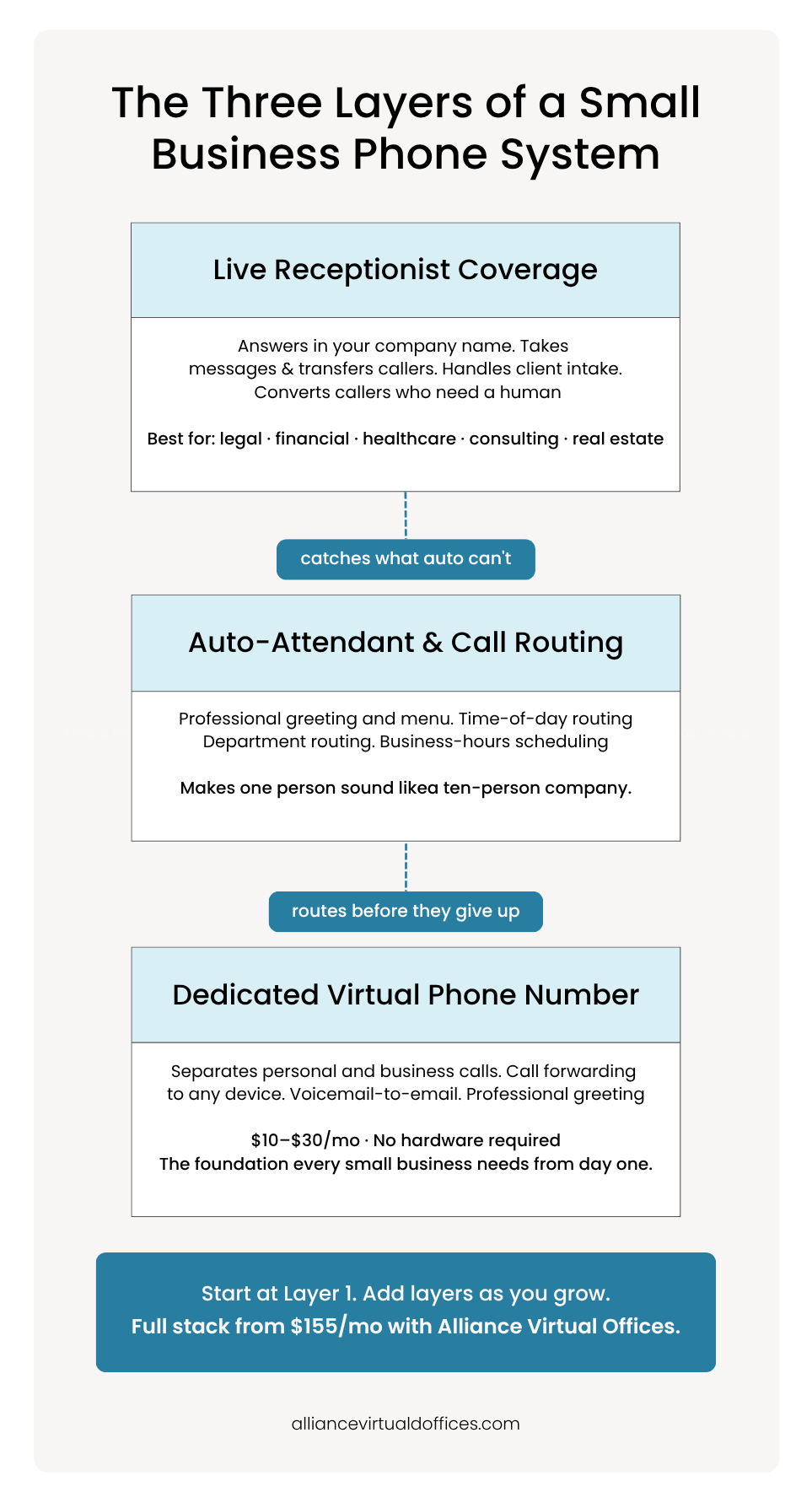
A business communication stack is a layered system of phone tools, ensuring every caller reaches a professional response. At the base, sits a dedicated phone number. In the middle, an auto-attendant handles routing and greetings. At the top, a live virtual receptionist answers calls that automated tools can’t handle on their own.
Small businesses benefit from thinking in layers, rather than buying standalone tools in isolation. Each layer catches the calls the layer below would miss.
As 80% of callers won’t leave a voicemail when they reach one, every unanswered call is a potential client moving on to the next provider. Even a single-layer system (say, a phone number with voicemail) only captures the callers willing to leave a message.
Add an auto-attendant, and you route callers to the right person or department before they give up. If you’re trying to figure out whether a live receptionist makes sense for your budget, this calculator breaks it down by business size and call volume. Add a live receptionist service, and you’ll catch the callers who need a human response to feel confident enough to do business with you. The stack doesn’t need to be expensive or complicated, but it must be intentional.
Most small businesses handle communication with calls being answered by the owner on a personal cell phone during the day. After hours, calls go to a generic voicemail. There’s no dedicated number, routing, nor way to separate a sales inquiry from a personal call.
A communication stack replaces that fragmented approach with a deliberate architecture. Each layer handles a specific type of call scenario, with the layers working together so that no call falls through the cracks. The business owner doesn’t even need to be available around the clock: the stack handles what they can’t.
How to Get A FREE Live Receptionist
Request Your Code Below and Get a FREE
Live Receptionist for 1 Month!

The Three Layers of a Small Business Phone System
When you’re building a virtual phone system for small business, there are three layers to consider.
Layer 1: A Dedicated Virtual Phone Number
The foundation of any professional phone presence is a dedicated virtual phone number for business use. This is a cloud-based number separating personal calls from business calls, which can be forwarded to any device, presenting a consistent identity to clients.
In a provider, look for local or toll-free number options, call forwarding for small business to your mobile or landline, voicemail-to-email transcription, and a professional greeting. Most virtual phone number providers charge between $10 and $30 per month for these core features.
A virtual office provider offers a dedicated business phone number as an add-on to a cloud-based phone system with call forwarding, voicemail, and the option to add auto-attendant features, without hardware installation requirements or a long-term contract.
Here’s how a dedicated virtual phone number works in practice:
| Feature | What It Does |
|---|---|
| Dedicated business number | Separates personal and professional calls |
| Call forwarding | Routes calls to your cell, landline, or team |
| Voicemail-to-email | Sends transcribed messages to your inbox |
| Professional greeting | Presents a polished first impression to every caller |
Layer 2: Auto-Attendant and Call Routing
The next layer adds a level of professionalism that many small business communication tools lack by default. An auto-attendant is the automated greeting callers hear when they dial your number (e.g. “Press 1 for sales, press 2 for support”). It routes them to the right destination without a human operator.
This layer is particularly valuable for businesses that aren’t ready to pay for live answering. A well-configured auto-attendant system handles business-hours scheduling, department routing, custom greetings, and hold music. It makes a one-person operation sound like a ten-person company.
At this layer, prioritize features including call forwarding rules, such as time-of-day routing and simultaneous ring, voicemail-to-email, and the ability to update greetings remotely. Many Voice over Internet Protocol (VoIP) vs virtual phone debates center on this layer, as VoIP is a technology that transmits calls over the internet, while a virtual phone system is built on that technology with a configured auto-attendant, routing, and scheduling.
Layer 3: Live Receptionist Coverage
The top layer is where a virtual phone system for small business transforms from a routing tool into a business phone answering service. A live virtual receptionist answers calls in your company name, takes messages, transfers callers, and handles basic intake, all without you lifting a finger.
This layer is essential for client-facing businesses and industries where trust matters on the first call, including legal, financial services, healthcare, consulting, and real estate professionals. When a prospective client calls and hears a real person who greets them by name, the conversion rate increases significantly compared to when they reach voicemail or an automated menu.
The differentiator between an affordable virtual receptionist service and a premium one is the integration. When a live receptionist is part of the same system as your phone number and auto-attendant, calls flow seamlessly. There’s no manual configuration between platforms, no missed handoffs, or troubleshooting integration errors. Callers won’t know that multiple layers are involved: they simply experience a professional, responsive business.
Read more: What Is a Live Receptionist and How It Works
How to Build Your Communication Stack Step by Step
Setting up your communication stack doesn’t require technical expertise. Follow these five steps to go from zero to a fully functioning virtual phone system for small business with live receptionist support:
Step 1: Choose a virtual phone number provider and set up a dedicated business line. Select a local or toll-free number that matches your market.
Step 2: Configure auto-attendant greetings and call routing rules. Record a professional greeting, set business hours, and define call routing during and after hours. For example, route to your cell during the day and to voicemail (or a receptionist) after hours.
Step 3: Decide on adding live receptionist support. If you’re in a client-facing business or missing more than a few calls per week, a live receptionist service pays for itself. An answering service for small business ensures no call goes unanswered during coverage hours.
Step 4: Test the full stack. Call your own number from a personal phone, walk through the auto-attendant menu, verify a receptionist answers in your business name and follows your script, and check that messages arrive in your inbox.
Step 5: Document your call flow so team members understand the routing. A simple diagram works like this: Caller → Business Number → Auto-Attendant → Live Receptionist or Voicemail. Share this with anyone who handles client communication.
Here’s a sample call flow you can use for a three-layer communication stack:
| Call Scenario | What Happens |
|---|---|
| Business hours when you’re available | Call forwards directly to your mobile or desk |
| Business hours when you’re busy | Auto-attendant greets caller, then routes to a live receptionist |
| After hours (within live receptionist coverage) | Live receptionist answers in your business name |
| After hours (outside live receptionist coverage) | Auto-attendant plays after-hours greeting and routes to voicemail |
| Weekend (with Saturday live receptionist coverage) | Live receptionist answers during coverage hours; auto-attendant plays after-hours greeting and routes to voicemail |
This documentation takes ten minutes to create and saves hours of confusion when bringing contractors, virtual assistants, or new team members into your business.
Cost Comparison: DIY Multi-Vendor vs. Integrated Stack
Cost is typically the first question small business owners ask when building their communication stack. But pricing depends on whether you build your stack from separate vendors or choose an integrated provider.
The DIY approach involves selecting a standalone phone service and a separate answering service. A common combination is Grasshopper (starting between $14 and $55 per month depending on plan) paired with Ruby Receptionists (entry plan at $235 per month for 50 minutes), putting the minimum monthly cost at between $249 and $290, before accounting for overage charges, integration complexity, and managing two separate accounts.
The integrated approach consolidates everything under one provider. Alliance Virtual Offices provides a virtual phone number from $30 per month, with a Live Receptionist service at $125 per month, totaling $155 per month for a complete communication stack. This includes a seamless call handoff and single billing without integration headaches.
Here’s a cost breakdown for these two approaches:
| Feature | DIY Multi-Vendor | Integrated (Alliance Virtual Offices) |
|---|---|---|
| Virtual phone number | Grasshopper: $14 to $55/mo | Virtual Phone Number: $30/mo |
| Live receptionist (50 min) | Ruby: $235/mo | Live Receptionist: $125/mo |
| Total monthly cost | $249 to $290+/mo | $155/mo |
| Number of accounts to manage | 2 | 1 |
| Call handoff integration | Manual configuration | Seamless, built-in |
| Single billing | No | Yes |
| Overage rate | Varies by provider | $1.75/min |
Integration simplicity matters when you’re a small team more than accounting costs. With a multi-vendor setup, you configure call forwarding between platforms, troubleshoot handoff failures, and manage separate billing cycles. With an integrated provider, the phone number, auto-attendant, and receptionist work as a single system from day one.
Although standalone phone-only solutions work well for businesses that don’t need live answering, a multi-vendor stack makes scalability harder. Adding a second business number or increasing receptionist minutes means coordinating changes across platforms.
With an integrated provider, scaling is a single account adjustment. As your team grows, the integrated approach adapts without requiring you to rebuild your communication stack from scratch.
Read more: How Much Does a Virtual Receptionist Cost?
Which Communication Stack Is Right for Your Business
The right communication stack depends on your business stage, call volume, and client expectations. Here’s a useful framework to guide your decision:
| Business Stage | Recommended Stack | Estimated Monthly Cost |
|---|---|---|
| Solopreneur (1 person) | Layer 1 + Layer 2: Virtual phone number with auto-attendant | $30/mo (Alliance Virtual Offices) |
| Growing firm (2 to 10 people) | Full three-layer stack: Virtual phone number + auto-attendant + live receptionist service | $155/mo (Alliance Virtual Offices) |
| Multi-location / multi-entity | Multiple virtual numbers routing to a shared receptionist team | $155 to $260+/mo |
Industry-specific considerations also shape decisions. Legal and financial services firms often need a live answering service for compliance, trust, and intake purposes, making a professional phone presence non-negotiable when prospective clients call during a stressful moment. E-commerce and tech companies, on the other hand, may rely more on auto-attendant with callback options and digital support channels.
Healthcare practices, real estate agencies, and consulting firms fall somewhere in between. These businesses typically need a live answering service during business hours but can rely on auto-attendant and voicemail after hours.
The key question to ask is: what does your caller expect when they dial your number? If they expect a human, a live receptionist service isn’t optional.
A practical test involves tracking your missed calls for one week. If you’re missing more than three to five calls per week, a live receptionist likely pays for itself within the first month through recovered client conversations. If most of your calls are informational and your callers are comfortable with voicemail, having a virtual phone number and an auto-attendant with call forwarding provides strong value.
“Start with the layer that matches your current needs and add layers as your business grows. You don’t need to build a full stack on day one.”
Build a Virtual Phone System for Small Business That Grows With You
Having a phone number, auto-attendant, and live receptionist service gives small businesses a professional phone presence without enterprise-level costs. Instead of stitching together disconnected tools from multiple vendors, build a communication stack where each layer reinforces the one below it.
Alliance Virtual Offices is an integrated provider that delivers all three layers of your communication stack for just $155 per month when you pair a virtual phone number ($30/mo) with a live receptionist service ($125/mo). That’s a single provider and a single bill, with a seamless handoff from auto-attendant to live person. Setting up a virtual phone number takes less than 24 hours.
Higher-volume plans are available at $175 per month for 100 minutes and $260 per month for 200 minutes, with receptionists available Monday through Friday, 8 a.m. to 9 p.m. ET, and Saturday, 9 a.m. to 7 p.m. ET. Overage is charged at $1.75 per minute, so you only pay for what you use beyond your plan. Compare that to hiring an in-house receptionist (at $2,400 to $3,200 per month), and the math speaks for itself.
Frequently asked questions
What’s the best virtual phone system for a small business?
How much does a virtual phone system for small business cost?
Can I get a virtual phone number with a live receptionist?
What’s the difference between VoIP and a virtual phone system?
Do I need a separate business phone number?
Further Reading