


- Why meeting room etiquette wins clients
- Do’s that impress in the first five minutes
- Don’ts that silently cost you deals
Q: How do you run a meeting that wins clients over?
A: Arrive early, set a clear agenda, and run a quick tech check so your meeting runs seamlessly and without distractions. Host like a pro by giving both in-person and remote attendees equal opportunities to contribute, summarize decisions as you go, and always end with next steps. Leave clients feeling confident and ready to say yes.
First impressions make or break deals.
Meeting room etiquette isn’t about being formal – it’s about projecting reliability, respect, and a readiness to deliver.
When you set the tone with a clear agenda, a well-prepared space, and a seamless experience, clients feel at ease and ready to engage.
That’s how you accelerate decisions and improve close rates.
Below are the essential do’s and don’ts for running a memorable meeting that will win clients, fast.
Whether you’re a founder or part of a small team, here’s how to ensure your next in-person or hybrid meeting runs smoothly, feels professional, and leaves clients knowing their time was well spent.
Why meeting room etiquette wins clients
Clients remember how you make them feel long before they remember what you said. Friendly, thoughtful interactions turn hesitation into trust.
That experience starts at reception and continues through every follow-up touchpoint. Consistency builds community, sparks referrals, and fosters long-term loyalty.
Your setting matters, too.
A clean, fully equipped room with reliable tech reinforces your brand, eliminates distractions, and keeps everyone focused on results.
Booking on-demand meeting rooms by the hour gives you that level of professionalism – without the full-time overhead – ideal for occasional presentations, negotiations, or whenever you need a neutral, professional space.
Read More : Meeting Room Names: What to Call Your Office Meeting Room
Do’s that impress in the first five minutes
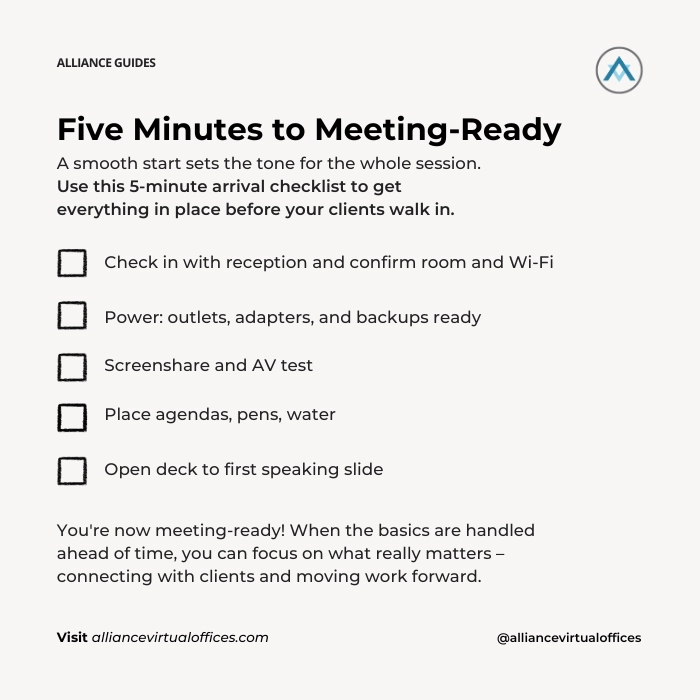
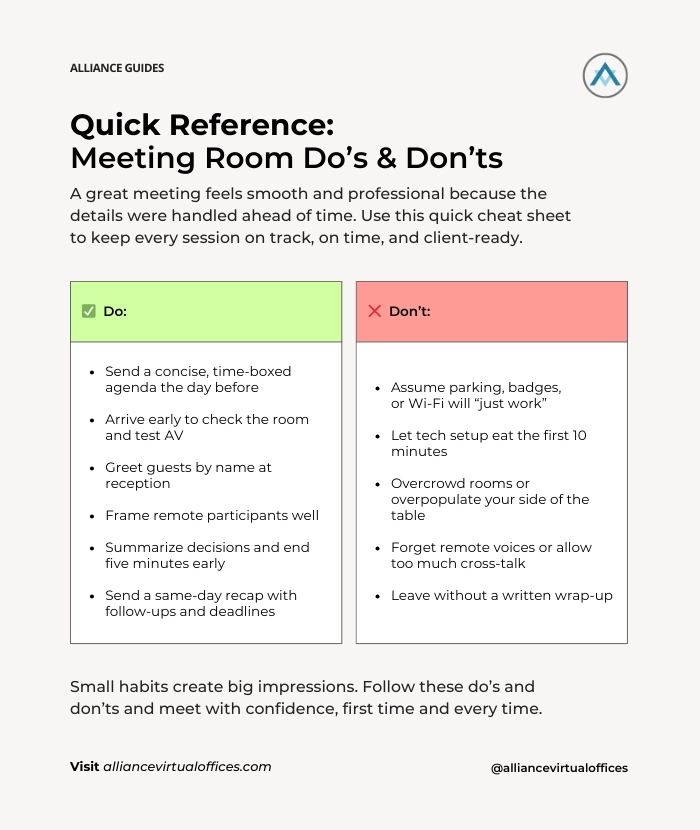
- Arrive early: Be on site at least 15 minutes ahead of time. Confirm the room name with reception, set up tent cards (or on-screen labels for hybrid meetings), and greet guests by name. Share the guest list with the receptionist and agree on how to handle late arrivals.
- Set a clear, welcoming agenda: Send a short, bulleted agenda with timeframes the day before. Print a spare for the table. Open the meeting by restating the goal or decision you’re working toward so everyone’s aligned.
- Run a tech check: Before guests arrive, connect to the display, launch your conferencing app, test audio in and out, confirm screen sharing, and queue your deck to the opening slide. Ask the on-site receptionist or workspace manager for help, if needed. If you plan to record, always ask permission first.
- Mind the table: Keep water within reach, tuck cords out of sight, clear the whiteboard, and square up your materials. Remove branded clutter unless it adds value – the space should highlight the client, not distract them.
- Encourage equal participation: For hybrid meetings, seat in-person attendees close to the camera. Keep remote participants visible by showing names on screen, and pause regularly to invite input from anyone who hasn’t spoken.
- Use micro-recaps: At natural breaks, summarize decisions and next steps out loud. This keeps everyone focused and helps latecomers catch up without disrupting the flow.
- Close with clarity: Wrap up five minutes early. Confirm owners and deadlines, agree on next steps (proposal, recap, or calendar hold), and thank participants by name.
Read More : Struggling with Virtual Meetings? Here’s How to Make Them Better
Don’ts that silently cost you deals
- Don’t leave logistics to chance: “We’ll figure out parking when we get there” is a recipe for disaster. Include parking details, building access instructions, and a cell number in the calendar invite so guests arrive relaxed, not rushed.
- Don’t wing the tech: Few things drain credibility faster than fumbling with cables. Bring a universal HDMI/USB-C adapter, a spare clicker battery, and a mobile hotspot as your plan B.
- Don’t overfill (or underfill) the room: Six people in a four-seat space feels cramped and unprofessional. Likewise, 4 people in a cavernous boardroom can feel daunting and even wasteful. Reserve a room that fits your headcount – with one or two extra seats for last-minute or unexpected attendees.
- Don’t dominate the airtime: If your team outnumbers the client, assign clear roles: a lead, a demo driver, and a note-taker. Everyone else stays in supporting mode. Clients notice when they’re being “talked at.”
- Don’t neglect the remote experience: Poor camera framing, bad lighting, or off-mic chatter make remote participants feel like an afterthought. Show them their input matters by giving them equal presence and clear audio.
- Don’t skip the wrap-up: Walking out without a recap lets action items slip through the cracks. Send a same-day summary with decisions, deadlines, and owners.
- Don’t misuse the space: Treat on-demand rooms as if they were your own office. Tidy up, erase whiteboards, and leave on time. Both venue staff and clients notice – and appreciate – professionalism.
The “golden hour” pre-meeting timeline
- 60-30 Minutes Before Meeting: Confirm headcount, dietary notes, and any security requirements. If your receptionist service is screening calls, set quiet hours so you aren’t interrupted mid-pitch.
- 30-10 Minutes Before: Arrive, test AV, check cleanliness (especially trash cans and surfaces), and set place cards. Pre-stage any materials you’ll hand over at the end (not the beginning).
- 10-5 Minutes Before: Greet guests. Offer water, restate timing, confirm the agenda, and get permission if recording.
- During the Meeting (0 to 45 Minutes): Lead the conversation, listen actively, and keep the client’s priorities front and center. Summarize decisions as you go to maintain momentum.
- Wrap Up (45-55 Minutes): Finish a few minutes early. Confirm next steps, assign owners, and set deadlines so everyone leaves aligned.
- Post-Meeting (55–75 Minutes): Reset the room, thank the venue staff, and send your recap while details are fresh in mind.
Read More : What is a Virtual Office and How Does it Work?
Scripts and templates
Calendar Invite Copy
“Looking forward to connecting on Tuesday at 2:00 PM in the Hudson Room (Level 12). Parking is available in Garage B. Please check in with reception for badges. I’ve attached a short agenda (25-minute working session + 5-minute wrap-up). Call or text if you need anything: (###) ###-####. “
Same-Day Recap Email
Thank you for meeting today. Here’s what we agreed on:
- We’ll deliver the revised scope by Friday
- You’ll loop in Finance for pricing feedback
- Our next review call is Tuesday at 11:00 AM PT
I’ve attached today’s deck and notes for reference. If we missed anything, please reply to all with updates.
Meet in the right space – without the long lease
You don’t need a permanent office to deliver a premium client meeting experience.
On-demand meeting rooms and day offices from Alliance Virtual Offices give you a professional setting, front-desk support, and reliable tech – available by the hour or by the day.
Many entrepreneurs pair a virtual office address with meeting room access so they can register their business, receive mail, and meet clients in one consistent, credible location.
With Alliance Virtual Offices, you can reserve beautifully furnished conference rooms at 1,200+ locations worldwide – plus get a prestigious business address, secure mail handling, a 411-listed business number, and optional Live Receptionists who answer calls in your company name up to six days a week.
It’s the easiest way to run a professional, client-ready business without unnecessary overhead.
Pro Tip: Our Platinum Plus Plan bundles a Virtual Office with up to 16 hours of meeting room use every month – perfect if you host regular client sessions, interviews, or team huddles.
How Alliance helps you run a professional, credible business
- Virtual Office + Meeting Rooms: Book private conference rooms by the hour in the same location as your company address – creating a seamless, consistent client experience every time.
- Live Receptionists: Friendly, U.S.-based teams answer calls in your company name, capture leads, and schedule call-backs so you can protect your focus and stay fully present during meetings.
- Business Phone: A dedicated business number with call routing and voicemail-to-email keeps personal and professional lines separate – making your brand easy to reach and responsive.
Key Takeaways: Meeting Room Etiquette 101: Do’s & Don’ts That Win Clients Fast
Handling details behind the scenes creates a positive meeting experience and leaves clients with a positive impression.
With a clear agenda, smooth technology, and a space that reflects your professionalism, you’ll shorten sales cycles and earn that all-important ‘yes’.
Plus, you can do all that without committing to a costly office lease.
Ready to meet with confidence? Book meeting space in 1,200+ locations for as little as one hour. Or pair a virtual office with meeting room access, add a dedicated business phone number, and let Live Receptionists protect your time while building positive relationships with your clients.
Alliance Virtual Offices offers flexible meeting rooms, professional live receptionists, coworking, and business phone numbers – giving entrepreneurs a complete 360° Virtual Office solution to operate with confidence, move quickly, and grow efficiently.


