

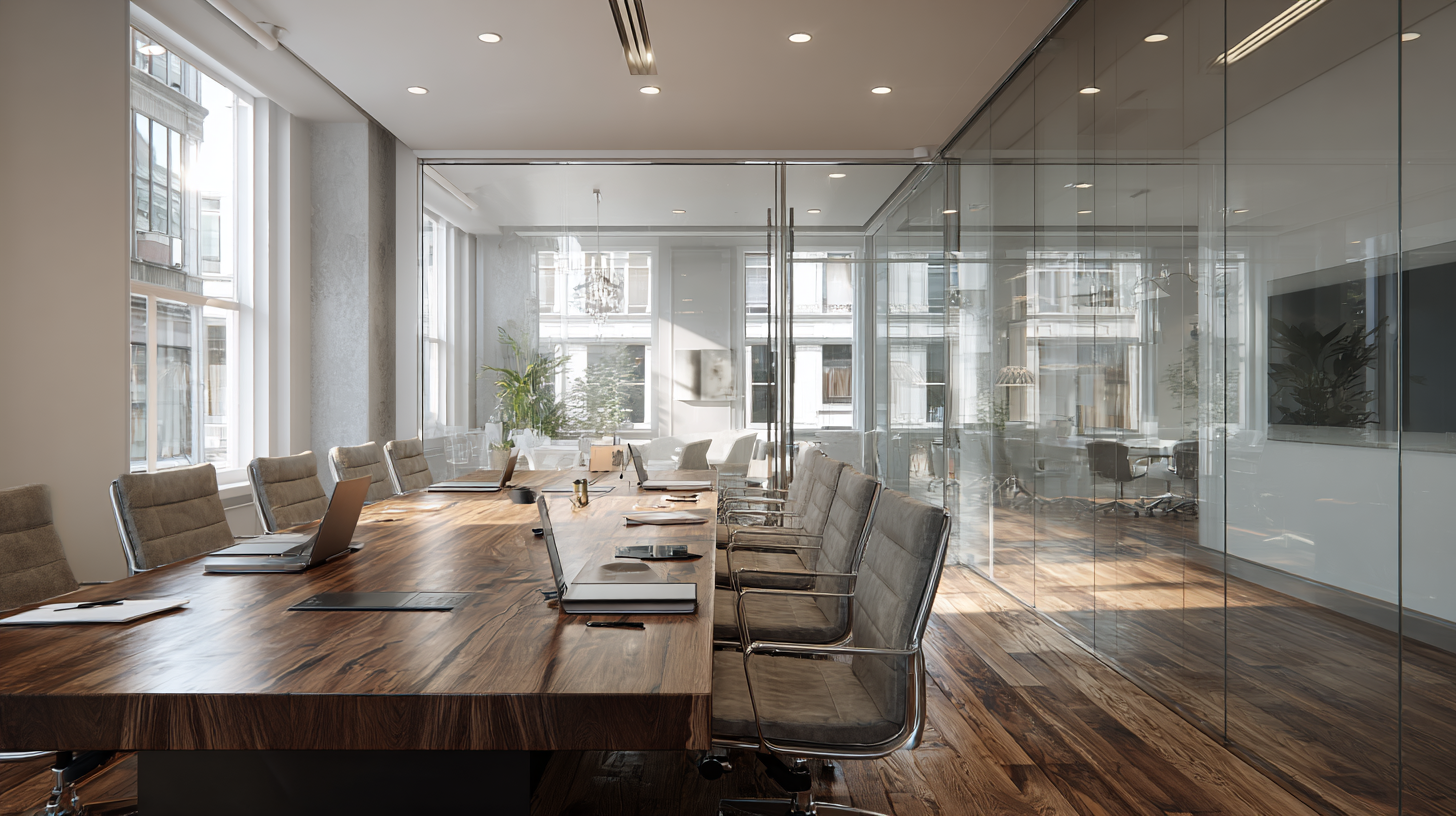
- How to Choose the Right Meeting Room
- Run a Focused Meeting That Actually Ends with Decisions
- Turn One Productive Hour into Ongoing Momentum
Q: How do you turn an hourly meeting room rental into a high-ROI session that starts on time, engages hybrid participants, and ends with clear decisions?
A: Choose a space and tech setup that fits your goals. Arrive early with a focused agenda and defined roles and finish with a recap of follow-ups and deadlines. Book only the time you need, make the most of included meeting hours in your Virtual Office plan, and utilize on-site support to keep everything running smoothly.
Great meetings don’t just happen. They’re designed.
If you’re renting a conference room by the hour (smart move), a little prep turns “just another meeting” into focused work that wins business and moves projects forward.
This guide shares practical ways to maximize your meeting room rental – before, during, and after the session – so you get real outcomes, not calendar clutter.
Hybrid and remote teams can use on-demand space to collaborate in person without paying for under-utilized office space.
We’ll also share how a Virtual Office bundles a business address, secure mail services, and meeting room access into one flexible plan. With Alliance’s Platinum Plus Plan, you get up to 16 inclusive meeting room hours every month with selected Virtual Office locations – ideal for recurring workshops and client reviews.
Unlock Our Current Virtual Office Offers
Enter your email below and we’ll send you the latest available promotions and monthly specials for Virtual Offices, Meeting Rooms, and Live Receptionists.
How to Choose the Right Meeting Room
The right space can make or break your meeting experience. Before booking, clarify the outcome and then match the room, tech, and support to your goals. A little forethought creates a smoother experience and helps your team stay focused.
Clarify the mission in one line.
What must be achieved by the end of the session? Example: “Approve Q4 creative and assign owners.” A single-sentence outcome keeps agendas tight and helps determine room selection.
Match the room to the job.
- Interview or board-style meeting: Look for a private conference room with comfortable seating, frosted or privacy glass, and professional receptionists to greet guests.
- Workshop or sprint: Prioritize layout flexibility, collaboration tools such as whiteboards, and movable seating.
- Hybrid participants: You’ll need fast and reliable Wi-Fi, a large monitor, high-quality camera (or your laptop camera), and mics. Choose an appropriate room size that minimizes echo for remote attendees. Hybrid meetings work best when technology and layout support equal participation.
Confirm the essentials.
- Connectivity: Reliable, high-speed Internet connectivity and/or Wi-Fi, screen sharing to a TV or projector, and easy plug-and-play.
- Privacy & acoustics: Frosted or privacy glass and thick walls or partitions that minimize sound from adjacent areas.
- Admin support: On-site staff to greet guests, assist with catering, and provide quick tech support.
Read More : Meeting Room Names: What to Call Your Office Meeting Room
Book by the hour or day.
Hybrid teams rarely need a full-time office. By renting meeting rooms or office space as-needed, your business remains flexible and avoids unnecessary costs.
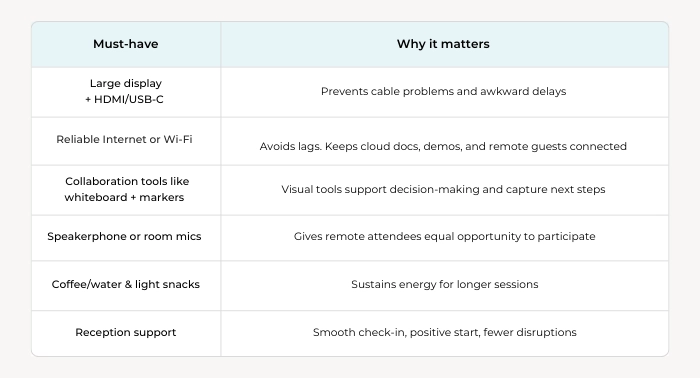
Quick Equipment & Comfort Checklist
Run a Focused Meeting That Actually Ends with Decisions
Start on time with a visible agenda.
Put the agenda on the screen or whiteboard before people walk in. List tasks and time boxes. Cap the meeting at 45–55 minutes if possible.
Assign roles.
- Facilitator keeps pace and manages meeting time and discussions.
- Decision-maker summarizes actions and assigns roles and deadlines.
- Scribe takes notes in real time.
Use “decision frames.”
For each agenda item, be clear about the outcome you need, outline the options, and share the criteria for choosing. Then make the decision. If pre-reads were sent, keep the discussion focused – don’t let the meeting turn into a first read. Anyone who isn’t prepared can follow up after the meeting.
Read More : Elevate Your Meetings: Discover the Benefits of Renting a Conference Room for Your Business
Make hybrid inclusive by design.
Hybrid teams that blend remote focus work with periodic in-person sessions report stronger engagement and productivity. Here’s how to ensure remote attendees participate fully:
- Bring remote attendees onto the screen at eye level, not a laptop off to the side.
- Use a round-robin for input before an open debate so quieter voices aren’t drowned out.
- Summarize agreements out loud to confirm shared understanding.
Remove distractions.
Route routine calls to voicemail. This is where a Live Receptionist comes into their own – they screen every call and provide a friendly, human response that delivers a more positive experience than voicemail. If you get an urgent call, they can still reach you. It means you can protect deep work time without sacrificing responsiveness.
Always end with a recap.
In the final five minutes, the scribe reads back the list of to-dos including task owners, deadlines, and dependencies. Then schedule follow-ups as needed.
Turn One Productive Hour into Ongoing Momentum
A great meeting shouldn’t end when everyone leaves the room. The way you capture decisions, share next steps, and plan ahead determines your meeting productivity. Use these tips to turn a single session into lasting traction for your team and your clients.
- Send a same-day action summary: Bullet the decisions, task owners, and dates. Keep it concise. Store it where work happens (project tool, CRM, shared drive) so it doesn’t vanish in an email.
- Attach proof: Snap whiteboards, drop photos into the notes, and link the presentation deck. Visuals trigger memories and help keep your content fresh, long after the meeting ends.
- Schedule follow-ups. Book the next follow-up meeting as soon as possible. Not only will you get the best choice of meeting time and room, but you’ll also give attendees a deadline to work towards. Nobody likes turning up at a meeting unprepared.
- Book only what you’ll use: If possible, reserve the room for 60 minutes and add 10-15 minutes of setup time. Room booked back-to-back? Run a 45-minute meeting, start at 15 minutes past the hour and use the first 15 minutes as setup time. This keeps your team nimble and your budget under control.
Read More : Court Reporting Success: How Meeting Rooms Provide a Competitive Advantage
Did you know that with a Virtual Office from Alliance, you can bundle meeting time with your business address?
If you operate remotely, a Virtual Office provides a professional business address, secure mail handling, and on-demand meeting rooms with no long-term leases or costly overhead.
Many business owners use their Virtual Office as their professional HQ while the team works wherever they’re most productive.
If you hold recurring reviews, trainings, or interviews, a Platinum Plus Plan includes up to 16 hours of monthly meeting room time – ideal for regular client meetings or team collaboration.
FAQs:
How do you choose the right meeting room?
Start with your goal and who will be in the room. Then match the space to the task: boardroom-style setups work well for interviews and reviews; flexible seating and whiteboards are best for workshops; and reliable AV is essential for hybrid participation. On-site support is invaluable – it helps avoid time-wasting tech hiccups and keeps the meeting on track.
What should be in a meeting room checklist?
Reliable Wi-Fi, a large display, simple plug-and-play cables, a whiteboard with markers, clear audio, and a private, distraction-free environment. Add water or light refreshments for longer sessions. For hybrid meetings, make sure cameras and mics give remote participants an equal seat at the table.
How do hybrid teams use meeting rooms effectively?
They book rooms only for high-impact moments – like kickoffs, client pitches, or complex planning sessions – while keeping focused work remote. Hourly reservations help maintain flexibility, control costs, and keep the team agile.
Pro Tips from Frequent Bookers
Frequent users know the little details make the biggest difference. These quick habits keep meetings running on time, participants engaged, and clients impressed.
- Add Setup Time: Add 10–15 minutes before your start time so you’re ready even if the previous group runs late.
- Pack a “Go Bag”: Include a clicker, spare cables, a laptop charger, sticky notes, and markers so you’re never caught off guard.
- Name Decision Owners in the Invite: Listing owners ahead of time removes ambiguity and speeds up decisions.
- Set a Standing “Client Day”: Reserve the same day and time each month to build momentum. A Virtual Office plan with included hours makes it easy to plan ahead.
- Protect Your Focus: Have Live Receptionists screen calls during meetings so you avoid distractions while giving callers a positive experience.
Why Business Owners Choose Alliance for Meetings
You want a meeting room that looks the part, runs smoothly, and is easy to book.
When you book meeting space with Alliance, you can rest assured that every location is professionally staffed so guests are greeted warmly, the Wi-Fi works, and you can call on helpful support whenever you need it.
This means you can book fully equipped furnished conference rooms by the hour or day with confidence. What’s more, you’ll keep overhead low – especially when you pair it with a Virtual Office address and use your included hours.
Key Takeaways: Maximize Your Meeting Room Rental: Productive Meeting Tips
When you rent a meeting room with purpose, you’re investing in outcomes – not just space. With the right room, you’re more likely to run a focused agenda, protect your team’s attention, and finish with clear next steps.
If you want all the benefits of a professional office without the costly, long-term lease, choose a Virtual Office Platinum Plus plan that includes a business address, mail handling, and monthly meeting room access. Use your included hours for the meetings that matter most – such as client pitches, planning sessions, and key reviews.
Ready to book smarter? Explore Virtual Offices and on-demand meeting rooms today and make your next session your most productive yet.
Alliance Virtual Offices offers flexible meeting rooms, professional live receptionists, coworking, and business phone numbers – giving entrepreneurs a complete 360° Virtual Office solution to operate with confidence, move quickly, and grow efficiently.


