

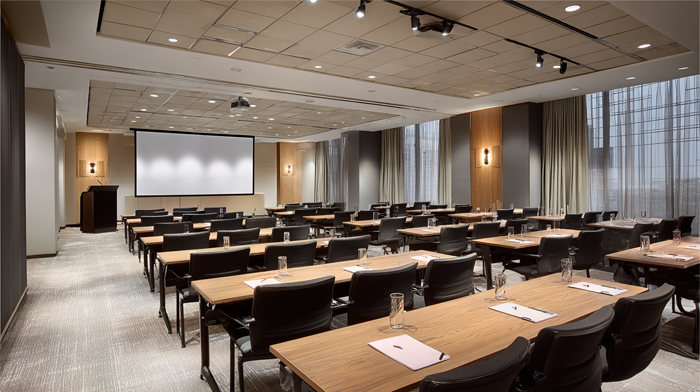
- How to right-size your choice of meeting room
- Amenities that actually matter (and what’s nice-to-have)
- Location strategy: convenience, credibility, and cost
Q: How can small businesses choose the right meeting room-size, amenities, and location – without overspending?
A: Match room size to headcount and purpose, prioritize hybrid must-haves (reliable Wi-Fi, clear audio, generous display, on-site support), pick a credible and convenient location, and control costs with on-demand bookings or a Virtual Office plan that includes meeting room hours.
Choosing a meeting room should be simple. Yet too many teams end up in spaces that are too small, too large and cavernous, or in the wrong part of town.
This guide breaks it down by size, amenities, and location, so you can book the right meeting room the first time, whether you’re hosting a client pitch, an investor update, an all-hands, or a quarterly planning sprint.
Along the way, you’ll find practical checklists, a quick-sizing table, and smart ways to stretch your budget. And because hybrid work isn’t going anywhere, these tips help you support remote participants just as well as in-room attendees.
Unlock Our Current Virtual Office Offers
Enter your email below and we’ll send you the latest available promotions and monthly specials for Virtual Offices, Meeting Rooms, and Live Receptionists.
How to Right-Size Your Choice of Meeting Room
Start with headcount + purpose. A 1:1 coaching session needs a quiet huddle room; a 10-person workshop needs whiteboards and wall space; a 20-person training needs U-shape seating and screens.
Use this sizing guide as your shortcut:
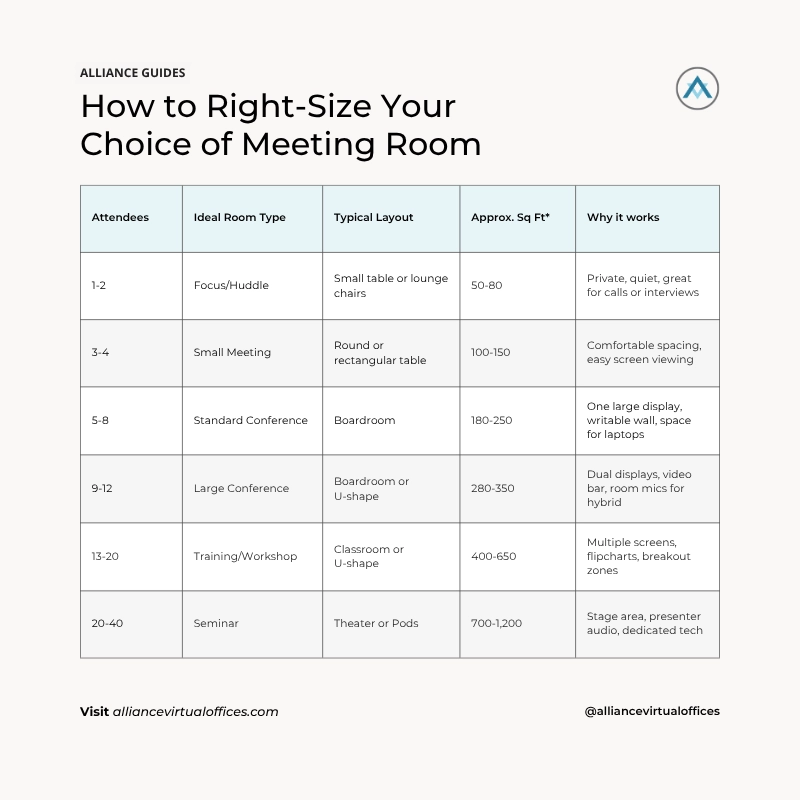
*Rules of thumb: approximately 25-35 sq ft/person seated at a table, or around 15-20 sq ft/person in theater. If your group uses laptops, add 10-15% more space.
Pro tips for sizing:
- If more than 30% of attendees are remote, prioritize acoustics and display sightlines over a larger table. Hybrid works best when everyone can see and be heard clearly.
- Workshops need movement: pick rooms with perimeter wall space, writable surfaces, and floor area for activities
- When in doubt, book one size up for comfort and ventilation – especially for all-day sessions.
NEXT STEPS: Struggling with Virtual Meetings? Here’s How to Make Them Better
Amenities that Actually Matter (and what’s nice-to-have)
A modern meeting runs on more than chairs and coffee. Here’s a focused checklist that keeps your session on track, without paying for gear you won’t use.
Must-have for most business meetings
- Reliable, fast Wi-Fi: test at the table, not the hallway.
- Large display: 55″+ for up to 8 people; dual displays for 9-12. Add a confidence monitor if presenters face the room.
- Single-touch video: Zoom/Teams/Meet-capable room system with a quality sound bar + beamforming mics so remote attendees hear clearly in hybrid sessions.
- Acoustics: soft finishes, minimal HVAC noise. This helps to reduce fatigue in long meetings.
- Writable surfaces: wall-mounted whiteboards or glass boards; bring your favorite markers.
- On-site support: human help at reception for AV hiccups, guest check-in, and last-minute printouts. A friendly, on-site team isn’t just a nice-to-have – they enable you to meet with confidence and help guests feel welcome.
Nice-to-have (choose by meeting type)
- Room cameras with auto-framing for hybrid collaboration
- Breakout rooms nearby for interviews, workshops
- Catering coordination for long sessions
- Secure printing & shredding for legal/finance meetings
- Lobby listing / professional reception for client-facing brand presence.
Amenities by use case
- Client pitch: polished reception, lobby listing, dual displays, good quality coffee and refreshments, easy parking.
- Board meeting: privacy, sound isolation, on-site tech, non-reflective screen, catering.
- Team offsite: natural light, writeable walls, movable furniture, breakout nooks, nearby or onsite lunch.
- Remote attendees: video bar, ceiling mics, minimal glass walls, ethernet backup.
NEXT STEPS: Alliance Virtual Offices Set to Add Convenience and Value by Offering Meeting Rooms Online
Location Strategy: Convenience, Credibility, and Cost
1) Convenience for the people who matter most.
Map attendee origins and minimize total travel time. For external meetings, pick a location that’s easy to find, has clear parking/transit options, and minimal “elevator maze” between lobby and room. For hybrid teams, consider a central transit hub to reduce overall friction.
2) Credibility for your brand.
Impressions matter. A recognizable business district, a professional lobby, and a staffed reception desk send the right signals – even if you work remotely most days. Virtual office locations with on-demand meeting rooms let you match the market (downtown for finance, creative districts for agencies) without a full-time lease.
3) Cost control.
Full-time space is expensive; on-demand workspace means you pay only for what you use. Many small businesses mix coworking access, virtual office services, and bookable rooms to cover the year’s key moments – such as client acquisition, quarterly planning, or investor meetings, all while keeping OPEX light.
4) Community & opportunity.
Choosing a center that runs regular business mixers or showcases local members can spark partnerships and referrals. This is especially helpful for solopreneurs and service firms. Look for locations where virtual office clients are invited to events and treated like in-house members.
A Simple 7-step Checklist
- Define the outcome: decision, pitch, training, planning?
- Headcount & hybrid mix: in-room vs remote; decide your must-have tech.
- Pick size & layout using the table above.
- Audit the AV: test video + audio in the actual room, not the lobby.
- Confirm support: know who to call if Zoom freezes or HDMI misbehaves.
- Lock logistics: access instructions, guest badges, parking, coffee, catering.
- Plan follow-ups: printing/signing, scanning, or mailing? Ensure on-site services can handle your needs, or add a virtual office plan for mail and admin requirements.
Budget Tips for Small Teams
- Bundle smartly. A Virtual Office with inclusive meeting room access is often more cost-effective than à-la-carte bookings, especially if you meet regularly. It also gives you a professional address for licensing, banking, and credibility.
- Prioritize audio. If money’s tight, choose the room with better mics over a bigger display. Remote attendees will thank you.
- Book slightly off-peak. Mid-mornings and mid-afternoons often have more availability and lower demand.
- Leverage community. Some centers offer discounts for virtual members on day passes or room time; ask about virtual office client perks and networking events.
Why this Matters in Hybrid Work (and for freelancers & solopreneurs)
Hybrid teams need “together time” for onboarding, strategy, and relationships. The rest of the week can (and should) be flexible. On-demand meeting rooms are the glue – giving you professional, well-equipped space exactly when you need it, and zero overhead when you don’t.
For freelancers and solopreneurs, a professional space plus a recognizable address can elevate your brand, support client trust, and keep costs predictable as you grow.
Where Alliance Virtual Offices Comes In
Prefer one vendor for your business address, flexible workspace and phone requirements?
A Virtual Office with Platinum Plus includes 16 monthly meeting room hours at most locations – perfect if you host regular client sessions or offsites.
Add a Business Phone and Live Receptionist service when you’re ready, so prospects always reach a friendly, professional voice.
Further Reading:
- Meeting Room Names: What to Call Your Office Meeting Room
- Remote Work and Coworking Spaces: A New Era of Flexible Employment
- How to Set Up a Virtual Business Address for LLC
Key Takeaways : How to Choose the Right Meeting Room: Size, Amenities & Location
Ready to prep a great meeting? When you match room size to headcount, amenities to your agenda, and location to your audience, you protect outcomes, relationships, and budget. If your team is hybrid or distributed, the right meeting room strategy gives you professional “together time” without the burden of a lease.
Explore Alliance’s Virtual Office plans, and look for Platinum Plus in select locations for up to 16 meeting room hours every month at a highly discounted rate. Add a Business Phone or Live Receptionist service when you’re ready.
Alliance Virtual Offices offers Live Receptionists, flexible Meeting Rooms, Coworking access, and Business Phone Numbers, delivering a complete flexible workplace solution to run and grow your business.


