
- How to Forward Calls on iPhone and Android
- Carrier Codes and What Each Carrier Actually Supports
- Carrier Forwarding vs. VoIP vs. a Virtual Phone Service
Q: How do I forward calls to another number?
A: On iPhone, go to Settings > Apps > Phone > Call Forwarding, toggle it on, tap Forward To and enter the destination number. On most Samsung phones, go to Settings > Apps > Phone > Call Forwarding > Always forward. On Verizon, you can also dial *72 followed by the 10-digit number. Verified September 2026
You are covering a weekend, handing your business phone to a colleague for three days, or carrying a second device and want both to ring. Learning how to forward calls should take ninety seconds, and on a current phone it does.
The reason it often does not is that the menus moved. Apple inserted an ‘Apps’ layer into Settings, so almost every set of instructions published before this year now sends you down a path that no longer exists.
This has become a routine problem rather than an edge case. In 2025, 35% of employed people did some or all of their work at home, rising to 51% among those with a bachelor’s degree or higher, which means a great many people are splitting calls across a desk line, a cell, and a laptop.
This guide covers the current device steps for iPhone and Android, what each major carrier officially supports, the limits nobody mentions until you hit them, and an honest comparison of carrier forwarding against a dedicated business line.
How to Forward Calls to Another Number
Call forwarding is set on the handset itself, in the phone’s own settings, on every major US carrier. The path differs by operating system and by manufacturer, so find your device below rather than following a generic route.
Carrier and device steps verified September 2026.
Forwarding must be configured from the phone whose calls you are redirecting. You cannot set it from the destination device, and on most carriers, you cannot set it from a web account either.
Forward Calls on iPhone (iOS)
- Open Settings
- Tap Apps
- Tap Phone
- Tap Call Forwarding
- Toggle Call Forwarding on
- Tap Forward To and enter the destination number
The Apps step is the new one, and it is the reason older instructions fail. Before this change the path ran straight from Settings to Phone, which is still what most published guides show.
Two details from Apple’s support guide are worth knowing. You must be in range of the cellular network when you turn forwarding on, or calls will not forward, and the feature behaves as a GSM network service, so on CDMA service Apple directs you to your carrier instead.
A call forwarding status icon appears in the status bar whenever forwarding is active. If your iPhone has Dual SIM, you will be asked to choose a line first. AT&T’s iPhone device tutorial walks the same path with screenshots.
Forward Calls on Android
There is no single Android path, and any guide that gives you one is guessing. The menu location depends on the manufacturer, the OS version, and sometimes the carrier build, so here are the three verified routes that cover most readers.
On recent Galaxy devices (A15 5G, A16 5G, S24 FE), the path is Settings > Apps > Phone > Call Forwarding > Always forward, then enter the number and turn it on. Samsung has converged on the same “Apps” structure Apple adopted.
On older Galaxy devices (S9, A52 5G, A03s), open the Phone app > Menu > Settings > Supplementary services > Call forwarding > Always forward. The older builds file forwarding under supplementary services rather than under a call forwarding heading of its own.
On Google Fi, forwarding is not in the handset settings at all. Open the Google Fi app or website > Home tab > Phone settings > Call forwarding, then choose Don’t forward, Ring all numbers, or Always forward.
If none of those match your phone, open the Phone app, find its settings menu, and look for either “Call forwarding” or “Supplementary services.” That is how to set up call forwarding on nearly any Android build, even when the exact route differs.
How to Confirm Forwarding Is On, and How to Turn It Off
Check the status bar first. A call forwarding status icon sits there the whole time forwarding is active, on iPhone and on most Android builds, which is the fastest confirmation you have.
The reliable test is to call your own number from a different phone and see where it rings. Do this before you rely on forwarding for anything that matters, because carrier settings can take a moment to propagate.
Turning it off reverses the same path. Return to Settings > Apps > Phone > Call Forwarding and toggle it off, or on Verizon dial *73 from the handset that is doing the forwarding.
One constraint applies to both directions. Forwarding must be switched off from the phone it was switched on from, so a phone left at home with forwarding active cannot be reset remotely on most carriers.
Read More: Virtual Phone System for Small Business
If a separate business line sounds like the better fit than a workaround, Alliance’s guide to getting a business phone number covers the setup from scratch.
Call Forwarding Codes by Carrier
Star codes used to be the universal method. They mostly are not anymore, and this is where outdated guides do the most damage by publishing codes that were never official or no longer work.
The current position across the three major US carriers is straightforward once stated plainly. Device settings are now the reliable method everywhere, and only one carrier still publishes verifiable codes.
Verizon Call Forwarding Codes
Verizon is the only major carrier still publishing a call forwarding code set, and these are the only ones that could be verified against official documentation.
- *72 + 10-digit number: forward all calls (unconditional forwarding)
- *71 + 10-digit number: forward only calls you do not answer (conditional call forwarding)
- *73: turn forwarding off
The one to pay attention to is *71. Conditional call forwarding sends a call onward only when your phone is busy or you do not pick up after three or four rings, which means you keep answering calls yourself and only the ones you miss get passed along. Unconditional forwarding, by contrast, redirects everything the moment it is switched on.
Verizon’s published restrictions are worth reading before you rely on the feature. The destination number must be an active, voice-capable 10-digit US number, there is no international forwarding, and there is no monthly fee on current plans.
One more limit catches travelers. Forwarding cannot be set up while you are roaming internationally, although forwarding configured before you leave keeps working while you are away.
If you do not have the handset, Verizon directs customers to call 800-922-0204. Forwarding must otherwise be set from the phone itself.
AT&T Call Forwarding
AT&T publishes no star codes in its canonical wireless call forwarding article, last updated April 2025. The article states that forwarding can only be changed from the wireless phone and cannot be managed online.
For AT&T customers the answer is the device path in the section above. You will find *21*number# and #21# circulating as AT&T codes on third-party sites, but they are not confirmed by any official AT&T source and should not be treated as documented.
T-Mobile Call Forwarding
T-Mobile also publishes no star or hash codes and routes customers to per-device tutorials instead. Its calling services page does confirm several operating rules.
There is no international forwarding. The destination must be a 10- or 11-digit number, and both unconditional and conditional forwarding are supported on the network.
Forwarding while roaming depends on the host country’s network rather than on T-Mobile alone. As with AT&T, the codes circulating for T-Mobile are generic GSM MMI codes the carrier does not officially document, and community threads disagree about whether conditional forwarding works reliably on the network at all.
What Call Forwarding Can’t Do: Limits, Costs and Gotchas
Every limit below comes from carrier documentation rather than from a vendor blog, and most competing pages skip all of them. These are the things readers discover after they have already set forwarding up.
The short version is that forwarding is a redirect, not a routing system. It does one thing, and the edges are sharper than they look.
- No international forwarding on any major US carrier. This is the most common disappointment.
- Forwarding overrides wireless voicemail. Calls that would have gone to voicemail go to the destination number instead.
- Outgoing calls still work normally. This is the most common worry, and the answer is simply yes.
- A busy destination gives callers a busy signal, not voicemail.
- Forwarded calls are billed for call length and may incur long-distance or roaming charges.
- The destination number must be active and voice-capable. A data-only line or a disconnected number will not accept the forward.
- Roaming restrictions apply. Verizon forwarding cannot be set up while roaming internationally, though forwarding configured beforehand continues to work.
Two of these deserve a second look if you are forwarding for business. Losing voicemail means a missed call now rings out somewhere else rather than leaving you a message, so the destination needs its own voicemail or the call is simply gone.
And because forwarding is unconditional by default on most setups, learning how to transfer calls to another phone this way is an all-or-nothing switch unless your carrier supports conditional forwarding.
One more limit worth naming before you set anything up: forwarding doesn’t know the difference between an important caller and a spam call. Everything that would have reached your phone reaches the destination instead, robocalls included, which means the person receiving your forwarded calls inherits your entire call volume, not just the parts worth answering.
If you’re forwarding to a colleague or a shared line, mention this before they start wondering why their phone won’t stop ringing.
Can Someone Forward Your Calls Without You Knowing?
This question comes up constantly, so here is the plain answer: on iPhone, no, not invisibly. A call forwarding status icon appears in the status bar the entire time forwarding is active, so the state is visible on the device.
The second safeguard is physical. Forwarding has to be set from the handset on every major carrier, which means someone would need access to your unlocked phone to turn it on.
The broader point is that a personal number is a single point of failure for a business, because everything routes through one device you also use for everything else. A separate business line removes that dependency.
Read More: Reasons not to use your personal phone for business
Choosing a Call Forwarding Service: Carrier, VoIP or Virtual Phone
Carrier forwarding solves one problem well: getting calls to a different phone today, for free, in under a minute. It does not solve the problem underneath it, which is that your business number and your personal number are the same number.
The shift in business telephony is already well past the tipping point. As of June 2025 there were 43,972,000 business-grade interconnected VoIP subscriptions against 8,612,000 business switched access lines, roughly five to one.
In the same data, 81.5% of US wireline business voice connections are now non-ILEC interconnected VoIP versus 11.8% on traditional switched access lines.
That matters for a simple reason. Most of the features people want from a call forwarding service are routing features, and routing lives on the VoIP side rather than in a carrier star code.
Carrier forwarding is adequate for a great many readers, and there is no reason to pay for business call forwarding if a free toggle covers the situation. The case for the other two options is specific.
How to Get A FREE Live Receptionist
Request Your Code Below and Get a FREE
Live Receptionist for 1 Month!

VoIP earns its place when you need rules rather than a redirect: ring a sequence of devices, route by time of day, or send calls to different people by what the caller pressed. See the VoIP features of a virtual phone plan for what that layer typically includes, and free VoIP service costs for where the free tiers stop.
A virtual phone number gives you a separate business line with its own routing rules, so forwarding becomes a setting rather than a workaround. It is the option that addresses the identity problem rather than the redirect problem.
The distinction matters most at the moment something goes wrong. A carrier forwarding setup that stops working, because the phone died, the SIM changed, or an OS update reset the toggle, fails silently until someone tells you calls aren’t getting through.
A virtual phone number’s routing lives on the provider’s side rather than on one physical device, so it isn’t tied to the fate of a single handset the way carrier forwarding always is.
Alliance’s virtual phone plans are built around exactly this: a dedicated business number with routing rules that don’t depend on remembering to toggle a carrier setting. The practical differences are covered in Alliance’s business virtual phone number and virtual phone system for small business guides.
There is a reason a separate number is worth considering even for a one-person operation. Nearly 8 in 10 consumers say phone calls are important for communicating with businesses, yet 80% block calls from unrecognized numbers, and 74% do not answer unknown numbers, according to a TransUnion survey of 1,556 US adults.
A number that reads as a business, and that you can answer as a business, behaves differently from a personal cell.
The scale of the audience for this is larger than it sounds. The Census Bureau counts 30.4 million US nonemployer businesses generating $1.8 trillion in receipts, roughly 86.4% of them sole proprietorships, which is a great many businesses running on one person’s phone.
If you want to compare specific options, Alliance’s guides on virtual numbers for business and best providers, best business phone number apps, and free business telephone numbers cover the field at different price points.
What to Look For in a Call Forwarding Service
The best call forwarding service for you depends on which of these six answers you need, so ask each one before you compare monthly prices.
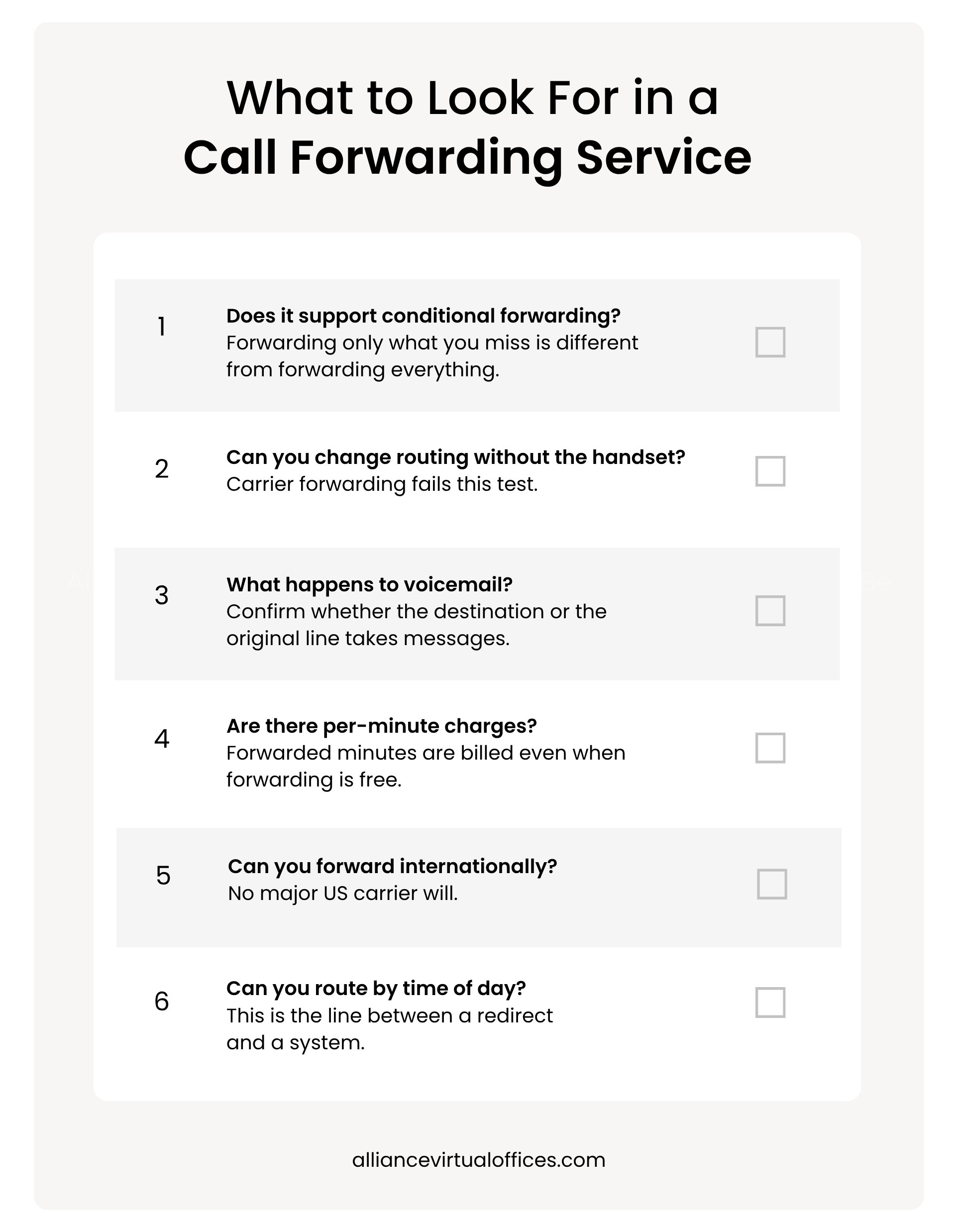
View a longer list of the capabilities worth having in Alliance’s guide to business phone system features every small business needs.
NEXT STEPS: Explore Alliance’s Virtual Phone Numbers for Business
How to Forward Calls Without Losing Track of Them
Forwarding is a good short-term fix and a poor long-term system. It solves “reach me on a different phone today” and does nothing about “my business number and my personal number are the same number.”
Forwarding is a good short-term fix and a poor long-term system.
Use it for what it is good at: covering a weekend, moving between devices, or handing the line to someone else for a few days.
The test worth applying is frequency, not preference. Occasional forwarding is a convenience. Weekly or daily forwarding is a workaround for a problem forwarding was never built to solve, and every workaround has a point where the effort of maintaining it costs more than the thing it was avoiding.
If you are reaching for it every week, the thing you actually need is a separate line rather than call forwarding. Alliance’s virtual phone plans start at $30 a month and solve exactly that problem.
Frequently Asked Questions
How do I forward calls to another number on my iPhone?
Does 72 forward phone calls?
How do I turn off call forwarding?
Can I forward calls to an international number?
Will I still be able to make outgoing calls while call forwarding is on?
Further Reading