


- Why professionalism (and privacy) matter more than lattes
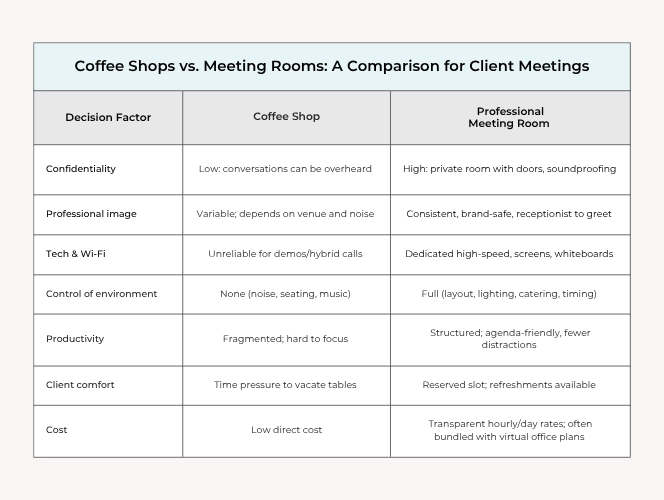
- Coffee shops vs. meeting rooms: a comparison for client meetings
- How to choose the right space (and keep costs down)
Q. Meeting rooms vs. coffee shops: which setting actually wins client trust?
A. A private meeting room signals professionalism, protects confidentiality, and gives you reliable technology. Coffee shops are fine for casual intros, but when money, data, or decisions are on the table, a reserved meeting room helps you close with confidence.
If you’re meeting clients, the space you choose says as much about your brand as your pitch.
Coffee shops are convenient, sure. But when the stakes involve trust, confidentiality, and closing new business, professional meeting rooms consistently deliver stronger outcomes.
This guide breaks down when each option works, why dedicated meeting rooms win for professionalism, and how to keep costs in check with flexible, on-demand workspace.
Unlock Our Current Virtual Office Offers
Enter your email below and we’ll send you the latest available promotions and monthly specials for Virtual Offices, Meeting Rooms, and Live Receptionists.
Why Professionalism (and privacy) Matter More than Lattes
First impressions drive buyer confidence.
A private, purpose-built meeting room signals reliability, protects sensitive conversations, and gives you tools and services that cafés can’t – such as AV, whiteboards, stable Wi-Fi, and a professional onsite staff.
For modern teams that work hybrid or fully remote, occasional in-person time is still mission critical – whether that’s onboarding a new client, running a strategy sprint, or negotiating a contract.
Research and experience across flexible work show that organizations increasingly blend remote work with scheduled, in-person collaboration because it boosts engagement and productivity while cutting real estate bloat.
Professional space also solves the compliance and optics gaps that pop up with public venues.
When you meet in a café:
- Confidentiality breaks down. Conversations carry. Screens face the room. Documents sit on tables.
- Control is limited. You can’t manage noise, lighting, seating, or interruptions.
- Technology is hit-or-miss. Video calls, demos, and hybrid participants suffer on shared Wi-Fi.
- Signal is diluted. Even a polished deck loses impact when it competes with espresso grinders and table turnover.
By contrast, meeting rooms in a virtual office center (or a flexible workspace) give you a smooth arrival experience, reception support, and high-quality equipment – without the overhead of a traditional lease.
This hybrid approach is precisely why virtual office solutions remain popular with remote and distributed teams: you keep a recognized business presence and bring people together only when you need to.
Quick take: Use coffee shops for casual catch-ups or top-of-funnel intros. Use meeting rooms for anything that touches client data, money, contracts, performance, or strategy.
Many independent professionals and small teams run lean by design.
A virtual office model matches that reality: a commercial business address for credibility and licensing, optional live receptionist support, and on-demand meeting rooms when face time matters.
It’s a practical way to present a stable HQ without paying for empty desks.
Even digital-first operators such as solopreneurs, ecommerce businesses, and freelancers benefit from a recognizable address and a private place to meet clients or partners.
A virtual office builds trust through key elements such as a 411-listed number, staffed reception, and secure mail handling, which a home address can’t.
What’s more, it lets you book meeting rooms by the hour wherever your clients are.
NEXT STEPS: Coworking vs. Meeting Room Bookings: Find the Right Space for Your Needs
How to Choose the Right Space (and keep costs down)
1) Match the room to the meeting outcome.
- Discovery or casual reconnection: A quiet café can work – keep it short and avoid sensitive details.
- Proposal, pricing, negotiations: Book a small meeting room.
- Workshops, board reviews, hybrid sessions: Choose a larger meeting room with screen share, whiteboard, and reliable conferencing.
2) Look for an address that doubles as your business base.
A virtual office at a reputable location strengthens brand perception across your website, proposals, and contracts, while giving you access to bookable rooms onsite. It also streamlines mail and can be used for licensing and banking.
3) Use bundled value.
Unlike many providers, select virtual office plans include meeting room credits each month. Alliance’s Platinum Plus plan includes up to 16 meeting room hours per month – ideal for regular client reviews or interviews. The meeting room bundle is highly discounted compared with the hourly rate, and includes the standard virtual office reception services, mail handling, and a recognized business address.
4) Bring Live Receptionists into the workflow.
A friendly, professional receptionist screens calls, schedules appointments into your calendar, captures leads, and protects you from interruptions. That helps you keep focused and show up prepared. It’s especially valuable for legal, real estate, wellness, and other client-centric fields.
5) Standardize the in-room experience.
Create a simple checklist: agenda, attendee list, screen mirroring test, markers/post-its, printed copies of decision documents, and a defined start-end time. This structure reinforces the “we’re serious about your business” message.
6) Build a “hybrid day” rhythm.
If your team blends remote and in-person time, schedule recurring on-site touchpoints such as monthly retros and quarterly planning to make the most of each visit. Teams that combine focused remote work with purposeful in-person sessions report stronger engagement and results. A meeting-room-first policy for key milestones keeps that cadence predictable.
Practical Scenarios (and what to book)
- Investor or high-ticket sales meeting
Book a boardroom with reception check-in, screen, and refreshments. Arrive early, set name placards, and test HDMI/casting. Follow with a hold room if legal review is likely. - Confidential HR or performance conversation
Reserve a private office. Avoid open lounges or cafés to protect privacy and reduce risk. - Hybrid pitch with remote stakeholders
Book a conference room with stable video, echo-free audio, and shared screen support. Assign a “virtual producer” to monitor chat and record action items. - Discovery coffee
Keep it to 30 minutes, bring a one-page document, avoid screen-sharing, and steer clear of pricing or sensitive details. If the conversation deepens, offer to “move to a private room” and send a booking link.
NEXT STEPS: Maximize Your Meeting Room Rental: Productive Meeting Tips
Cost Control for Small Teams
- Use your virtual office plan’s included hours first. Block recurring meetings using your inclusive monthly credits.
- Batch meetings. Book multiple sessions back-to-back in the same room to minimize hourly charges.
- Right-size the room. A 4-6 person conference room costs less than a boardroom; reserve the big space only when it’s required.
- Leverage receptionist scheduling. Reduce no-shows with confirmations and calendar invites handled by a Live Receptionist.
- Add a business phone line. Route calls to your cell, keep your personal number private, and present a consistent brand across invites and signage.
Soft Skills That Make Any Room Feel Professional
- Host welcome: Greet at the door, offer water, and set the agenda in the first two minutes.
- Time discipline: Start on time, land decisions, and end early with clear next steps.
- Artifact clarity: Leave with a written summary including action items, task owners, and deadlines.
- Follow-through: Send the recap and calendar holds within 24 hours.
When a Coffee Shop Works
- Early-stage networking or mentor coffees
- Quick discovery sessions with freelancers or partners (no confidential data)
- Casual debriefs after a formal meeting
Just remember: as soon as money, data, or decisions enter the chat, move to a private meeting room. It protects you, reassures clients, and speeds deals.
Further Reading:
- Meeting Room Names: What to Call Your Office Meeting Room
- Ensuring Privacy & Security in Rented Meeting Rooms
- Switching to Remote Work? Don’t Settle with Your Remote Workspace
Key Takeaways : Meeting Rooms vs. Coffee Shops: How to Keep Client Meetings Professional
Impressions matter. Private, on-demand meeting rooms protect confidentiality, sharpen your message, and reinforce a trustworthy brand – without locking you into a costly lease.
The smart move is flexibility: use a professional address, route calls to a dedicated business line, and reserve private meeting rooms only when you need them.
Alliance’s Platinum Plus virtual office plan includes 16 monthly meeting room hours in select locations, so you can host professional sessions every month and keep your budget under control.
Ready to level up your client meetings? Explore virtual office plans, Live Receptionists, meeting rooms, coworking access, and business phone numbers – a complete flexible workplace solution designed for modern entrepreneurs and growing teams.


