


Q: What’s the smartest, most cost-effective way for a startup or small business to host professional client meetings without a long-term office lease – and what should you look for when booking?
A: Use on-demand meeting rooms through a Virtual Office plan to get a credible address, professional staffed reception, and client-ready workspace only when you need it. Prioritize location, capacity, and requirements such as plug-and-play AV. You can cut costs with included hours (through Alliance’s Platinum Plus plan) and enhance productivity through a business phone and a Live Receptionist service.
aunching a company takes resourcefulness and agility. That’s why meeting rooms for startups and small businesses should be flexible, affordable, and professional.
This guide covers what to look for, how to budget, and smarter ways to book meeting rooms on-demand – so you can impress clients, run workshops, and close deals without the burden of a long-term lease.
Unlock Our Current Virtual Office Offers
Enter your email below and we’ll send you the latest available promotions and monthly specials for Virtual Offices, Meeting Rooms, and Live Receptionists.
Why Meeting Rooms Matter for Startups & Small Businesses
Great ideas deserve a great setting. The right room upgrades your brand presence, helps conversations flow, and keeps discussions private.
When do meeting rooms really prove their worth?
- Sales presentations and investor pitches where first impressions count.
- Hybrid team sprints that need whiteboards, screens, and zero distractions.
- Client onboarding, interviews, or performance reviews requiring privacy.
- Workshops, product demos, and quarterly planning days.
On-demand beats owning
Leasing a private suite just to host occasional meetings ties up cash you could invest in product or growth.
A virtual office with bookable meeting rooms gives you the “HQ effect” only when you need it, letting remote or hybrid teams regroup in a professional space, then get back to focused work elsewhere.
Community and credibility
Professional centers come with front-desk staff, welcoming lobbies, and conference-ready tech – details that signal legitimacy to prospects and partners.
They also plug you into local business communities, which often leads to partnerships and referrals.
NEXT STEPS: 5 Step Meeting Room Rental Checklist
What to Look For (So You Don’t Overbuy… or Underwhelm)
Meeting rooms aren’t one-size-fits-all. Match your use cases with the specs below.
Capacity & Layout
- 1–4 people: Huddle room or day office for interviews and quick working sessions.
- 5–8 people: Standard conference room for client meetings and team stand-ups.
- 10–20 people: Boardroom or training room for workshops, demos, or investor days.
Pro Tip: If you frequently host 1–2 person meetings, book a day office. This is often cheaper than conference room hourly rates, and still provides privacy with a professional setting.
Tech that “Just Works”
- Large display or projector with easy laptop hookups (HDMI/USB-C).
- Stable, business-grade Wi-Fi with guest access.
- Video-first tools: wide-angle camera, quality speakerphone, acoustics.
- In-room whiteboard or digital board; markers that haven’t run dry.
If hybrid is your norm, prioritize centers known for reliable VoIP and conferencing infrastructure. It keeps communications sharp.
Privacy & Professionalism
- Soundproof walls and doors.
- Reception team to greet and direct guests.
- Optional signage or “in session” door markers.
Location & Access
- Easy parking or transit, plus a recognizable business address for invites.
- Hourly and daily booking windows that match your schedule (even short notice).
- Onsite support for last-minute printouts, catering, or tech help.
Nice-to-Haves That Wow
- Onsite coffee/tea/water service (or catering coordination).
- Breakout booths for side conversations.
- Lobby directory listing to reinforce your brand presence.
Smarter Budgeting: On-Demand Rooms vs. Office Leases
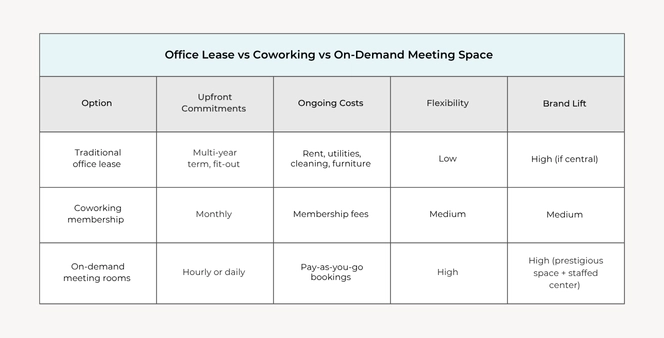
Buying a full office for occasional meetings is like leasing a bus to commute two people. On-demand beats fixed rent for flexibility, choice, and cost-efficiency.
Typical meeting room needs for a young company
- 4–12 hours/month for sales and customer success calls.
- 1–2 half-days/month for team planning or workshops.
- Quarterly all-hands (half to full day).
With a virtual office, you pay only for the meeting room hours you use – and you won’t need to pay for traditional office costs like utilities, cleaning, or furniture.
That’s a huge saving you can invest back into product, hiring, and customer acquisition.
Unlock included hours
Some virtual office plans include a set amount of meeting room hours per month, so your “per-hour” cost is significantly discounted. It’s one of the easiest ways to reduce overhead without sacrificing professionalism.
One of them is Alliance’s Platinum Plus Plan, which includes up to 16 hours inclusive meeting room time each month alongside your business address.
Read more: Maximize Your Meeting Room Rental: Productive Meeting Tips
How Startups Use Meeting Rooms at Each Stage
- Pre-seed/Seed: Investor pitch run-throughs, early-customer interviews, and agency/vendor vetting. Book small conference rooms to keep costs tight.
- Product-Market Fit: Sales demos, onboarding sessions, and success reviews. Use medium rooms with reliable AV to record and repurpose demo snippets.
- Scaling: Quarterly planning and hiring loops. Reserve boardrooms with breakouts for panel interviews and working groups. Layer in a Live Receptionist to shield sellers from interruptions between sessions.
Practical Meeting Room Booking Tips
- Pad the time by 15 minutes for setup/teardown.
- Send a calendar hold with building entry instructions, parking details, and a receptionist contact number.
- Test the tech: Plug in, share screen, run audio checks, then invite the client.
- Record responsibly: Get consent before recording a video demo or interview.
- Book near your clients: With a national network, meet where your customer is; this means less travel and higher show rates.
Soft Costs You’ll Actually Save
- Lost focus: Quiet, dedicated rooms reduce distractions so your team gets more done.
- Brand erosion: Café meetings feel exposed and unprofessional. A private room ensures confidentiality and projects the right image.
- Wasted time: With a Live Receptionist handling calls, you reclaim hours lost to interruptions and constant task-switching.
Putting It Together: A Lean, Professional Meeting Solution
A Virtual Office doesn’t just provide a credible address for registrations, banking, and mail – you can also layer on professional services to help save time and grow flexibly:
- Meeting rooms bookable by the hour wherever you need to connect and collaborate.
- Live Receptionist to answer calls in your company name, schedule call-backs, and filter distractions.
- Virtual Phone with unlimited extensions and IVR so clients reach the right person fast – no personal numbers on invites.
Further Reading :
- Elevate Your Meetings: Discover the Benefits of Renting a Conference Room for Your Business
- Meeting Room Names: What to Call Your Office Meeting Room
- Crafting Your Hybrid Work Policy: A Guide for Teams and Entrepreneurs
Key Takeaways: Meeting Rooms for Startups and Small Businesses: Practical Guide
If your team needs meeting space on an ad-hoc basis, on-demand meeting rooms are the ideal flexible solution.
Pairing a Virtual Office address with flexible meeting rooms strengthens your brand and enables clear budget control. Select Virtual Office plans with Alliance include monthly meeting room access – perfect for small businesses that host regular client meetings and strategy sessions.
Ready to explore meeting room locations?
For Virtual Office plans with inclusive meeting room access, ask about Platinum Plus. And don’t forget to add a Live Receptionist or Business Phone to capture calls professionally and streamline your business communications.
Alliance Virtual Offices offers Live Receptionists, flexible Meeting Rooms, Coworking, and Business Phone Numbers, providing a complete Virtual Office solution for growing businesses.


