
- The Virtual Mailbox Workflow: Step by Step
- Mail Scanning and What Business Owners Actually Get
- Virtual Mailbox vs. PO Box vs. USPS Mail Forwarding
Q: What’s the difference between a virtual mailbox and mail forwarding?
A: Mail forwarding redirects mail to a new physical address; a virtual mailbox receives mail at a facility, photographs and scans it, and gives you digital access through an online dashboard. With a virtual mailbox, you can manage your business mail from anywhere, without physical delivery.
There are 19 million U.S. businesses based at home, according to the National Association of Women Business Owners, and many receive business mail at a personal address. But mail is one of those back-office details that feels trivial until it isn’t. A missed compliance notice, a check sitting in a box for two weeks, or a home address printed on a public filing can each create a real problem for a small business.
A virtual mailbox service changes that arrangement, giving businesses a real street address that can handle physical mail digitally, so you don’t have to be there to collect it. That combination of a professional address and remote access is why this model has moved from novelty to standard operating practice for many business owners.
This article walks through the operational workflow of a virtual mailbox, the scanning features that matter for a business, the real differences between your options, and the specific use cases where a virtual mailbox earns its monthly fee.
What Is a Virtual Mailbox?
A virtual mailbox is a real street address at a secure commercial facility where staff receive your mail on your behalf. Instead of collecting mail in person, you manage everything through an online portal or mobile app. You see what arrived, decide what happens to each piece, and keep digital copies of anything important.
READ MORE: Virtual mailbox versus PO Box guide
The Virtual Mailbox Workflow: Step by Step
The virtual mailbox process is the same across most reputable providers, with small differences in turnaround and pricing.
Here’s how a virtual mailbox works, from signup to a clean inbox of scanned documents:
- You sign up and get a real street address at a secure Commercial Mail Receiving Agency (CMRA) facility. You complete USPS Form 1583, which authorizes the facility to receive mail on your behalf.
- Your mail arrives at the facility. Staff log each item and photograph the outer envelope, then notify you by app or email.
- You view your mail in your digital dashboard. You can see the sender, the arrival date, and the envelope image without anyone opening it.
- You choose an action for each piece: open and scan the contents, forward it to any physical address, shred and recycle it, or hold it for pickup.
- Your scans are stored securely in your online account, accessible from any device, searchable, and downloadable whenever you need them.
That five-step loop (receive, notify, view, act, archive) is the entire model. Once it’s running, your business mail behaves a lot like email.
The onboarding step is the only part that takes real effort, with most of it requiring filling out Form 1583. The form requires two valid forms of ID and, in many cases, notarization, which some providers now handle with an online notary in a few minutes. Notarization is when you have a notary public verify your identity and witness your signature.
Once the form is on file, the virtual mail facility is legally authorized to accept mail addressed to you, and the rest of the workflow runs without any further paperwork. Plan for a short setup window when you sign up, then expect the day-to-day to be effortless.
READ MORE: Virtual Address vs. Virtual Mailbox: What’s the Difference?
Mail Scanning and What Business Owners Actually Get
The scanning workflow is where a virtual mailbox stops being a glorified post office box (P.O. Box) and starts being a mail management system. Scanning is also the fastest-growing part of the category, and demand for it is rising as more owners run their operations remotely.
What Gets Scanned and How
Every item gets the outer envelope photographed when it arrives, so you know what mail is waiting for you. When you request it, staff at your chosen virtual mailbox facility open the envelope and scan the contents as a high-resolution PDF. Storage policies vary, but a common default is around 30 days of cloud retention, after which you download anything you want to keep permanently.
Check Depositing Through a Virtual Mailbox
Plenty of businesses still receive paper checks. Many virtual mailbox providers will scan a check and submit it for bank deposit on your behalf, which removes a trip to the bank branch. Availability and fees differ by provider, so confirm this feature is included before selecting a plan. For a service business that collects checks, it can save time each month.
There is a privacy angle here as well. Because the check is handled inside a secure facility and recorded digitally, you get a clear paper trail of what arrived and when, which is useful at tax time and for bookkeeping.
Compare that to a check sitting in an unattended box, where you have no record until you physically retrieve it. For owners who travel or run multiple locations, handling deposits remotely is often the single feature justifying a virtual mailbox subscription.
AI-Powered Mail Management
Some virtual mailbox providers now generate an AI summary of a letter before you even request a full scan, so you can triage faster.
A few providers also offer Health Insurance Portability and Accountability Act (HIPAA)-certified handling for healthcare businesses that receive protected information by mail. These features aren’t universal across providers, so treat them as a differentiator to look for rather than something to expect.
Virtual Mailbox vs. PO Box vs. USPS Mail Forwarding
People often lump these three together, but they solve different problems. The table below lays out where each one fits, and the notes after it explain why the differences matter for a business:
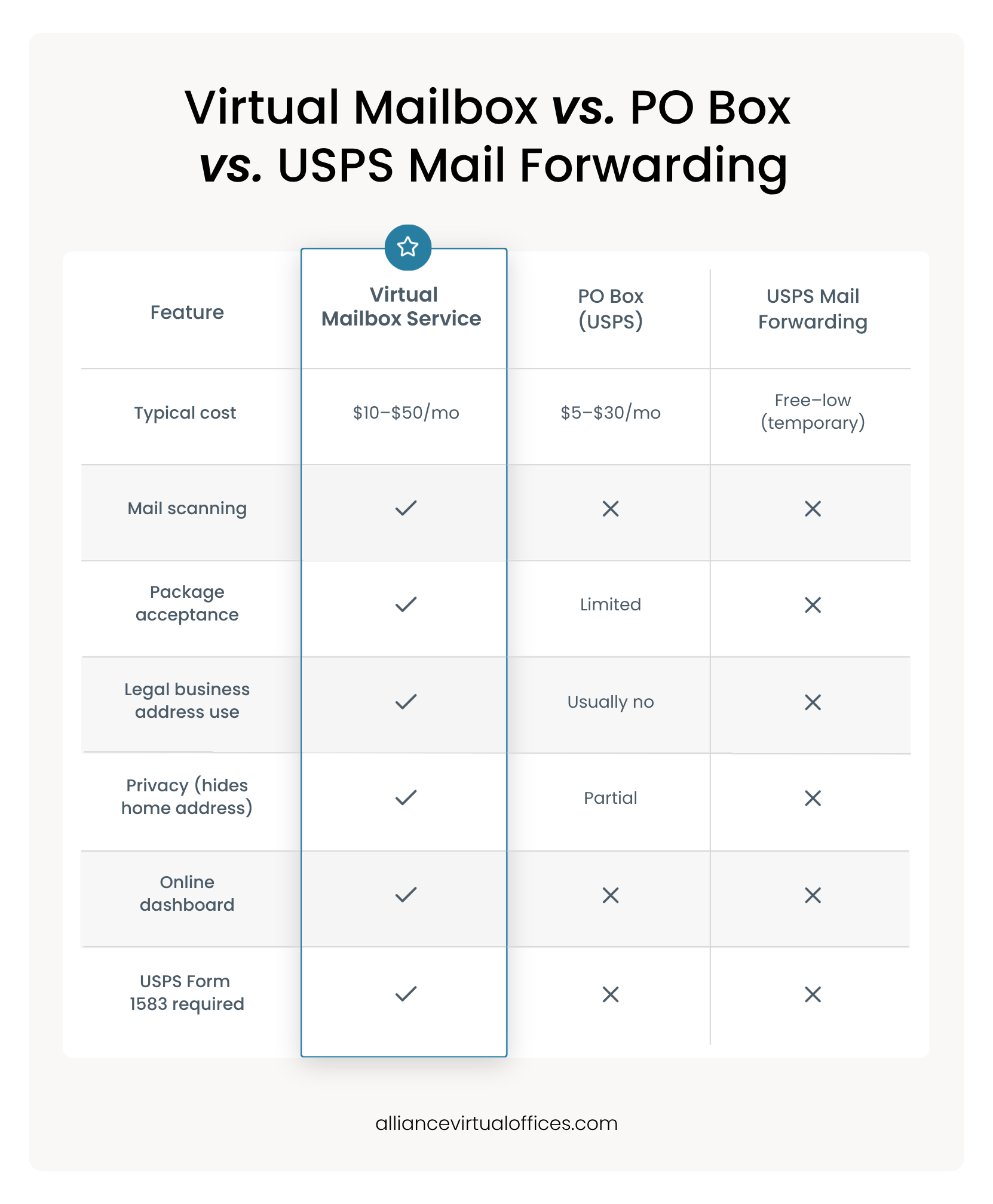
A P.O. Box is affordable and available nationwide, but in most states, it doesn’t serve as a legal business address and offers no scanning. The United States Postal Service (USPS) mail forwarding service is a temporary redirect with no digital access or address of its own, useful for a move rather than for running a business.
A virtual mailbox is the only one of the three mailing solutions that combines a real street address, digital management, and business-address legitimacy in a single service.
The right choice depends on what you’re trying to achieve with your business. For instance, if you only need to keep personal mail private during a temporary relocation, USPS forwarding may be enough. On the other hand, if you need a cheap, fixed pickup point and don’t need a business address, a P.O. Box can work.
But if you’re running a company and need a credible address, remote access, and the ability to act on mail without being present, a virtual mailbox is built for those solutions. The category is growing accordingly.
According to DiMarket insights, the virtual mailbox market was valued at $2.5 billion in 2025 and is projected to reach $7.2 billion by 2033, a roughly 15% compound annual growth rate. Scanning is the fastest-growing piece of that demand.
5 Business Use Cases for a Virtual Mailbox Service
In the U.S., 33 million small businesses make up the mailbox rental commercial demand, according to Business Research Insights. However, a virtual mailbox isn’t for every business owner, but several common situations make it close to essential. Here are the five that come up most often.
Use Case 1: Home-Based Business and Privacy
If you run a business from home, your personal address is probably sitting on public filings right now. A virtual mailbox lets you keep your home address private while still receiving everything a business needs to receive.
The privacy gap is easy to underestimate. Once your home address appears on a state business registration, it is generally part of the public record, searchable by anyone, including customers, vendors, and strangers. A separate business address keeps your home off those filings as well as your invoices, website footer, and shipping labels.
For solo founders and anyone running a business where clients visit a website before they ever call, that separation is worth setting up from day one rather than untangling later.
Use Case 2: E-Commerce and Online Sellers
Online sellers receive returns, vendor mail, and tax documents while rarely sitting still. A virtual mailbox digitizes all of it so you can manage the paperwork from a warehouse, a laptop, or a different state entirely. With e-commerce entrepreneurs accounting for an estimated 27% of mail forwarding segment demand, according to Business Research Insights, this reflects how well the model fits remote retail.
Some selling platforms and payment processors ask for a verifiable business address, and a CMRA address satisfies that without exposing where you live. If you sell across several states or fulfill through a third party, a single fixed address keeps your vendor accounts, sales tax registrations, and return mail consistent even as your operations move around.
Use Case 3: Remote Teams and Distributed Businesses
If you run a distributed team, your mailing address shouldn’t be tied to any one person’s home. A virtual mailbox gives the business a stable, professional address that doesn’t move when an employee does.
A shared dashboard helps here, too. Several team members can be granted access to view and route mail, so a bookkeeper handles invoices while an operations lead handles contracts, all without anyone meeting in person. That removes the single point of failure you get when one person collects the company’s physical mail and everyone else waits on them.
Use Case 4: LLC and Business Registration Compliance
Most states require a real street address for an LLC’s principal office state filings. A virtual mailbox provides exactly that, and the Form 1583 process makes the mail receipt USPS-authorized.
Use Case 5: International Business Owners, Travelers, and Digital Nomads
If you operate from outside the U.S. or travel constantly, a virtual mailbox gives you a permanent American address for banking, clients, and compliance, no matter where you physically are. Your scans are accessible globally through the mobile app, so distance stops being a problem.
What to Look for in a Mail Forwarding and Scanning Service
Once you’ve decided that a virtual mailbox fits your business, the provider you choose matters more than the category.
The non-negotiable is CMRA certification with Form 1583 compliance. Without it, the address will not hold up for business registration. From there, verify that the address is a real commercial building.
Then weigh the operational details, including scanning turnaround time, storage and retention policy, package handling, and whether pricing is per-scan or all-inclusive. If you receive checks, confirm that deposit handling is available. If you live in your cloud tools, look for Google Drive or Dropbox integrations.
When it comes to pricing structure, a per-scan plan can seem cheap for a low-mail business and expensive for a high-volume one, so match the plan to your actual mail flow.
A virtual mailbox address is only as good as the building behind it, so confirm the location is a genuine commercial site and check whether your state accepts that specific address for Limited Liability Company (LLC) filings before you sign up.
Verify the retention window, too, because a 30-day default means you should make a habit of downloading anything you want to keep. The right virtual mailbox provider makes both of these easy, having a real building, a clear retention policy, and a dashboard you’ll actually open to view your mail.
Managing Your Business Mail the Way Modern Businesses Run
A virtual mailbox service gives you professional, private, and fully digital mail management without a physical office. The workflow stays simple from day one: sign up, receive, scan, and act, whether that means forwarding, shredding, depositing, or archiving. For owners who once planned their week around a trip to the post office, that shift is the whole point.
For LLCs and anyone with compliance needs, a virtual mailbox provides infrastructure that a P.O. Box and USPS forwarding cannot match, namely a real business address, USPS-authorized receipt, and a digital record of everything.
Alliance Virtual Offices operates at hundreds of real commercial locations across the United States, and every address is CMRA-compliant and ready for LLC filings, which removes the guesswork on the requirement that matters most.
Read more about how the service runs in our overview of Alliance Virtual Offices mail forwarding service.
Frequently Asked Questions
How does a virtual mailbox work?
What’s the difference between a virtual mailbox and a PO Box?
Is a virtual mailbox a legal business address?
How much does a virtual mailbox cost per month?
Further Reading