
- How a Small Business Phone System Works: The Main Types
- Best Phone Systems for Small Business Compared (2026)
- How to Choose the Best Phone System for Your Small Business
Q: What’s the best phone system for a small business?
A: Usually, a cloud-based VoIP service works for small businesses, offering low per-user pricing, call routing, and mobile apps without on-site hardware. Solo operators and very small teams often do better with a virtual phone number paired with live answering.
For most small businesses, the first missed call is the first lost customer. Recent industry research found that roughly 62% of incoming calls to small businesses go unanswered, and that 85% of callers who don’t reach a person never call back, with some going straight to a competitor.
The cost adds up; it’s estimated that the average small business loses around $126,000 a year in potential revenue to missed calls. That figure reflects how a phone that no one answers is a leak in the funnel, not just an inconvenience.
Choosing the best phone system for small business needs is less about features on a spec sheet and more about making sure those calls convert.
This guide walks through how small business phone systems work, comparing the leading providers and their starting prices for 2026, breaking down the features that matter, and giving you a simple framework for matching a phone system to the size and call volume of your business.
How a Small Business Phone System Works: The Main Types
A phone system for small business is the combination of hardware, software, and service that routes calls to and from your business phone number. The biggest decision is where the “brains” of that system live: on equipment in your office, or in the cloud.
However, the market is crowded and the terminology confusing. VoIP, cloud PBX, SIP trunking, virtual phone numbers, multi-line systems: each one promises to be the answer. The choice you make on the best phone system for small business shapes your cost, flexibility, and how much you have to manage yourself.
On-Premise PBX vs. Cloud Phone System
A traditional on-premise PBX (Private Branch Exchange) is physical hardware installed at your location. You own it, maintain it, and pay upfront for the equipment. It can make sense for larger or call-heavy operations that want full control, but for most small teams, it’s expensive and rigid.
A cloud phone system, sometimes called hosted PBX, moves that hardware into a provider’s data center. You access it over the internet, pay a monthly per-user fee, and the provider handles maintenance and upgrades. For a cloud based phone system for small business, this typically means lower startup costs and the ability to add or remove lines as you grow.
The practical difference shows up across cost, control, and maintenance. On-premise hardware front-loads the expense, putting upgrades on your shoulders, while a cloud system spreads cost into a predictable monthly fee and shifts upkeep to the provider. For most small businesses opening or modernizing a line in 2026, the cloud model removes the parts of phone ownership that used to require a technician.
VoIP and SIP Trunking
Most modern cloud systems run on VoIP (Voice over Internet Protocol), which carries calls over the internet instead of copper phone lines. A VoIP phone system for small business can run on desk phones, computers, or mobile apps.
Industry data published in SQ Magazine shows that over 60% of small businesses were using VoIP in 2025, with the attraction to cloud VoIP systems over PBX being that no hardware installation is necessary, it can scale with headcount and costs less than a traditional phone system, eliminating maintenance burdens.
Some small and mid-sized businesses also report meaningful productivity gains after switching phone systems.
SIP (Session Initiation Protocol) trunking is a related option that connects an existing PBX to the internet, letting businesses that already own phone hardware modernize without replacing everything at once.
In fairness, VoIP has one real dependency worth understanding. As it relies on your internet connection, call quality relies on your bandwidth, so a business on a weak or congested connection may notice it. Having a stable and reliable broadband line is a practical fix; for heavier users, install a router that prioritizes voice traffic.
For the vast majority of small businesses in 2026, most internet services are reliable enough that this is a setup consideration rather than a reason to avoid VoIP.
Virtual Numbers and How Many Lines You Need
A virtual phone number is the lightest-weight option. It’s a business number that rings on devices you already own, with voicemail, call forwarding, and basic routing, which means you don’t need any physical hardware installation or per-seat licensing.
Deciding how many lines you need comes down to how many calls happen at the same time. A multi-line phone system for small business matters when several people answer calls simultaneously; a solo operator rarely needs more than one or two concurrent lines.
However, a common mistake is confusing extensions with lines. Extensions are how calls reach individual people or departments, whereas lines determine how many conversations can happen at once.
You can have several extensions on a single number and only need additional concurrent capacity once two calls regularly arrive in the same moment. Mapping your call patterns, rather than guessing, keeps you from paying for capacity you won’t use.
Read More: Virtual Phone System for Small Business
Best Phone Systems for Small Business Compared (2026)
The table below compares widely used providers, the type of business each tends to fit best, an approximate starting price, and a standout feature.
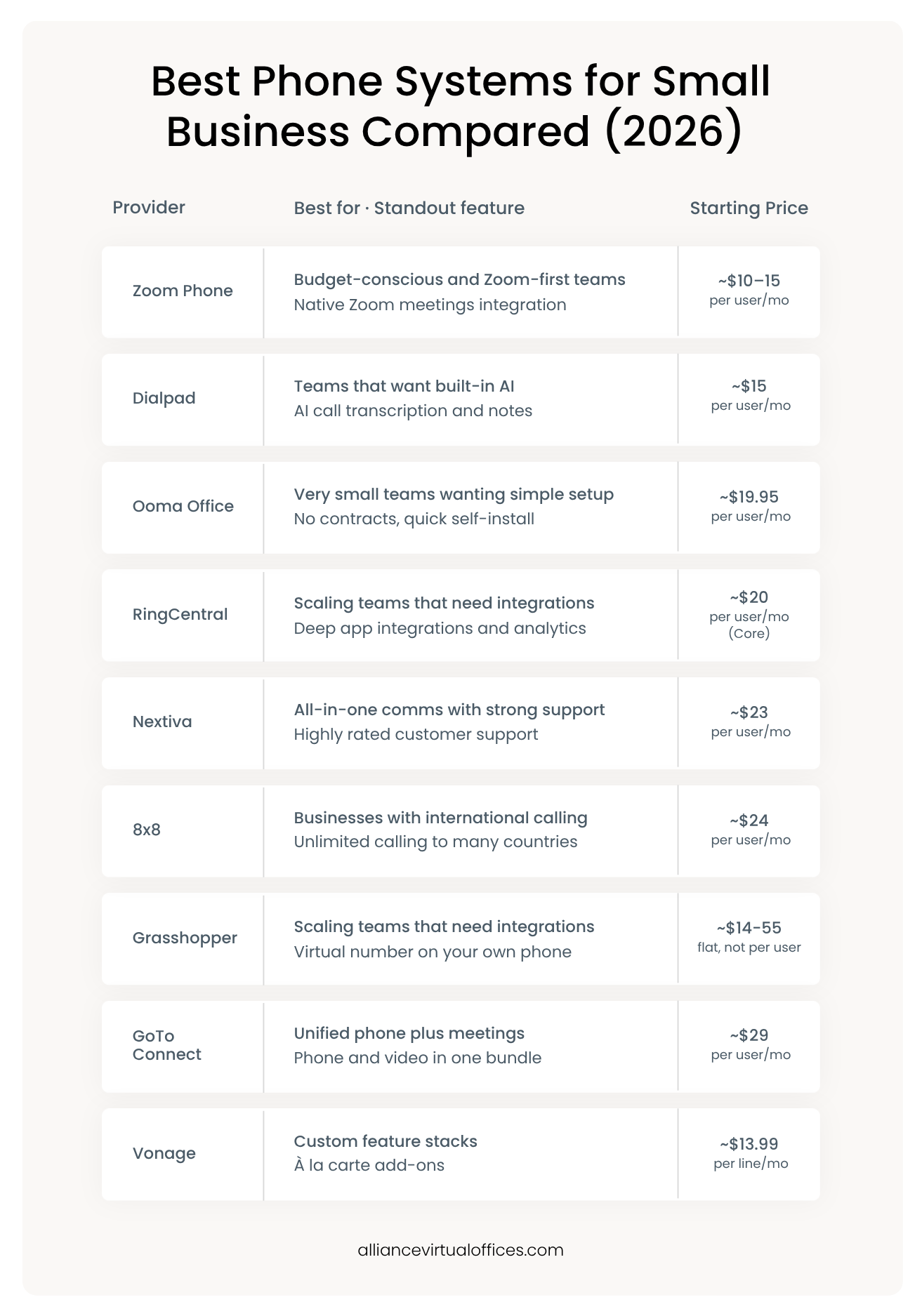
Prices reflect entry-level plans as of 2026 and change often, so confirm current pricing directly with each provider before you commit.
Per-user pricing rewards consistency but adds up as you hire, while flat-rate options like Grasshopper can be more economical for a one- or two-person business. The cheapest sticker price is rarely the full story, because add-ons, metered minutes, and number fees vary widely.
Here is a closer look at where each provider tends to fit, so the table is more than a list of names:
- RingCentral is a full unified-communications platform built for growing teams. Its strength is the depth of integrations and reporting, which matters once you have several people and a Customer Relationship Management (CRM) platform to connect. For a true solo operator, much of that capability sits unused.
- Nextiva competes on all-in-one communication and customer support quality. If you need a phone, messaging, and a help desk under one roof and value responsive support, it lands near the top of most small business phone system shortlists.
- Ooma Office leans into simplicity. Setup is designed to be self-service with no long-term contract, which appeals to a very small team that wants a working business line without an IT project.
- Zoom Phone is often the budget pick, especially for teams already living inside Zoom meetings. Calling and video share one login, with metered plans keeping the entry cost low for teams with lower call volume.
- Dialpad differentiates on built-in artificial intelligence, including live transcription and automatic call notes. Teams with high call volume and want a record of every conversation tend to value it most.
- 8×8 is a strong choice when international calling is part of the job, with unlimited calling to a long list of countries on its higher tiers. Domestic-only businesses may not need that reach.
- Grasshopper takes a different approach, as plans include a flat monthly rate and a virtual number that rings on the phone you already own. It’s a purpose-built solution for solopreneurs who want to sound professional without managing a system.
- GoTo Connect bundles phone and video meetings together, which suits a small team that requires unified communications without stitching together separate tools.
- Vonage sells a configurable core plan with à la carte add-ons, so you can build up only the features you need. That flexibility is useful, though it also means watching how the add-ons affect your final bill.
Read More: Business Phone System Features Every Small Business Needs
Key Features to Compare in a Small Business Phone System
Once you know the types of phone systems and the providers available, the next step is comparing features against how your business handles calls. The best phone system for small business needs is rarely the one with the longest feature list, but whose core features match the way you work. Focus on the handful that change the day-to-day experience for your business.
Call Routing and Auto-Attendant
Call routing decides where a call goes and in what order it rings. An auto-attendant makes a one-person business sound established and sends callers to the right place. For a small team, smart routing is what prevents calls from dropping when one line is busy, as the call can move to another person, a mobile device, or voicemail-to-email.
Business hours rules are part of the same feature. Routing knows to send after-hours calls to voicemail, an answering service, or a forwarding number, so a caller out of business hours can still get a professional experience rather than an endless ring. For a business that can’t staff the phone all day, this is often the single most valuable capability to get right.
Mobile and Softphone Access
A softphone is an app that turns a computer or smartphone into your business line, keeping your personal number private while letting you answer business calls anywhere without forwarding chaos. If you or your team work outside a central office, mobile access enables remote answering that means you’ll never lose a call.
Integrations and Scalability
Look at whether your chosen phone system connects to the tools you already use, such as your CRM platform, email provider, or help desk. Integrations reduce manual work and keep call notes where the rest of your customer data lives.
Scalability is the quieter consideration. A cloud phone system for small business should let you add a line in minutes, not require a new hardware order, which means that growth rarely stalls on logistics.
One integration that small teams underrate is texting. Many customers now prefer a quick text to confirm an appointment or ask a question. A business phone system that supports SMS messaging from your business number keeps those conversations professional and on the record. If your customers text, treat it as a core feature rather than an extra.
Pricing and Hidden Costs
Compare the all-in monthly cost of your chosen business phone system, not just the advertised per-user rate. Watch for charges tied to extra numbers, international minutes, number porting, hardware rental, and overage on text messages.
A plan that looks cheap at $15 per user can cost noticeably more once you add the features your business actually needs. It also helps to read the contract terms.
Some providers discount the monthly rate heavily in exchange for an annual commitment, which can work if you’re confident in the choice, but costly if you switch providers mid-term. Month-to-month plans cost a little more but keep you flexible while a young business is still evolving.
How to Get A FREE Live Receptionist
Request Your Code Below and Get a FREE
Live Receptionist for 1 Month!

How to Choose the Best Phone System for Your Small Business
With the pieces on the table, choosing a phone system provider comes down to matching the system to three things: your team size, call volume, and budget. The goal is to buy what fits, not the most that you can afford.
Start with size and volume. A team of five fielding dozens of calls a day benefits from a full VoIP phone system for small business with features such as routing, an auto-attendant, and multiple seats. A solo consultant taking a few calls a day rarely does.
Next, weigh budget against features. List the features you’ll use in the first 90 days and price plans against that list, ignoring tiers built for companies several times your size. If you find yourself paying for an enterprise feature set to get one or two functions, that is a signal the system is oversized for you.
It also pays to think one step ahead without overbuying. Ask whether the system can add a line, a number, or a feature when you actually need it, rather than buying that capacity now on the chance you might grow. A good cloud system makes those additions a quick setting change, which means you can start lean and expand when you actually need it.
Then, consider whether a full PBX is simply overkill. On-premise hardware and many-seat cloud plans assume a steady, in-office team. If your “office” is a laptop and a cell phone, a lighter setup will serve you better and cost less.
When the time comes to lock in a number and basic business calling, you can explore a simple virtual phone number rather than a full multi-line platform.
One last detail belongs on every checklist: keeping your number. If you already advertise a business phone number, confirm the provider supports number porting so you can bring it with you. Losing a number that customers already know is a hidden cost which rarely shows up in a pricing table, and it’s entirely avoidable if you ask about this before signing up with your chosen provider.
It can help to picture two common cases. A five-person service business that books jobs by phone all day should lean toward a full VoIP system with an auto-attendant and several seats, because the routing and capacity pay for themselves.
Meanwhile, a solo consultant who takes a handful of calls between client work has the opposite problem, where the same system would sit mostly idle and still let a call slip when they are heads-down.
Naming which case scenario you’re in usually answers the question faster than any feature comparison.
When a Virtual Number Plus Live Answering Beats a Full PBX
For larger or call-heavy teams, a full VoIP or PBX system earns its keep. The honest, vendor-neutral case is that a business with several people answering simultaneous calls needs the seats, routing depth, and administration those platforms provide.
For solo founders and micro-teams, though, the math often points the other way. A full system can mean paying per seat for capacity you don’t use, configuring features you’ll rarely touch, and still missing calls when you step away from the desk.
A virtual phone number paired with live answering changes the equation, giving you a professional business line that rings wherever you are. Live answering means a real person handles calls you cannot take, instead of sending callers to voicemail.
The combination also protects your personal number and time. A dedicated business line keeps your cell number private, separating work calls from personal ones, while live answering lets you stay focused on billable work knowing a caller will reach a person rather than a recording. For a one-person business, that recovered attention can be worth as much as the calls themselves.
That matters because of how buyers behave. Industry research found that 78% of customers buy from the first business that responds to their inquiry. For a small operator, being the one who picks up, or having someone pick up on your behalf, can outweigh every advanced feature on a comparison chart.
A virtual number plus a Live Receptionist isn’t the right fit for every business, and a high-volume sales team will likely outgrow it. But for the solo or two-person business deciding between a complex platform and simply catching more of their calls, it’s often the more practical choice.
There’s also a credibility benefit that is easy to overlook. When a caller reaches a courteous person who answers in your business name, a one-person operation sounds like an established company.
That impression shapes whether the caller trusts you with the job, and it costs far less than the seat-based platforms built for larger teams. You can use our live receptionist calculator to see how the numbers compare for your business.
Choosing the Best Phone System for Your Small Business
The best phone system for your small business is the one that fits how you work today and can flex as you grow. For most small teams, that means a cloud-based VoIP service with routing, mobile access, and transparent pricing. For solo operators and micro-teams, it often means a simpler virtual number paired with live answering so fewer calls go unanswered.
Start by mapping your team size and call volume, compare a short list of providers on all-in cost rather than headline price, and be honest about the features you’ll use. The right system should feel like it is keeping up with you, not the other way around.
Set up a virtual phone system with a dedicated business phone number through Alliance Virtual Offices, then add Live Receptionist services as you scale.
Frequently Asked Questions
How much does a small business phone system cost?
What are the different types of business phone systems?
Do I need a multi-line phone system?
Why do you need a business phone system?
Further Reading