
- What You Get with a Virtual Phone System
- Why Your Personal Phone Is Not a Business Phone
- Virtual Phone Number vs. Traditional Business Phone
- Compare Virtual Phone Plans and Features
Q: What is a virtual phone number for business, and how does it compare to using a personal phone or a traditional business phone system?
A: A virtual phone number is a dedicated business line that runs over the internet and forwards calls to any device you choose. It separates personal and business communication, adds professional features like auto-attendant and voicemail-to-email, and delivers the functionality of a traditional business phone system without hardware, contracts, or high costs.
A virtual phone number is a dedicated business phone line that works over the internet and forwards calls to any device you choose. It’s a single business number that can ring on your cell phone, laptop, desk phone, or office phone depending on where you are. Unlike forwarding calls from your personal phone, a virtual number separates your business and personal life completely. Callers reach your business number; you answer whatever device is convenient.
Virtual phone numbers solve three problems at once: they create a structured, professional business presence (a dedicated business phone system rather than a personal line), they keep your personal and business calls separate (no more “who’s calling my cell” uncertainty), and they work from anywhere (your office, your car, your home). You get all the features of a traditional business phone system without the hardware, wires, or IT complexity.
This guide explains how virtual phone numbers work, what features come with them, how they compare to traditional business phones, which businesses benefit most, and how to choose the right provider for your needs.
How a Virtual Phone Number Works
Virtual phone numbers operate through VoIP (Voice over Internet Protocol) technology. Instead of routing calls through physical phone lines, they route calls through the internet. Here’s what happens when someone calls your virtual number:
Step 1: Call arrives at your virtual number. A prospect or client dials your business number. The call hits the VoIP provider’s system.
Step 2: Call routes to your devices. Your VoIP provider automatically forwards the call to wherever you’ve specified. That could be your cell phone, your office phone, your laptop via a softphone app, or multiple devices at once (your cell rings first, then your office phone after 15 seconds).
Step 3: You answer your device. The caller hears a ring tone, and you pick up. They have no idea whether you’re answering your phone, desk, or kitchen. That creates the experience of calling a structured, established organization — without the overhead of a traditional phone department.
Step 4: Features work automatically. If you don’t answer, features like auto-attendant, voicemail, and call screening kick in. You can set different rules for different times: business hours forward to your cell, after-hours go to voicemail, sales calls get screened, repeat callers route differently.
The entire system requires only an internet connection. No hardware, no installation, and flexible plan options depending on your provider. You control everything through an app or web dashboard from your phone or laptop.
What You Get with a Virtual Phone System
A virtual phone system from a provider like Alliance Virtual Offices includes several core features. Understanding what each one does helps you choose the right plan:
Dedicated Phone Number
You get a business phone number that belongs to you. This number appears in the caller ID, on your website, on your marketing materials. It’s exclusively yours and forwards to your device of choice. You can select a local number (to appear local to your clients), a toll-free number (professional and free for callers), or a vanity number (matching your business name or easy to remember).
Call Forwarding
One virtual number can ring on multiple devices simultaneously. Your cell phone, office phone, and home phone all ring at once, or you can set up a sequence: ring the cell for 10 seconds, then the office desk, then voicemail. You choose routing.
Auto-Attendant
When callers reach your system, an auto-attendant answers with a professional greeting and menu options: “Press 1 for sales, press 2 for support, press 3 to reach [Employee Name].” This directs calls without human intervention and creates a larger business impression.
Voicemail to Email
Voicemail transcripts arrive in your email inbox as text and audio files. You never have to call a voicemail number again. You can read the message, listen on the spot, and decide when to call back.
Call Screening
You can block specific numbers, flag calls from known contacts with a different ring tone or see the caller’s name and reason for calling before you answer (if they entered it into the auto-attendant).
Multiple Extensions
A single virtual number can route multiple team members. Marketing calls go to the sales team, billing questions route to accounting, support issues reach the help desk. Each team has their own extension and voicemail.
Business Hours Settings
Set different call handling for business hours versus off-hours. During the day, forward to your team. After 5 PM, send calls to voicemail. On weekends, route to an emergency contact or take the day off completely.
Call Analytics
Track how many calls you receive, which numbers call most frequently, which extensions get the most traffic, and where your missed calls happen. This data helps you optimize your phone system.
Why Your Personal Phone Is Not a Business Phone
Some entrepreneurs answer business calls on their personal cell phone number. It works initially, but problems compound quickly. Here are five practical reasons why your personal phone number does not project the professional image you want:
Caller ID Shows Your Personal Name
When you include your personal phone number on your business website, someone looking you up on their phone sees your personal name in the contacts: “John Smith” instead of “Smith & Associates Law Firm.” That splits perception. You want people to see your business name.
No Business Hours Separation
Personal phones ring all hours. Clients and prospects cannot tell whether you want to be called at 9 PM on Sunday. Business calls interrupt your family time. Family calls interrupt your business. A virtual phone number lets you set business hours; after 6 PM, it goes to voicemail. You reclaim your personal time.
You Cannot Screen Business from Personal Calls
Your phone rings. Is it a client, a family member, or a wrong number? You have to answer to find out. A virtual phone system shows caller name, allows the auto-attendant to ask the purpose of the call, and lets you decide which calls are worth interrupting your current meeting for.
No Professional Voicemail
A personal phone’s default voicemail greeting sounds like a personal phone. “Hi, you’ve reached John, leave a message.” A business virtual number has a professional greeting with your company name: “Thank you for calling Smith & Associates. Your call is important to us.” Callers experience a professional business from the first second they call.
Personal Number Ends Up in Business Registrations
Once your personal number is on a contract, a business license, your company website, or your client intake form, it stays there. If you change jobs, start a new business, or sell your practice, that number is tied to your old business and clients will call it forever. A dedicated business virtual number belongs to the business, not to you personally. You can transfer it, pause it, or retire it without affecting your personal phone.
Who Uses Virtual Phone Numbers
Solo Attorneys and Law Firms
Attorneys need a professional, separate business line. Clients expect their lawyer to have a business phone number. A virtual phone system with local number selection lets attorneys in one city project a presence in multiple markets. A dedicated number keeps client calls away from personal matters.
Certified Public Accountants (CPAs)
During tax season, call volume explodes. A virtual phone system handles the surge without hiring temporary staff. Auto-attendant routes urgent client calls directly to available tax preparers. Off-season, the same number handles lower volume. The system scales with demand.
Real Estate Agents
Agents work across multiple listings and are frequently in showings where they cannot answer their desk phone. A virtual number rings on their cell, following them everywhere. Multiple agents can share extensions. Property inquiries route to the right agent. Voicemail-to-email keeps agent updated while showing homes.
Consultants and Service Businesses
Independent consultants, marketing agencies, design firms, and IT service providers use virtual phone systems to present a structured, established business presence. When a prospect calls and hears a professional auto-attendant or multiple extensions, they assume they’ve reached an established firm. That perception closes deals.
E-Commerce Businesses
Online retailers, drop-shippers, and Amazon sellers need a business phone for customer service and supplier relationships. A virtual number with local presence in key markets builds trust. Voicemail-to-email keeps the owner connected without being tied to a desk.
Startups
Startups do not have the budget for a PBX system, dedicated phone person, or office lease. A virtual number is month-to-month, scales instantly, and costs $15 to $50 per month. It projects a professional image while the founder operates remotely or from flexible work environments.
Virtual Phone Number vs. Traditional Business Phone
A traditional business phone system uses dedicated phone lines, hardware, and contracts with a telecom provider. A virtual system uses the internet. Here’s how they compare:
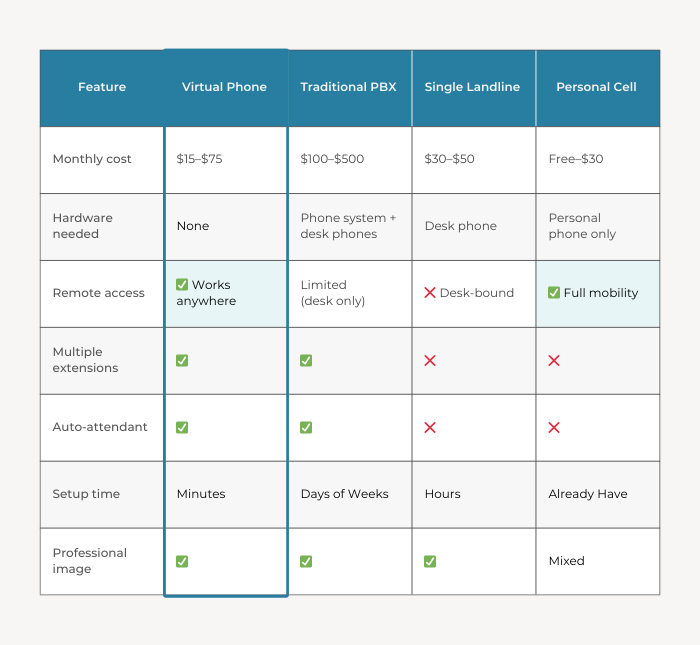
The bottom line: A virtual phone gives you most of the features of a traditional system at a quarter of the cost, with none of the hardware or installation hassle. For most small and mid-sized businesses, you retain the core features and professionalism without the hardware or long-term contracts. Traditional PBX systems may still make sense for large, centralized teams with fixed office infrastructure. For distributed teams, remote work environments, or businesses prioritizing flexibility, virtual systems are often more practical.
Compare Virtual Phone Plans and Features
Review available business phone numbers, extensions, and feature tiers to see what fits your team size and call volume.
How to Choose a Virtual Phone Provider
Not all virtual phone providers are created equal. The difference in call quality, feature set, and support can significantly impact your experience. Here is what to look for when evaluating a provider:
Call Quality and Reliability
A dropped call or poor connection damages your professional image. Ask the provider about their uptime guarantee, what happens if the internet goes down, and whether they offer bandwidth requirements or recommendations. Test a trial with a real call to a trusted colleague and listen for quality issues.
Feature Set Matches Your Needs
Some providers offer auto-attendant, others do not. Some include voicemail transcription, others charge extra. Some support multiple extensions, others are single-user only. List your must-have features (voicemail to email, call recording, extensions, time-based routing) and verify the provider includes them.
Mobile App and Web Dashboard
You will manage your phone system from your phone, not a desk. The app should be intuitive, let you check voicemail, block numbers, route calls, and see call history easily. Test the app before committing to a provider.
Integration with Your Other Tools
Does the provider integrate with your CRM, email, calendar, or other business software? Integration reduces manual steps. For example, a call from a contact in your CRM could automatically show their account details when they call.
Transparent Pricing
Some providers charge per minute, others per call, others a flat monthly rate. Understand the pricing model, what features are included in the base plan, and what costs extra. Ask specifically about overage charges if you exceed plan limits.
Scalability and Flexibility
Your call volume will change. More clients means more calls. Seasonal businesses fluctuate. The provider should let you add extensions, upgrade plans, or pause service without long-term contracts or penalties.
Local Number Availability
If you want a local number in multiple cities (to appear local), confirm the provider offers numbers in those areas. Some providers have limited availability in smaller markets.
How Virtual Phone Pairs with Live Receptionist Service
A virtual phone number is the channel where calls arrive; a live receptionist is the person who answers them. Together, they create a complete professional phone presence.
Think of it this way: your virtual phone number is your business address on the phone network. Your live receptionist is your front-door greeter. The virtual number gets the call to the right place. The receptionist creates the experience.
Here is how they work together:
Virtual phone number routes calls. All inbound calls for your business come through your dedicated number. You control where calls go based on time, caller type, or other rules.
Live receptionist answers the call. When you want calls answered by a real person instead of voicemail, the live receptionist picks up and follows your custom script and instructions. They greet with your business name, take messages, screen calls, and route to you.
Together they handle the full experience. A caller reaches a professional business number, a real person answers professionally, messages are taken accurately, and you get notified immediately. That is the experience of calling a large, established company, but at the cost of a solo operation.
This is particularly valuable during peak hours, during your business launch when you cannot answer every call, or when calls arrive while you are in client meetings. The virtual phone provides the professional number; the receptionist ensures no call goes unanswered or unhandled. virtual office
Virtual Phone as Part of Your Virtual Office
A virtual phone works equally well as a standalone service or as part of a broader virtual office solution. When combined with a virtual office, it completes your professional presence:
Virtual office provides: A professional business address, mail handling, meeting room access, and a local presence in markets where you do not physically work.
Virtual phone adds: A professional business phone number with all the features of a full-scale phone system, handled from anywhere.
Together, your business has the complete infrastructure of an established firm. A prospect can call your number, speak to a professional, get your address, schedule an in-person meeting, and experience professionalism at every touchpoint.
The Bottom Line
A virtual phone number separates your personal and business identities, projects a professional image, and gives you call management features that would cost thousands per year with traditional phone systems. For solo professionals, small teams, and distributed workforces, it is an essential tool.
The cost is low ($15–$75 per month for a single number), the setup is instant, and the features are robust. You get a dedicated business number, call forwarding, voicemail, auto-attendant, and call management tools. No hardware, no installation, no contracts.
Start with a basic plan that includes the features you need most (call forwarding, voicemail-to-email, auto-attendant if you have a team). If your volume grows, add extensions or upgrade features. If you want to pair your virtual phone with a live receptionist, that integration is straightforward and handles the calls you cannot answer yourself.
Your phone is often the first interaction a prospect has with your business. Make sure it reflects the level of professionalism your business is building.
Set Up a Dedicated Business Phone Number
Choose a local or toll-free number, configure call routing, and activate your system in minutes.
Frequently Asked Questions
Can I keep my existing phone number when I switch to a virtual phone system?
In many cases, yes. Most providers support number porting, which means you can transfer your existing phone number to the virtual system. There is typically a one-time porting fee ($25–$50) and the transfer takes a few days. Ask the provider about porting during the signup process.
Do I need any special hardware for a virtual phone number?
No. All you need is an internet connection and a phone or computer with an app installed. You do not need a desk phone, PBX hardware, or physical infrastructure. You can use your existing cell phone or any device with the provider’s app.
Can I have multiple extensions on a single virtual number?
Yes. You can create extensions for different team members, departments, or purposes. When a caller uses the auto-attendant menu, they select the extension they need. The call routes to that person’s device.
Is a virtual phone number the same as VoIP?
Virtual phone numbers use VoIP technology to work, but they are not identical. VoIP is the underlying technology that carries calls over the internet. A virtual phone number is a business phone service built on VoIP. You could have VoIP without a virtual phone number (like using Skype for calls), or a virtual phone number without traditional VoIP hardware.
Can I get a local number in a city where I do not live or work?
Yes, most providers offer local numbers across the United States and many countries. You can have a New York number even if you are based in Chicago. This is useful if you serve clients in multiple markets or want your business to appear local to your primary client base. The number works the same way regardless of physical location.
What happens if I do not answer an incoming call?
The call goes to your voicemail system. You can customize the voicemail greeting, set up different greetings for business hours versus after-hours, or route after-hours calls to a live receptionist service instead of voicemail. The caller hears a professional message and can leave a voicemail or provide information to the receptionist.