

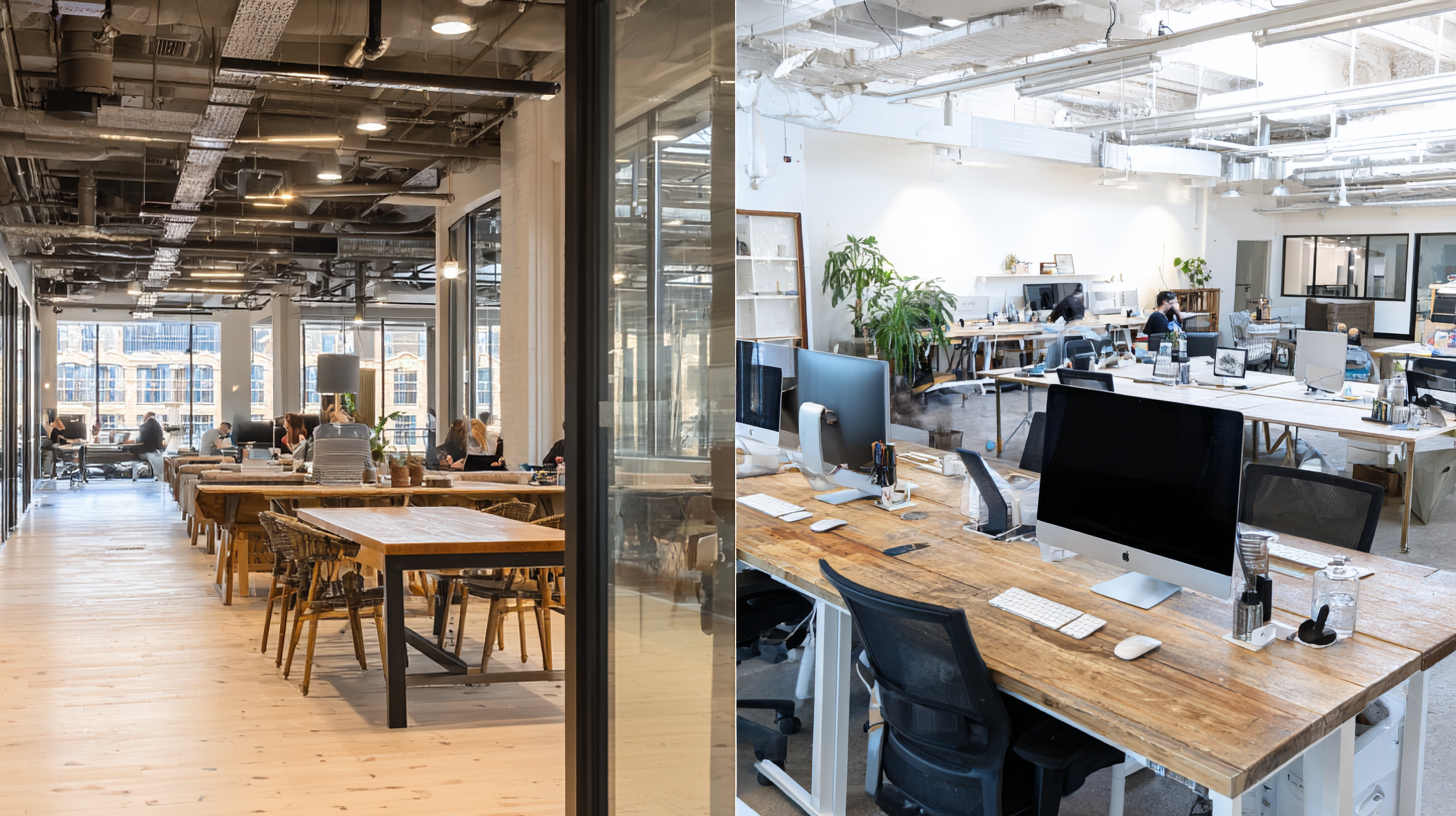
- What’s the difference between a shared desk and a dedicated desk?
- How to choose the right plan for your business
- Cost, flexibility & add-ons: what to look for
Q: Shared Desk vs Dedicated Desk: Which coworking plan actually fits how you work-and your budget?
A: If you value mobility and the lowest monthly cost, choose a Shared Desk. If you rely on a consistent setup (monitors, gear) and deep focus, a Dedicated Desk pays off in saved time and productivity. Add meeting rooms on demand to keep client-facing work polished, whichever plan you pick.
A shared desk – often called a hot desk – is a flexible, low-commitment way to get started. A dedicated desk gives you your own permanent workstation and a bit more privacy and control.
Which option works best for your business right now, and still lets you grow later?
This guide explains the differences in plain English, what each option costs, how flexible they are, and includes a simple 5-step checklist to help you choose with confidence.
What’s the difference between a shared desk and a dedicated desk?
Shared desk (hot desk): You choose any open seat in a common area. First come, first served.
Dedicated desk: You’re assigned a specific workstation in an open plan or semi-private area. It’s “yours” every day.
Quick comparison
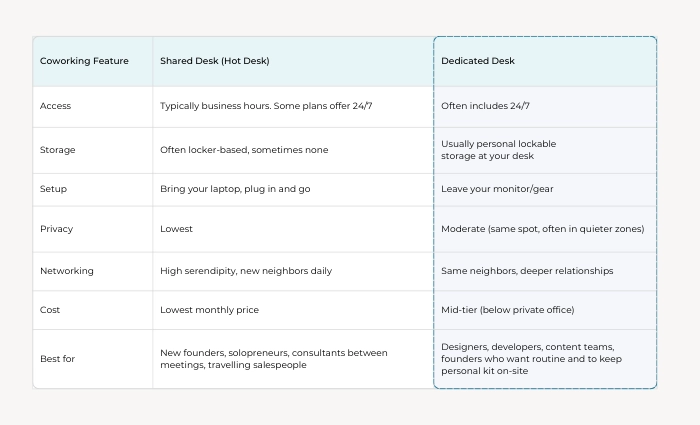
Why does it matter?
Consistency helps you work faster. If you rely on the same setup every day – like an external monitor, microphone, or drawing tablet – a dedicated desk saves time because everything stays put and ready.
But if keeping costs low and having variety are your priorities, a shared desk is the better choice.
NEXT STEPS: Coworking Space Buyer’s Guide
How to choose the right plan for your business
Use this five-question checklist. If you answer “yes” to 3 or more, you’ve likely found your fit.
1) Do you need the same setup every day?
- Shared desk: ❌ No: you’re not guaranteed the same desk every day.
- Dedicated desk: ✅ Yes: save time by using the same desk daily.
2) Do you frequently have video calls or deep work sessions?
- Shared desk: ⚠️ Possible: you’ll rely on phone booths or private meeting room bookings.
- Dedicated desk: ✅ Yes: you may still need to take calls elsewhere, but it’s easier to manage with a predictable environment.
3) Do you use peripherals (monitor, mic, drawing tablet) or do you need to keep reference materials on hand?
- Shared desk: ⚠️ Possible: you’ll carry equipment in and out every day.
- Dedicated desk: ✅ Yes: leave your gear safely at your station.
4) Is month-to-month flexibility and lowest cost your top priority?
- Shared desk: ✅ Yes: a shared desk is often the best value and most flexible option.
- Dedicated desk: ⚠️ No: it’s still flexible, but it generally requires a higher monthly rate.
5) Are you eager to integrate with the community and build relationships?
- Shared desk: ✅ Yes: a shared desk is great for meeting new people.
- Dedicated desk: ✅ Yes: same neighbors, build deeper relationships.
Typical Buyer Profiles
- Solo consultant or early-stage founder: Start with a shared desk for flexibility and cost control. Add meeting room credits only when you need them.
- Creator or engineer with daily deadlines: A dedicated desk is worth it for the focus and time you save setting up every day.
- Two- to four-person micro-team: Mix and match – get one or two dedicated desks for core team members, and shared desk passes for teammates who are often in the field.
- Hybrid workforce: Keep a few dedicated desks for local staff, and use shared hot desks for visiting team members.
What About Day Passes?
Day passes are a great way to try coworking or handle an irregular travel schedule.
But if you’re buying six to eight (or more) passes a month, it’s usually cheaper to switch to a shared desk or dedicated desk plan.
NEXT STEPS: The Future of Coworking: Trends, Reviews & What to Look for in Your Next Workspace
Cost, flexibility & add-ons: what to look for
1) Pricing and terms
- Shared desks deliver the lowest monthly cost and the least commitment. Ideal if you’re testing a new market or ramping up a side hustle.
- Dedicated desks cost more, but the ability to leave equipment in place often boosts productivity. It’s especially useful for design, development, and content roles.
2) Meeting room access
- In addition to the standard hourly rate, ask about discounted credit bundles.
- If you frequently pitch, sell, train, or run workshops, bundled meeting time can save hundreds monthly.
3) Reception & phone support
If inbound calls disrupt your day, consider pairing your desk plan with a professional live receptionist and business phone service. Shield your focus time, capture every lead, and protect your personal number.
4) Mail handling, address & lobby listing
Even if you don’t need a full office, a legitimate business address, secure mail handling, and optional lobby listing can strengthen credibility for licensing, banking, or prospective clients and investors.
5) Scale pathways
Choose a coworking space that offers room to grow. Look for easy upgrades to team suites, private offices, or virtual office with meeting room combinations.
A simple decision flow
- How many days per week will you be on-site?
- Less than 2 days average → Shared desk or day passes.
- 3–5 days → Dedicated desk.
- Do you need to leave gear set up?
- Yes → Dedicated desk.
- No → Shared desk.
- How often do you meet clients in person?
- Monthly/quarterly → Any plan + bookable meeting rooms.
- Weekly → Prioritize plans with bundled meeting room hours.
- Do you need frequent deep focus time?
- Add live receptionist + business phone to limit distractions.
- Growth outlook (next 6 months)?
- Uncertain → Shared desk for cost efficiency and low commitment.
- Predictable/stable → Dedicated desk for performance.
How Alliance Virtual Offices fits in
For entrepreneurs who want to maximize flexibility and cost efficiency, pairing a coworking plan with an Alliance Virtual Office can be a smart move:
- Prestigious business address + secure mail handling: Use your address for company registration, licensing, marketing, and more.
- Platinum Plus Plan: includes up to 16 meeting room hours every month with selected Virtual Office locations. Ideal if you host meetings or workshops regularly.
- Live Receptionist + Business Phone number: capture leads, route calls, and protect your focus.
- Coworking + on-demand meeting rooms: work productively in a fully equipped, supportive environment. Upgrade when you’re ready.
Unlike many providers that nickel-and-dime for rooms, Alliance’s Platinum Plus bundles generous meeting time so you can meet with confidence, with no surprise fees.
Further Reading :
- What is Coworking Space?
- Virtual Office vs Coworking: What You Need to Know When Choosing a Working Space
- Hybrid Work Unpacked: How to Grow Your Business While Working Flexibly
Key Takeaways : Shared Desk vs Dedicated Desk: Pick the Right Coworking Plan
Choosing between a shared desk and a dedicated desk isn’t about status – it’s about what works best for you right now. If you value flexibility and keeping costs low, start with a shared desk. If having a consistent setup and fewer distractions matters more, go with a dedicated desk.
Whichever you choose, pair it with the right support to make work easier. For instance, you could add a Virtual Office plan (with up to 16 hours of meeting room time included), a Business Phone, or a Live Receptionist to protect your focus.
Ready to work productively and grow flexibly? Explore plans or talk with our team to build the right mix of services for your business.
Alliance Virtual Offices offers Live Receptionists, flexible Meeting Rooms, Coworking, and Business Phone Numbers, making it a complete 360° Virtual Office solution for modern businesses.


