
Q: What’s a mail scanning service?
A: A mail scanning service receives your physical mail at a secure address, scans the exterior, and lets you view, open, forward, shred, or deposit each item online from anywhere. It turns paper mail into digital mail you can manage from a phone or laptop.
If you work remotely, run a business while traveling, or split your year between several places, physical mail often becomes a logistics problem. Letters pile up at an address you’re not close to, meaning important mail can sit unopened for weeks.
Choosing a mail scanning service is the practical fix. Instead of waiting to be at home to receive mail, a mail scanning service notifies you when it arrives at a virtual office address, so you can see a scan of the envelope and decide what happens next, all without touching paper.
This guide explains how a mail scanning service works, what it typically costs, and how the leading providers compare.
How a Mail Scanning Service Works
A mail scanning service is built around a simple loop that replaces a trip to your physical mailbox. With a virtual mail address, you receive a real street address where your mail is routed, and a team handles the physical side while you manage everything from a dashboard.
Here’s the process most providers follow:
- Receive mail. Your mail arrives at a secure facility tied to your assigned virtual mail address.
- Scan the exterior. Staff at the facility photograph the outside of each item so you can see who sent it.
- Notify. You get an alert with the scanned image in your online account or app.
- Choose an action. For each piece, you decide what happens: open and scan the contents, forward it, shred it, or deposit a check.
That last step is where the value lives. An on-demand mail scan option means you only pay to open the items worth reading, and a request to “open and scan” usually turns the contents around within a business day or two.
Most providers store the scanned images in your account for a set window, often 30 to 60 days, so you can download or organize anything important before it expires. Check deposits work the same way: you flag a check in your inbox, and the provider deposits it to a linked account or mails it on per your instructions.
Using a virtual mailing address means you can search, store, and access digital mail from anywhere, which is the heart of remote mail management. Instead of a stack of envelopes waiting at a door you rarely walk through, you get a tidy, time-stamped record of everything that arrived.
Read More: Virtual Office vs. PO Box vs. CMRA
Mail Scanning vs. Mail Forwarding vs. USPS Informed Delivery
People often blur mail scanning services with forwarding, and USPS (the United States Postal Service) Informed Delivery complicates things further. Each service solves a different part of the mail problem; it helps to look at each in turn:
- Mail scanning digitizes your mail so you can read it online.
- Mail forwarding physically reships items to another address, such as when you need the original document in hand. Many providers combine mail scanning with a mail forwarding service.
- USPS Informed Delivery is the free option people compare against, which emails you grayscale previews of the exterior of incoming letters. It’s so popular that more than 72.9 million customers are enrolled users, according to USPS. But it only previews the outside of an envelope, ties to one residential address, and doesn’t let you open, forward, or shred anything remotely.
Here’s a full breakdown of each mailing option:
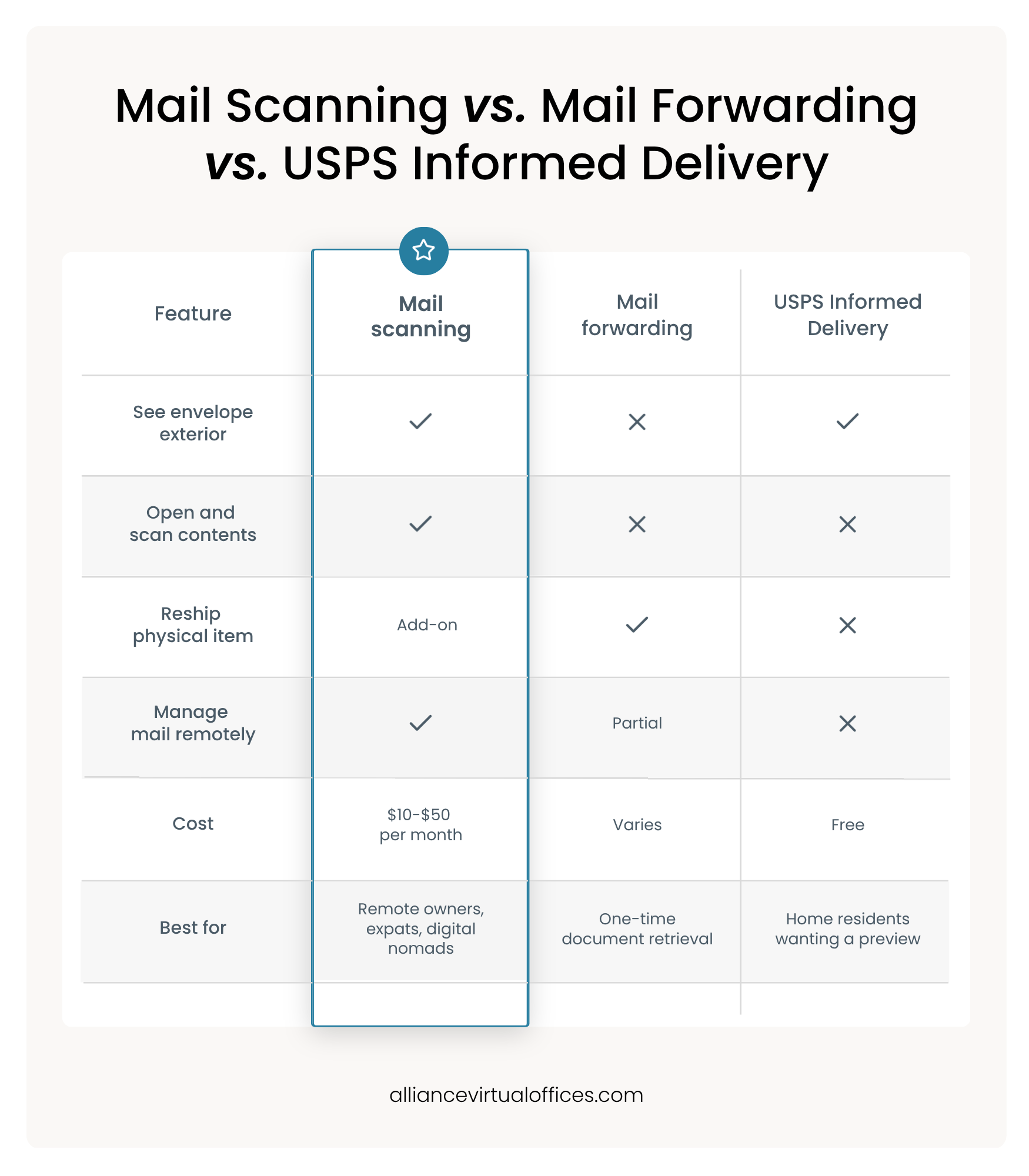
Informed Delivery is enough if you only want to know what’s coming to your home, but if you need to act on the mail you receive, then a paid scanning mail service is the tool to use. For physical documents, look at mail forwarding for business as a complement, not a replacement.
It’s worth remembering how much paper still moves through the system. In 2025, the U.S. Postal Service handled 108.7 billion pieces of mail. Important documents make up a meaningful share of this, such as tax notices, checks, government letters, and contracts. A mail scanning service exists so those items reach you wherever you are, rather than sitting in a mailbox until you are next at home.
Unlock Our Current Virtual Office Offers
Enter your email below and we’ll send you the latest available promotions and monthly specials for Virtual Offices, Meeting Rooms, and Live Receptionists.
Mail Scanning Service Costs
A mail scanning service typically costs between $9.99 and $49 per month, with the price tracking how much mail you receive and which actions you use. Entry plans cover a modest number of items, while higher tiers add storage, check deposit, and forwarding.
Per-scan or per-open fees may apply on lower plans, so read pricing carefully before you choose. Here are the common plan tiers:
What Drives the Price
Scan volume is the main driver of mail scanning service pricing, since plans cap how many items are included before adding overage fees. Add-ons, like check deposits, longer storage times, and forwarding services, can raise the monthly cost. Using a virtual mailing address in a premium district or city usually prices higher than a regional one.
When choosing a mail scanning service provider, match the fees that don’t appear on the headline price. Per-open and per-page scan charges, recipient limits, and forwarding postage are the most common surprises, so estimate a realistic month of mail for your business before committing.
Annual billing often trims the monthly rate, and some providers offer a short trial, which is the cleanest way to test turnaround speed and dashboard quality before signing up.
Mail Scanning Services Legal and Security Need-to-Knows
Mail scanning services are legal when you use a reputable virtual mailing provider. Legitimate services operate from secure facilities, restrict who can handle your mail, and follow federal rules for third-party mail handling.
The key legal step is filling out USPS Form 1583, a notarized authorization that lets a Commercial Mail Receiving Agency (CMRA) receive mail on your behalf. Completing it is a normal setup stage, and reputable providers will walk you through it.
On the data side, look for mail scanning services providers with documented security practices. Many describe Systems and Organization Controls 2 (SOC-2) aligned facilities, which verify that a service securely manages customer data for privacy protection. Equally, mail scanning service providers for healthcare or legal clients often note the Health Insurance Portability and Accountability Act (HIPAA)-aware handling.
A few questions separate a serious mail scanning service provider from a casual one. Ask the following when you’re choosing:
- How long scanned images are retained and whether they’re encrypted.
- Who at the facility can physically access your mail.
- How shredding is documented.
Reputable mail scanning service providers answer these plainly, which means if you receive a vague response, then it’s a reason to keep looking. If privacy is the priority, a scanning service also keeps your home address off public-facing records, since you can use a separate business address instead.
Read More: USPS Form 1583 Setup
Best Mail Scanning Providers Compared
There’s no single best mail scanning service for everyone, since the right pick depends on your volume, budget, and whether you need a credible business address. The table below compares well-known options on the factors that usually decide it:
Before you commit to a mail scanning service provider, test three things on any shortlist. First, confirm the address type, since a credible street address is treated differently from a generic box by banks and registries.
Then check turnaround time on opening and scanning, because a mail scanning service that takes days defeats the purpose for time-sensitive documents. Finally, read the action pricing line by line so the monthly total reflects how you’ll use the service for your business needs.
Who Should Use a Mail Scanning Service?
The further your mail is from you, the more a digital mail system is worth; a mail scanning service makes the most sense for anyone who’s not reliably near their mailbox.
Remote business owners use a mail scanning service to organize company mail, keeping it separate from personal correspondence. Meanwhile, expats and digital nomads rely on it to receive U.S. mail while living abroad or moving from place to place frequently, and snowbirds (people who migrate to warmer climates in the winter months) use it to manage mail across seasonal homes.
For people living overseas, the practical win is staying connected to U.S. institutions. A stable virtual mailing address that includes scanning lets an expat keep a bank account, receive Internal Revenue Service (IRS) notices, and handle official letters on time, even from a different time zone. This is hard to manage using a forwarding service alone.
Mail scanning services also appeal to privacy-focused owners who don’t want their home address on public records, and to small teams that need a shared, searchable record of important documents that any authorized member can access without waiting for one person to check the mailbox.
If your mail is mostly junk, you can shred it, which means a free preview tool may be enough, but once important documents arrive that you must act on remotely, mail scanning earns its cost.
NEXT STEPS: Explore Alliance’s Address and Mail Forwarding Services
Choosing the Right Mail Scanning Service for Your Situation
A mail scanning service turns physical mail into digital mail that you can manage from anywhere. This is what makes it a valuable service for remote owners, travelers, and privacy-minded professionals.
Before you choose whether to use a mail scanning service, and subsequently, which provider to choose, estimate your monthly mail volume and match it to a plan tier so you’re not paying overage fees.
Then you can decide whether you need a credible business address, not just a mailbox, since that narrows the field. Make sure to confirm your chosen provider handles USPS Form 1583 and clearly describes its security practices.
Get those right and the rest is detail. The best mail scanning service is the one that fits how and where you work.
Explore Alliance virtual office locations to set up a virtual mailbox.
Frequently Asked Questions
How much does mail scanning cost?
Is mail scanning secure and legal?
What’s the difference between mail scanning and mail forwarding?
Does USPS offer mail scanning?
Further Reading