
Q: What is the best auto-attendant phone system setup for a small business?
A: The best setup pairs a short menu (3 options max) with a “Press 0” escape route to a live person. For most small businesses, a hybrid works best: auto-attendant for routing, and a live receptionist service as a fallback for complex calls and high-value leads.
For small businesses managing more calls than one person can handle, auto-attendant phone systems are one of the first solutions that come up. Thanks to tools like virtual phone numbers and cloud-based VoIP platforms, setting one up has never been more accessible.
Auto-attendant systems answer automatically, present a menu, and route callers without human involvement. That efficiency is real. But whether your auto-attendant improves or damages your customer experience comes down almost entirely to how you set it up.
The meteoric rise of remote work has created an environment where those willing to take risks are often rewarded, so long as they stay flexible and respond to what the market is telling them. In the past, customer service was a secondary concern. Consumers had far fewer options, so even mediocre call handling rarely cost a business. That changed. Data collected by HubSpot shows that 90% of American consumers use customer service as a deciding factor when choosing whether to engage with a company.
Some businesses use an automated phone system to manage that demand. But is it the right path?
This guide covers how auto-attendant systems work, how to build one in 30 to 60 minutes, copy-and-paste scripts for every common scenario, the best practices that separate a professional experience from one that drives hang-ups, and when a live receptionist is the smarter call.
How Auto-Attendant Phone Systems Work
Auto-attendant systems are widely used, but the terminology around them creates confusion. Understanding what you’re working with makes setup faster and helps you avoid common design mistakes.
Auto-Attendant vs. IVR vs. Phone Tree
These three terms are used interchangeably, but they’re not identical:
- Auto-attendant: Answers calls automatically, plays a greeting, and routes callers via a menu (“Press 1 for Sales, Press 2 for Support”). Handles routing but does not process complex voice input.
- IVR (Interactive Voice Response): A more advanced system that processes both keypad and spoken responses. Can pull account data, confirm appointments, and manage multi-step interactions.
- Phone tree: A colloquial term for any branching call-routing structure. Your auto-attendant creates a phone tree.
- Digital receptionist: A marketing term some VoIP providers use for their auto-attendant feature.
For most small businesses, the practical difference between auto-attendant and IVR is minimal. Both route calls from menu input. The terms appear interchangeably across most small business phone platforms.
How the Call Flow Works
A standard auto-attendant call flow follows this path:
- Greeting plays your business name, welcome, and hours if relevant
- Menu presents options (“Press 1 for Sales, Press 2 for Support, Press 0 to speak with someone”)
- Routing sends the caller to the correct extension, department, or voicemail
- Fallback plays if no selection is made, typically connecting to voicemail or a zero-out to a live person
Small Business Use Cases
Auto-attendants are most effective for predictable, repetitive calls. Common applications include:
- Screening inbound sales calls before routing to the owner or sales team
- Directing appointment requests to a scheduling line or dedicated voicemail
- Separating billing questions from general support inquiries
- Providing after-hours information: location, hours, and emergency contact options
- Handling calls across time zones when staff are unavailable
The Pros of Using an Automated Phone System
According to Forbes, 56% of business owners report that customers use phones to contact their businesses more than any other channel. That volume is what makes auto-attendants appealing. Before weighing the pros and cons, it helps to clarify what automated phone systems actually are.
They come in many forms, from HR platforms that automate payroll and onboarding to ERP systems that unify financials and inventory. An automated phone system, sometimes referred to as an IVR system, handles high call volumes through pre-recorded messages and menu options, routing easy questions before passing complex requests to human staff.
Increased Efficiency
Automated phone systems handle large call volumes without human intervention, reducing wait times and freeing your team for higher-value work. A caller asking for your hours gets that answer in under 10 seconds, without tying up a staff member.
Cost-Effective
An auto-attendant costs significantly less than a full-time or part-time phone handler. These systems run 24/7 without overtime, benefits, or training overhead. Most VoIP providers include basic auto-attendant features in their standard business plans.
Consistent
Every caller hears the same greeting, the same menu, and the same level of service, regardless of the time of day or which team member would otherwise have picked up. That consistency builds a baseline of reliability that callers notice.
Customization
Menus, greetings, after-hours behavior, and routing paths can all be configured to match your specific business structure. A law firm routes differently than a clinic. A contractor routes differently than an e-commerce operation. Automated systems adapt to whatever call flow makes sense for your business.
NEXT STEPS: Compare virtual receptionist costs
The Cons of Using an Automated Phone System
Aside from the convenience, consistency, and cost savings, automated phone systems leave a lot to be desired. There is something about speaking to an automated system that does not inspire investor confidence or build the customer trust that other options can.
Lack of Personal Touch
HubSpot reports that 69% of customers are willing to interact with a bot on simple issues, but 54% say automated systems take too long and ask too many questions before connecting them to a human. For almost a decade, consumers have been vocal about the frustration of impersonal call handling. Automated systems have fixed questions and fixed responses. When a caller’s situation falls outside those parameters, reaching a real person becomes unnecessarily difficult.
Limited Ability to Handle Complex Inquiries
Auto-attendants cannot exercise judgment, adapt based on caller tone, or handle a question they were not configured for. When a caller has a pressing issue that does not fit neatly into the menu, the experience becomes a series of dead ends. That frustration compounds with every additional step.
Technical Difficulties
System issues can include call routing failures, incorrect transfers, menu gaps, and outright downtime. Common technical problems include:
- Call routing issues: Incorrect transfers harm both the customer experience and your operations. If your system routes a billing question to sales, the call usually ends badly.
- Inadequate menu: If options are limited or unclear, callers skip straight to the transfer request, even for simple questions that the menu should handle.
- System downtime: Any internet-dependent service can go offline. When it does, callers cannot reach your business at all.
- Voice recognition problems: Systems using voice input may struggle with varied accents and dialects, forcing callers to repeat themselves until frustration takes over.
- Long wait times: If call volume exceeds your routing capacity or staff availability, callers sit on hold longer than they expected.
- Integration issues: Poor integration with CRM or scheduling tools creates data gaps and missed follow-up opportunities.
Negative Perception
Some customers perceive automated systems as a signal that they are being deprioritized. In industries where relationships drive revenue, such as legal services, financial planning, and healthcare, a robotic first impression can actively work against you. Consumers consistently prefer interacting with humans. Services that include human connection will stand out.
The Real Reason Auto-Attendants Fail: Menu Friction
Common Mistake: The single biggest cause of auto-attendant failure is not technical. It is design. Menus with too many options, too many layers, or no clear path to a human drive callers to hang up or leave negative reviews. If your callers frequently press “0” or the operator option, that is a signal to simplify your menu and rewrite your script.
NEXT STEPS: Amplify service with a live receptionist
Unlock Our Current Virtual Office Offers
Enter your email below and we’ll send you the latest available promotions and monthly specials for Virtual Offices, Meeting Rooms, and Live Receptionists.
Setup Guide: Build a Small Business Auto-Attendant Step by Step
Setting up an auto-attendant does not require a technical background. Most VoIP providers walk you through configuration in their dashboard. This workflow gets you a clean, professional result in 30 to 60 minutes.
- Choose your system type. Most small businesses use a cloud-based VoIP phone system with auto-attendant included. Evaluate providers on call routing flexibility, pricing, and whether the auto-attendant is included in the base plan or sold as an add-on.
- Map your call flow before recording anything. Write down the top three reasons callers contact you. Decide which of those can be handled by a menu and which need a human. Build your menu around those three reasons, not your internal org chart.
- Write your scripts before recording audio. Draft your main greeting, menu prompt, and fallback scripts first. Rehearse them aloud. If they sound robotic when you read them, they will sound worse when recorded. Use the templates in the next section as a starting point.
- Set business hours and after-hours behavior. Configure a separate greeting for after-hours calls. Tell callers when to expect a response. If your business handles emergencies, add an emergency option before the main menu.
- Add a “Press 0” option. Every auto-attendant needs a zero-out route that connects callers to a live person, a forwarding number, or a live receptionist service. This single addition reduces hang-ups significantly.
- Test like a customer. Call your number from a mobile phone, a landline, and a noisy environment. Walk through every routing path. Confirm every voicemail delivers correctly. Fix anything that requires more than two presses to reach a human.
- Measure and adjust monthly. Track menu usage, missed calls, voicemail volume, and how often callers use the “0” or operator option. If that option is getting heavy use, your menu needs to be simplified.
NEXT STEPS: Set up call forwarding correctly
Pro Tip: Call your own business as if you were a first-time customer. Note every point of confusion. That list becomes your setup checklist.
Auto-Attendant Scripts: Copy-and-Paste Templates
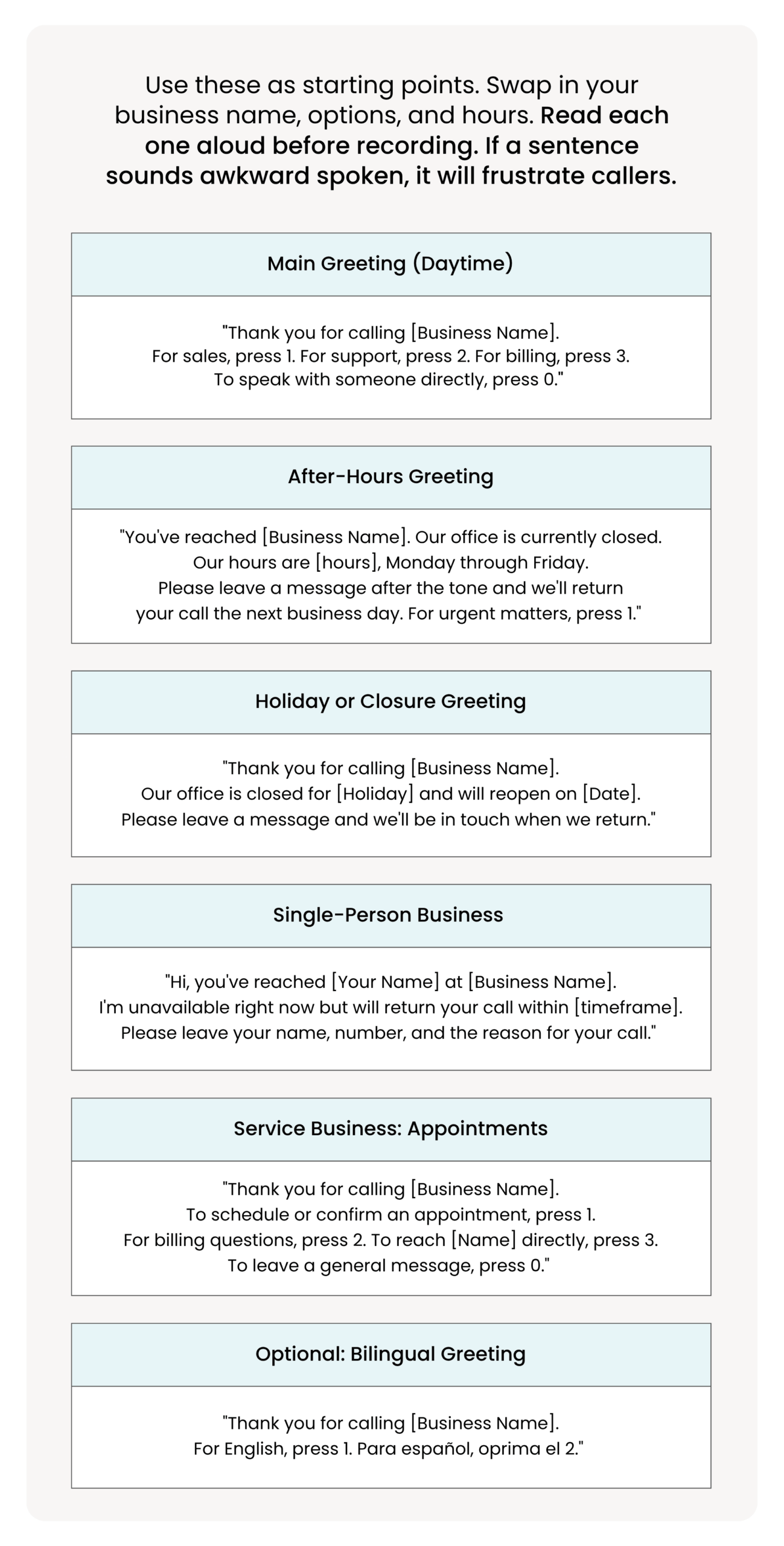
Use these as starting points. Swap in your business name, options, and hours. Read each one aloud before recording. If a sentence sounds awkward spoken, it will frustrate callers.
Main Greeting (Daytime)
“Thank you for calling [Business Name]. For sales, press 1. For support, press 2. For billing, press 3. To speak with someone directly, press 0.”
After-Hours Greeting
“You’ve reached [Business Name]. Our office is currently closed. Our hours are [hours], Monday through Friday. Please leave a message after the tone and we’ll return your call the next business day. For urgent matters, press 1.”
Holiday or Closure Greeting
“Thank you for calling [Business Name]. Our office is closed for [Holiday] and will reopen on [Date]. Please leave a message and we’ll be in touch when we return.”
Single-Person Business
“Hi, you’ve reached [Your Name] at [Business Name]. I’m unavailable right now but will return your call within [timeframe]. Please leave your name, number, and the reason for your call.”
Service Business: Appointments
“Thank you for calling [Business Name]. To schedule or confirm an appointment, press 1. For billing questions, press 2. To reach [Name] directly, press 3. To leave a general message, press 0.”
Optional: Bilingual Greeting
“Thank you for calling [Business Name]. For English, press 1. Para español, oprima el 2.”
Pro Tip: Keep every script under 20 seconds before the first menu option. Callers who wait more than 20 seconds before a clear action are significantly more likely to hang up.
NEXT STEPS: Explore VoIP phone systems
Unlock Our Current Virtual Office Offers
Enter your email below and we’ll send you the latest available promotions and monthly specials for Virtual Offices, Meeting Rooms, and Live Receptionists.
Best Practices So Callers Don’t Hang Up
These are the design and scripting decisions that separate a professional auto-attendant from one that drives callers away.
- Keep the first menu to 3 options. Never exceed 5.
- Always include a “Press 0” route to a live person or a live receptionist fallback.
- State business hours once in the greeting. Do not repeat them on every branch.
- Use plain language. Avoid internal jargon (“billing department” vs. “payments”).
- Cap menu depth at 2 to 3 levels. Every additional layer costs you callers.
- Design for mobile callers: speak slowly, pause between options, repeat once.
- Add smart fallbacks: voicemail-to-email, call forwarding to a mobile, or a live receptionist as backup.
- Review monthly. Frequent “0” presses signal the menu needs simplification.
NEXT STEPS: Why you need a dedicated business phone number
When a Live Receptionist Beats an Auto-Attendant
Automation is efficient, but it lacks the human connection that drives conversions and builds trust, particularly in service-based businesses. Alliance Virtual Offices offers a Live Receptionist service that gives small businesses a professionally trained, friendly voice that personally screens and answers calls, leaving a strong first impression on customers, investors, and clients.
Use This Decision Framework
Choose an auto-attendant if:
- Calls are predictable and repetitive (hours, directions, basic routing)
- You need 24/7 call routing without staffing phones around the clock
- Most callers have simple, menu-answerable questions
Choose a live receptionist if:
- Leads are high-value and conversion depends on the first impression
- Calls are nuanced: qualification, scheduling, or reassurance required
- Customers get frustrated quickly with menus. How AI is changing call answering shows where automation ends and human judgment begins.
Choose a hybrid if:
- You want routing efficiency with a human safety net for complex or high-value calls
- You serve both high-volume simple callers and relationship-driven clients
| Auto-Attendant | Live Receptionist | Hybrid | |
|---|---|---|---|
| Cost | Lowest | Moderate | Moderate |
| Availability | 24/7 | Business hours | 24/7 routing + human backup |
| Handles complex calls | Poor | Excellent | Good |
| First impression | Functional | Professional | Professional |
| Missed lead risk | High | Low | Low |
| Best for | High-volume simple calls | High-value leads, service businesses | Most small businesses |
What Makes Alliance’s Live Receptionists Different
Alliance Live Receptionists offer:
- Personalized service: Greeting callers by name and addressing specific needs builds the kind of rapport that automated systems simply cannot replicate.
- Flexibility: Beyond answering and transferring calls, Live Receptionists can schedule appointments, take messages, and handle basic customer service. They work while you are on vacation, in a meeting, or working from anywhere in the world.
- Cost-effective: Plans start at $125 per month. Alliance offers three tiers based on call volume, so businesses pay only for what they need.
- Professionalism: Callers are greeted by a trained professional, not an automated menu. In industries where image drives decisions, that distinction matters.
- Integration: Live Receptionists work seamlessly alongside virtual office setups, making it easy to add professional call handling to an existing business infrastructure.
NEXT STEPS: Explore Live Receptionist plans
An automated phone system for small business can meaningfully improve efficiency and reduce costs. But scripts and menu design determine whether it strengthens or damages your customer experience. Use the setup steps and script templates in this guide, go live, and then review your call data after 30 days. The numbers will tell you exactly where to improve.
According to Harvard Business Review, customer service data is almost always mismanaged. Most businesses react to daily issues rather than addressing the root causes: poor processes and undertrained systems. A Live Receptionist gives you the best of both worlds while staying affordable, and because Alliance offers a full suite of virtual solutions, it integrates easily with the tools you are already using to scale.
Want a Professional First Impression Without the Robotic Experience? Alliance Virtual Offices offers Live Receptionist plans starting at $125/month. Real people. Professional service. Easy setup.
Explore Live Receptionist plans
Further Reading